I tried 7 Replit alternatives to find the best AI app builder in 2026


Last edited June 22, 2026

Table of Contents
- What are Replit alternatives?
- Why developers and founders are looking for Replit alternatives in 2026
- How I chose the best Replit alternatives
- A quick comparison of the top Replit alternatives
- The 7 best Replit alternatives for building with AI in 2026
- How to choose the right Replit alternatives for your project
- Replit alternatives: It's not just about coding, it's about solving problems
Replit’s promise of "vibe coding" is seriously tempting. The idea of just describing an app and watching an AI bring it to life is pretty much the developer dream, isn't it? But if you've actually tried it, you might have run into the same issues I did. The unpredictable costs from its "checkpoint" system can feel like you're pulling a slot machine lever, the AI agent gets stuck on a loop, and suddenly your "quick" prototype needs a senior developer to untangle it. It's just plain frustrating.
That frustration is what sent me down the rabbit hole of finding the best Replit alternatives. I was determined to find tools that could deliver on the promise of faster, smarter development without all the headaches. I looked at everything from professional cloud IDEs and AI-native editors to no-code platforms and specialized tools. This guide is everything I found, written for anyone who's ever thought, "There has to be a better way to do this."
What are Replit alternatives?
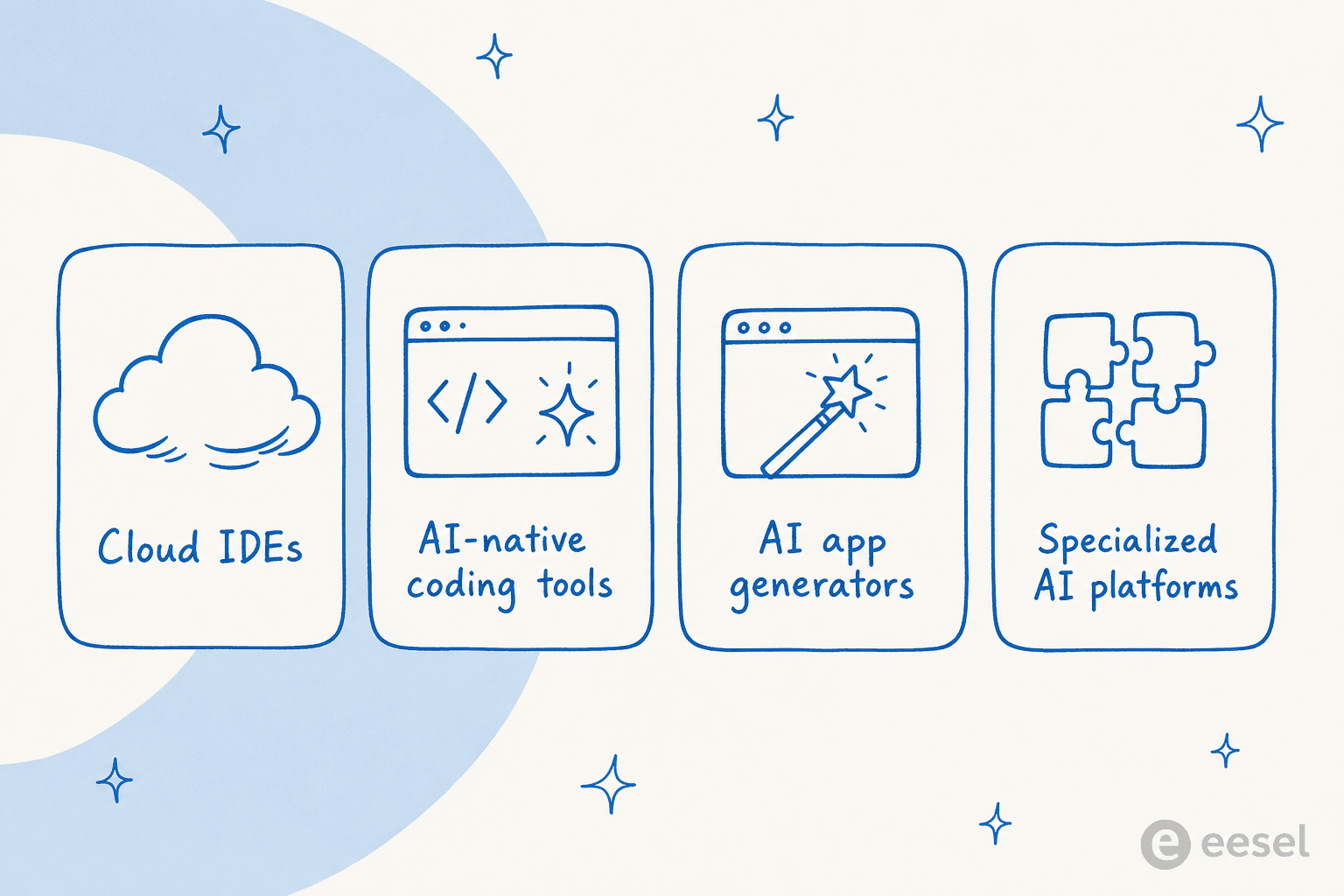
When we talk about Replit alternatives, we're not just looking for another place to write code in a browser. These tools are all about changing how we build things, especially with AI. They usually show up in one of four flavors:
-
Cloud-based IDEs: Think of these as your entire coding setup, but living in the cloud. They free you from the hassle of local machine configurations. Tools like GitHub Codespaces give you a powerful, consistent environment you can access from anywhere.
-
AI-Native Coding Tools: These editors were built from the ground up with AI in mind. Instead of just tacking on AI features, tools like Cursor weave it into the entire experience to help you code more effectively.
-
AI App Generators: This is the category that goes head-to-head with Replit's "vibe coding" dream. Platforms like Bolt try to build whole applications based on a simple text prompt you give them.
-
Specialized AI Platforms: These platforms solve a specific business problem for you, so you don't have to build an entire app from scratch. For example, instead of trying to code an AI support bot, a tool like eesel AI gives you one that's ready to go, which you can customize and launch in minutes.
Why developers and founders are looking for Replit alternatives in 2026
The hunt for alternatives isn't just about finding something cheaper or a little bit better than Replit. It's about solving some
that get in the way of actually shipping a product.very real frustrations

-
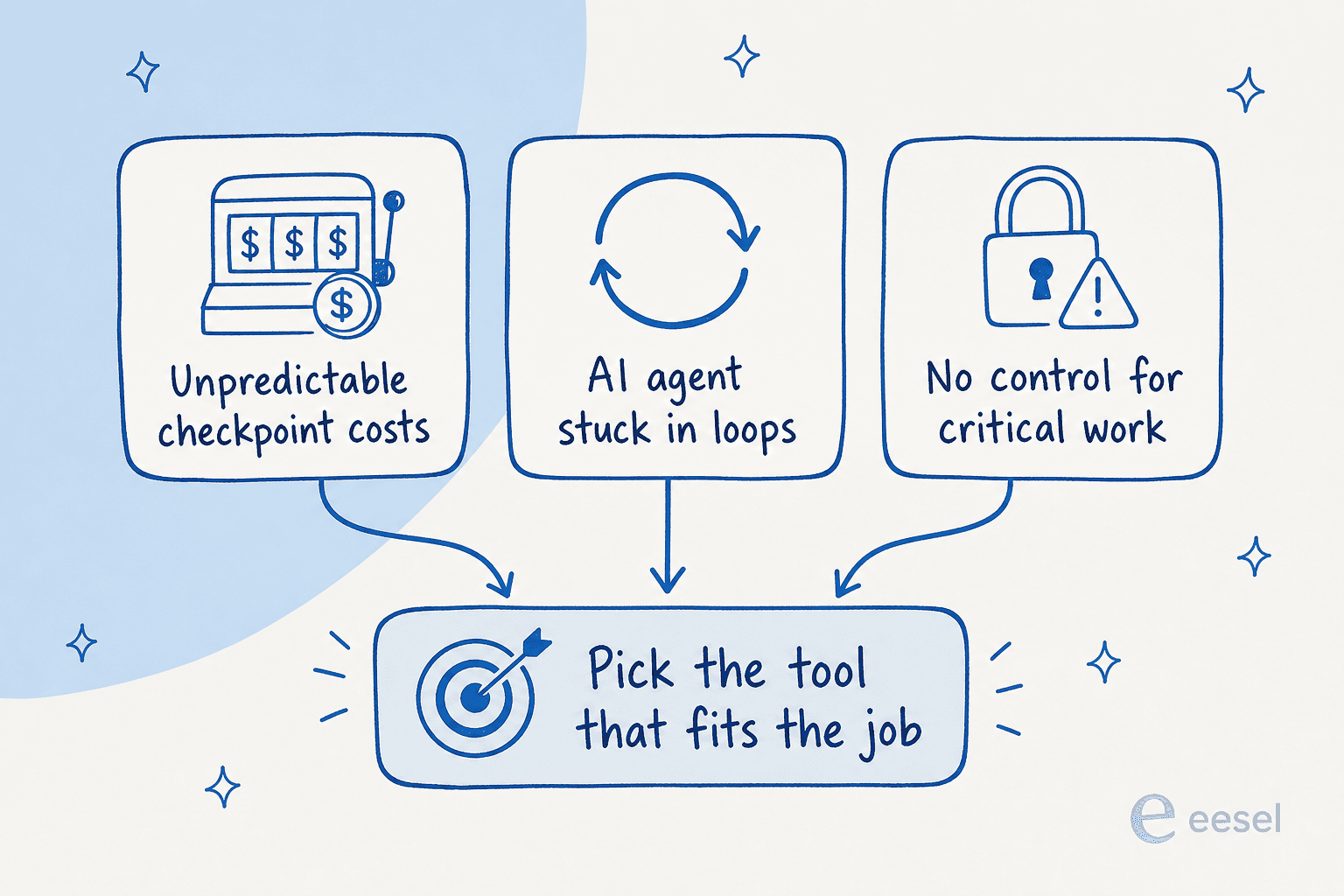
Unpredictable costs: That credit-based "checkpoint" system is a real headache. You watch the AI get stuck in a loop trying to fix a bug, and poof, there goes your budget, with nothing to show for it. It makes trying to forecast costs for a project feel like a guessing game.
-
Unreliable AI agent: We've all been there. The AI agent gets stuck in a circular error loop, makes up a feature that doesn't exist, or just spits out buggy code. The tool that was supposed to make development simpler becomes a new source of complicated problems that only an experienced dev can fix.
-
Lack of control and specialization: Replit is a general-purpose tool, which is fine until you need it for something specific and important. For a critical business function like customer support, its AI doesn't have the deep context, security guardrails, or fine-tuned control you need. You can't risk an AI going rogue with your customers.
-
Hidden complexity: Sure, starting a project on Replit is easy. But getting it to the point where it's a production-ready app is a completely different story. Debugging, deployment, and maintenance still demand a lot of technical skill, which kind of defeats the purpose for many non-technical founders.
How I chose the best Replit alternatives
To keep this list from getting out of hand and to make it actually useful, I judged every tool the same way I rank AI coding assistant tools, on a few key things:
-
Target user: Who is this really for? A professional developer, a non-technical founder, or a big enterprise team?
-
AI capabilities: How deep does the AI integration go? More importantly, is it actually helpful, or does it just create more work?
-
Ease of use: How quickly can you go from signing up to seeing a real result?
-
Pricing model: Is the pricing easy to understand? Does it feel fair, or are there hidden costs waiting to bite you?
-
Use case focus: Is it a jack-of-all-trades, or does it do one thing exceptionally well?
A quick comparison of the top Replit alternatives
Here’s a quick rundown of the tools that made the list.
| Tool | Best For | Key Feature | Pricing Model |
|---|---|---|---|
| eesel AI | Automating support & internal knowledge | Pre-built, customizable AI agents for business tasks | Usage-based, 40¢/ticket (no per-seat fees) |
| GitHub Codespaces | Professional developers & teams | Fully-featured VS Code in the cloud | Free 60 hrs/mo, then pay-as-you-go |
| Cursor | AI-native pair programming | Deep codebase awareness & AI-first editing | Free Hobby; Pro $20/mo; Teams $40/user |
| Glide | Non-technical users building business apps | No-code visual app builder with AI workflows | Free tier; Business from $199/mo (yearly) |
| Bolt.new | Rapid prototyping from a text prompt | AI-driven app generation | Free (1M tokens/mo); Pro $25/mo |
| CodeSandbox | Collaborative front-end development | Instant, shareable dev environments | Free (40 hrs); Scale from $170/mo |
| Coder | Enterprise teams needing security & control | Self-hosted cloud development environments | Open-source; Premium (custom, per user) |
The 7 best Replit alternatives for building with AI in 2026
Let's get into the details of what makes each of these tools a solid alternative to Replit.
1. eesel AI
Instead of battling a general-purpose tool to build an AI support bot, eesel AI gives you a specialized platform to launch a powerful and reliable solution in minutes. It's the perfect answer to the "should we build this ourselves or just buy it?" question for business automation.
Key features:
-
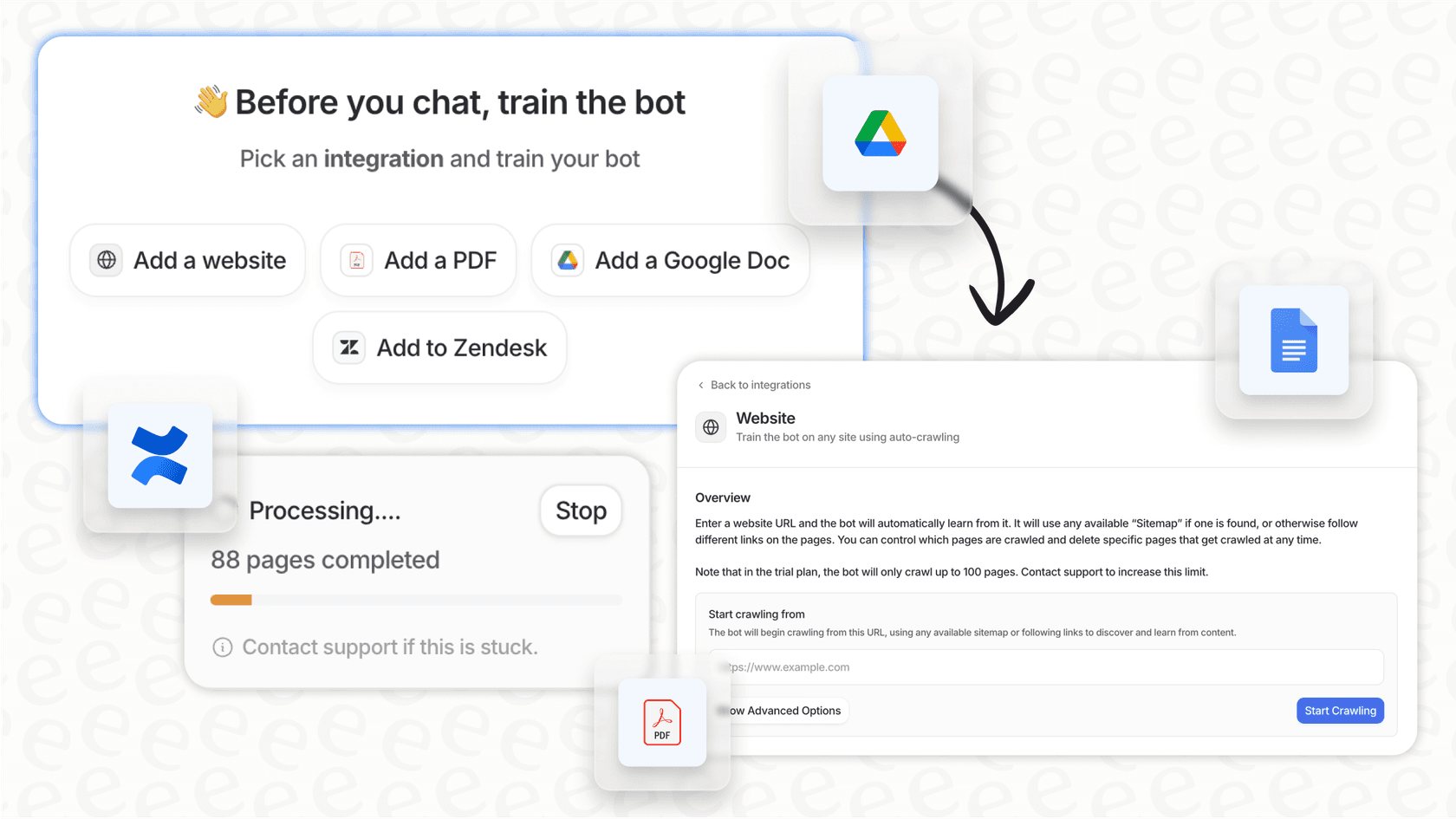
Go live in minutes: The whole setup is self-serve. You can connect your helpdesk (like Zendesk or Freshdesk), pull in knowledge from places like Confluence or Google Docs, and get an AI agent running without having to talk to a salesperson.
-
Train on your business context: It automatically learns from your past support tickets and internal docs to give answers that are accurate, on-brand, and sound like they came from your team, not a generic robot.
-
Total workflow control: You get fine-grained control to decide exactly which tickets the AI should handle and what it's allowed to do, from sorting issues to calling external APIs to look up order information.
-
Risk-free simulation: Before the AI ever talks to a real customer, you can test it on thousands of your past tickets. This shows you exactly how it will perform and what your ROI will be, so you can roll it out with confidence.

Pros & cons:
-
Pros: Incredibly straightforward setup, predictable pricing with no weird per-resolution fees, deep integrations with tools you already use, and powerful simulation and reporting.
-
Cons: It’s built specifically for customer support, ITSM, and knowledge management, so it's not a tool for general-purpose coding.
-
Usage-based: You pay 40¢ for each ticket or chat the AI handles—one conversation is one task, no matter how many replies go back and forth. There's no platform fee, no per-seat fee, and no monthly minimum, so a slow month is a cheap month. You also get an AI Copilot and a Slack integration without a separate add-on.
-
Free trial: $50 of free usage (plus 2 free blog generations), no credit card required, with every feature unlocked.
-
Annual commit: Commit to at least $300/month for the year and save 25%. The autonomous AI Agent, training on past tickets, and AI actions like triage are all included in usage. Enterprise adds a flat $1,000/month platform fee for SSO, HIPAA, higher knowledge-base limits, and a dedicated solutions engineer.
Our take: If your goal is to build an AI chatbot, automate customer support, or set up an internal knowledge bot, eesel AI is one of the smartest Replit alternatives you can choose. It solves the problem directly, saving you all the time, money, and guesswork of building it yourself.
2. GitHub Codespaces
GitHub Codespaces is pretty much the go-to for professional developers who already live and breathe GitHub. It spins up a complete, containerized VS Code environment in the cloud, making sure everyone on your team is working with the exact same setup.
Key features:
-
Works seamlessly with GitHub repositories, pull requests, and GitHub Actions.
-
You can customize dev containers ("devcontainer.json") to create consistent, repeatable environments.
-
Full access to the VS Code extension marketplace, including the all-important GitHub Copilot.
-
Free Tier (Individuals): Gives you up to 60 hours per month on a 2-core machine (120 core-hours) and 15 GB of storage.
-
Pay-as-you-go: Once you go past the free tier, you pay for compute and storage. A 2-core machine costs about $0.18/hour, and storage is $0.07/GB/month. This model can be a little tricky to predict your monthly bill, so it's worth checking the wider GitHub pricing picture before you commit.
Our take: For serious development, Codespaces is a fantastic tool that can effectively replace your local machine and make team collaboration a whole lot smoother.
3. Cursor
Cursor is what you get when you build an IDE for AI, not just with AI bolted on. It’s a version of VS Code that deeply integrates AI into every part of your workflow, helping you handle big tasks like large-scale refactoring, figuring out unfamiliar code, and asking questions about your entire codebase.
Key features:
-
The AI is "codebase-aware," meaning it reads your entire project to give super relevant suggestions and answers.
-
"Apply" and "diff" features let you instantly review and accept AI-generated code changes right in the editor.
-
It has built-in commands for migrating codebases, finding bugs, and generating tests with AI help.
-
Hobby (Free): A limited number of agent requests and tab completions, no credit card needed.
-
Pro: $20/month for extended agent limits and access to frontier models like Claude Opus 4.8, GPT-5.2, and Gemini 3, plus MCPs, skills, and cloud agents.
-
Teams: $40/user/month, adding centralized billing, SSO, and shared team context.
Our take: Cursor really does feel like the future of pair programming. It’s a smart, context-aware assistant that's perfect for professional-level development—my full Cursor pricing breakdown digs into where the per-request limits actually bite.
4. Glide
For the non-technical founder who was drawn to Replit's promise of turning an idea into a real app, Glide is a true no-code solution. It’s a visual platform for building some really impressive internal tools, customer portals, and mobile apps without ever having to write a line of code.
Key features:
-
Build working apps directly from data sources you already use, like Google Sheets, Airtable, or a SQL database.
-
An easy-to-use drag-and-drop interface for designing layouts and building out complex workflows.
-
Comes with user authentication, great-looking design templates, and integrated AI features for things like summarization and pulling out data.
-
Free Tier: Unlimited drafts with 1 editor and up to 25,000 rows, so you can build and test before paying.
-
Business Plan: Starts at $199/month (billed annually) and includes unlimited apps, 30 users, and 5,000 data updates a month (extra updates are 2¢ each).
-
Enterprise: Custom pricing for more advanced security, data sources, and scale.
Our take: If you want to build a business app and you don't come from a technical background, Glide is a much faster and more reliable way to get there than trying to prompt an AI to write the code for you.
5. Bolt.new
Bolt.new takes a direct shot at that "vibe coding" dream. It's an AI tool built to generate full-stack applications from a single, natural language prompt, taking care of everything from the user interface to the backend logic.
Key features:
-
Generates UI and backend code from a descriptive sentence.
-
Lets you make changes and refine the app through follow-up chat messages.
-
Automatically handles things like database schemas, APIs, and front-end components.
-
Free: Comes with a daily limit of 300k tokens and a monthly limit of 1M tokens.
-
Pro: $25/month for 10M tokens per month, with no daily limit. Your unused tokens roll over for an extra month.
-
Teams: $30 per member per month.
Our take: Bolt is a really interesting tool for quickly prototyping and seeing an idea come to life. But, its token-based pricing can be just as unpredictable as Replit's system, and it runs into similar challenges with reliability when you try to build something production-ready.
6. CodeSandbox
CodeSandbox is a cloud IDE designed for modern web development, with a big focus on front-end frameworks and real-time collaboration. Now part of Together AI, it’s a great choice for teams that work on JavaScript projects.
Key features:
-
Optimized for frameworks like React, Vue, and Angular with instant, pre-configured environments.
-
Real-time collaboration that feels a lot like using Google Docs for your code.
-
Integrations with design tools like Figma to make the handoff from design to code much smoother.
-
Build (Free): A generous free plan that includes 40 hours of VM credits per month.
-
Scale: Starts at $170/month and includes 160 hours of VM credits. Any extra usage is pay-as-you-go at $0.15/hour, which can make your bill a bit hard to predict.
Our take: For building web interfaces, collaborating on front-end projects, or sharing interactive prototypes, CodeSandbox is a faster and more focused Replit alternative.
7. Coder
Coder is an open-source platform for big companies that need to run cloud development environments on their own infrastructure. It gives large, regulated organizations the tight grip on security and control they need.
Key features:
-
You can host it yourself on any cloud (AWS, GCP, Azure) or on your own on-premise hardware.
-
Lets you centrally manage developer environments using Terraform templates for consistency.
-
Comes with enterprise-level security features, including role-based access control, audit logs, and resource quotas.
-
Community Edition: Free and open-source.
-
Premium: Custom pricing, billed annually per user. It adds global support, multi-organization controls, and advanced governance features.
Our take: For large organizations with strict security and governance requirements, Coder is the most solid choice for standardizing development across the company.
How to choose the right Replit alternatives for your project
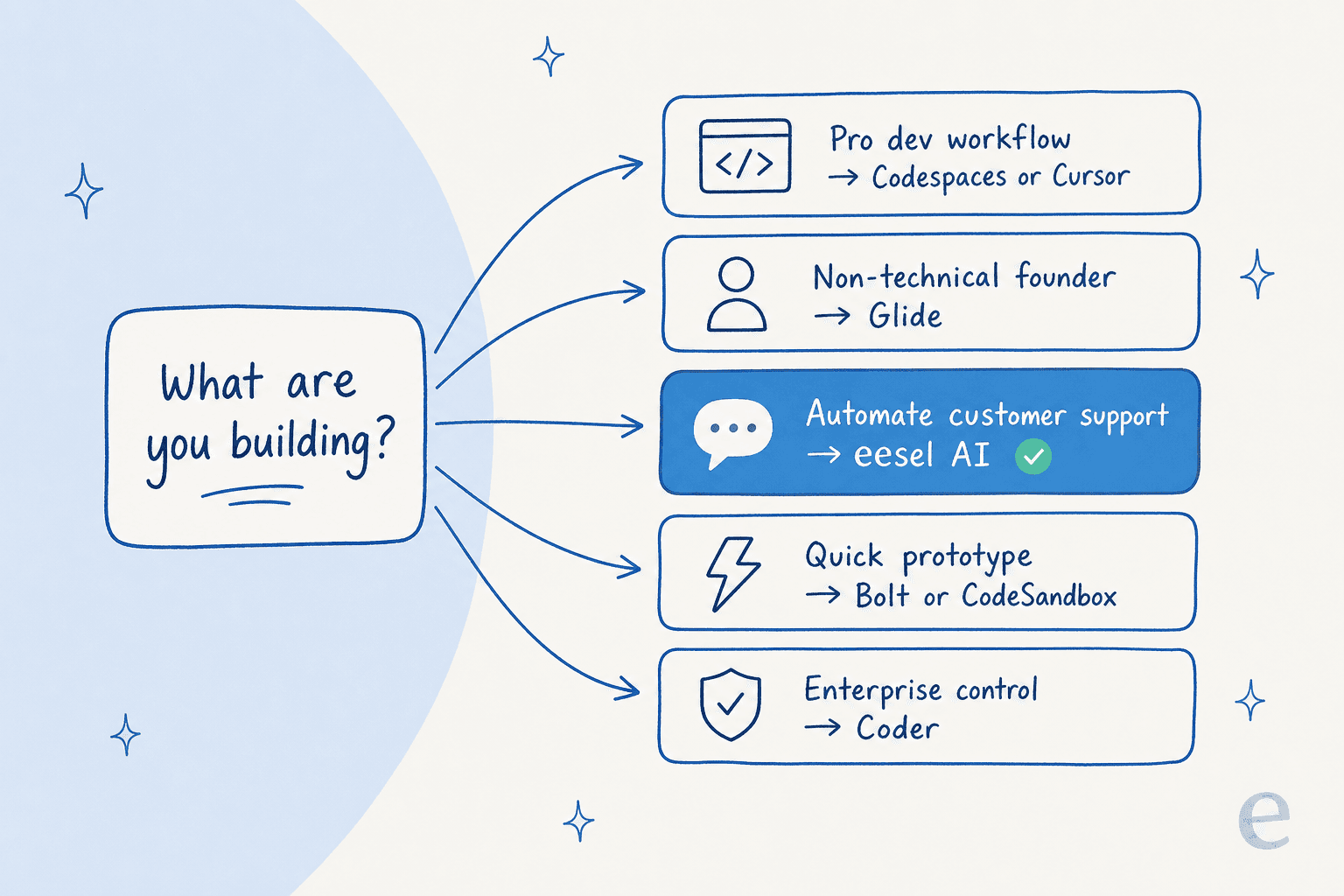
Feeling a bit lost with all the options? Here’s a simple way to think about it:
-
For professional developers: Go with GitHub Codespaces for its deep integration with the GitHub ecosystem or Cursor for a workflow that puts AI first.
-
For non-technical founders: A no-code tool like Glide is your fastest and most reliable path to a real business app.
-
For automating a business process (like support): A specialized platform like eesel AI will give you better, more reliable results with way less effort than trying to build it yourself.
-
For rapid prototyping: Tools like Bolt.new (for AI generation) or CodeSandbox (for front-end work) are great for quickly testing out ideas.
-
For large, security-conscious enterprises: Coder provides the control and self-hosting that big companies need.
Replit alternatives: It's not just about coding, it's about solving problems
So, what's the big takeaway from all this? The search for Replit alternatives shows that the goal isn't just to write code faster. It's to solve real business problems more effectively. While general-purpose AI coders are cool, they often bring their own set of new problems and uncertainties.
For many common business challenges, like providing instant customer support or building an internal knowledge base, specialized platforms are simply a smarter way to go. They let you skip the unpredictable and often frustrating process of building from scratch and deploy a reliable, context-aware solution from day one.
If the reason you opened Replit was to ship a support bot, skip the IDE entirely. eesel works like a new teammate that plugs into your helpdesk and help center in a few minutes, learns from your past tickets, and lets you simulate every rollout against historical conversations before it ever replies to a real customer—so you see the resolution rate and ROI up front instead of guessing. You pay 40¢ per ticket it handles, with no per-seat fees and a spend cap you set. Try eesel free, no sales call needed.

Frequently asked questions

Share this article