Your practical guide to the Salesforce AI assistant


Last edited November 14, 2025

Table of Contents
- What is a Salesforce AI assistant?
- The native Salesforce AI assistant approach: Getting to know Salesforce Agentforce
- The integrated approach: A faster, more flexible Salesforce AI assistant
- Salesforce AI assistant comparison: Salesforce Agentforce vs. integrated assistants
- Build the right Salesforce AI assistant for your team
If your company runs on Salesforce, you know it’s the center of your universe. But let's be real, a lot of the day-to-day work can feel like a grind. You’re constantly updating records, jumping between tabs to find that one piece of information, and writing customer emails from scratch. It’s a powerful tool, but it doesn't always feel very efficient.
This is where the idea of an AI assistant starts to sound pretty good. A Salesforce AI assistant can handle a lot of those repetitive tasks, freeing you up to focus on the parts of your job that actually matter. The only problem? It's a confusing landscape. Should you stick with Salesforce's own tools, or look for something that plugs in from the outside?
This guide is here to clear things up. We’ll look at Salesforce’s native AI and compare it to more flexible, integrated options so you can see the practical differences and pick the right tool for your team.
What is a Salesforce AI assistant?
A Salesforce AI assistant isn't one specific product. Think of it as a category of AI tools built to work with your Salesforce data. Their main job is to understand simple, plain-English commands to get things done, find information, and automate tasks tied directly to your CRM.
Salesforce has its own built-in assistant (now called Agentforce), but the term also applies to third-party tools that connect to it. These external assistants can often do the same things, and sometimes, they’re a lot more flexible.
At their heart, these assistants are designed to:
-
Answer questions about your CRM data. Things like, "What's the latest on the Acme Corp deal?" or "Pull up all open support tickets for this customer."
-
Handle data entry and updates automatically. You could say, "Log my call with Jane Doe and create a follow-up task for next Tuesday," and it would just happen.
-
Generate content for you. This could be drafting a follow-up email or summarizing a long case history using the context already in your CRM.
-
Perform multi-step actions that would normally have you clicking through several different screens.
The native Salesforce AI assistant approach: Getting to know Salesforce Agentforce
For most businesses, the natural starting point is the AI that Salesforce built for itself. It used to be called Einstein Copilot, and now it's known as Agentforce. This is the official, built-in AI for the Salesforce platform.
How the Salesforce AI assistant Agentforce works
Agentforce is a conversational AI that sits right inside your Salesforce interface. It’s designed to be deeply connected to your Salesforce data, using context from your records and the Salesforce Data Cloud to figure out what you’re asking for. It works by using a library of "actions." For instance, you can ask it to summarize an opportunity, and it will run a pre-built "Summarize Record" action to do it.
It comes with a few standard actions right out of the box, but if you want to customize it for your specific business processes, you'll need to get your hands dirty with Salesforce's developer tools. As their own Trailhead learning guides show, creating custom actions means using things like Salesforce Flows, writing Apex code, and setting up Prompt Builder. This isn't something you can do from a simple settings menu; it usually requires a developer or a highly skilled Salesforce admin to get anything beyond the basics working.
Salesforce AI assistant pricing
Accessing Agentforce usually means you need to be on one of Salesforce's high-end 'Einstein 1 Editions' or purchase it as an add-on for the already pricey Enterprise or Unlimited Editions. From there, the pricing can get a bit tricky.
Salesforce uses a couple of different models for Agentforce. You might pay with "Flex Credits," where you buy a bundle of credits upfront (think $500 for 100,000 credits). Another option is a per-conversation model, which costs about $2 per conversation.
The main thing to understand here is that your costs can be hard to predict. If you have a busy month with a lot of customer chats or your team starts relying heavily on the AI, your bill could shoot up unexpectedly. This kind of usage-based pricing makes budgeting a real challenge and can feel like you're being penalized for growth.
The limitations of a closed Salesforce AI assistant
A native tool sounds great on paper, but it comes with some real trade-offs that you need to consider before jumping in.
First, there's the complexity. Like we mentioned, making Agentforce do anything beyond its pre-programmed tasks is not for the faint of heart. It requires a serious investment in specialized Salesforce development skills. If you want the AI to handle a process unique to your business, you'll have to budget for a developer's time to build, test, and maintain that new action. It’s not a tool that your sales or support teams can easily adapt on their own.
The biggest issue, though, is the knowledge gap. Agentforce is brilliant at finding information that lives inside Salesforce. But what about all the other places your company knowledge is stored? Your detailed product specs in Confluence, marketing plans in Google Docs, or internal guides on SharePoint are completely invisible to it. The same goes for the thousands of conversations in your Zendesk or Intercom helpdesk. This means your AI assistant is working with only partial information, giving you answers based on a tiny slice of your company's actual knowledge base.

Finally, going the native route means vendor lock-in. You aren't just buying an AI assistant; you're tying your company even more tightly to the Salesforce ecosystem. This makes it much harder to bring in other best-in-class tools or change your strategy later without a huge, costly project.
The integrated approach: A faster, more flexible Salesforce AI assistant
There’s another way to do this. Instead of using an AI assistant built by Salesforce, you can use a specialized AI platform that plugs right into Salesforce. This is a more modern approach, built for businesses that value speed, flexibility, and an AI that can see the whole picture, not just the CRM.
What to look for in a modern Salesforce AI assistant
This new wave of integrated assistants is designed to solve the problems of older, closed systems. Here’s what sets them apart.
It should be a no-code, seamless setup. The best tools don't need a six-month implementation project. They should connect to Salesforce with just a few clicks, improving your existing workflow instead of making you start over.
It needs to be a unified knowledge hub. A truly useful Salesforce AI assistant has to learn from everywhere your knowledge is kept. It should securely connect to your help center, internal wikis like Confluence or Notion, shared drives like Google Docs, and even the chat histories from your helpdesk.
It has to be self-serve and customizable. Your team members, not just your developers, should be in the driver’s seat. A good tool will have an intuitive interface that lets you define the AI's tone of voice, tell it what kinds of questions it can answer, and set up custom actions, like looking up order info from Shopify, without writing a line of code.
You should be able to test it without risk. You shouldn't have to go live just to find out if your AI works. A critical feature is the ability to test your setup on thousands of your past, real-world customer tickets. This gives you an accurate idea of how it will perform and lets you fine-tune its behavior before it ever talks to a real customer.
How eesel AI offers a truly integrated Salesforce AI assistant experience
eesel AI is a perfect example of this integrated approach. It was built from the ground up to solve the headaches of siloed, complicated AI systems. The goal was to give you the power of a custom-trained AI without the pain.
With eesel AI, you get one-click integrations for Salesforce and over 100 other knowledge sources, including Confluence, Google Docs, Zendesk, and Slack. This gives your Salesforce AI assistant a complete view of your business from day one, so it can provide answers that are not only correct but also have the right context.
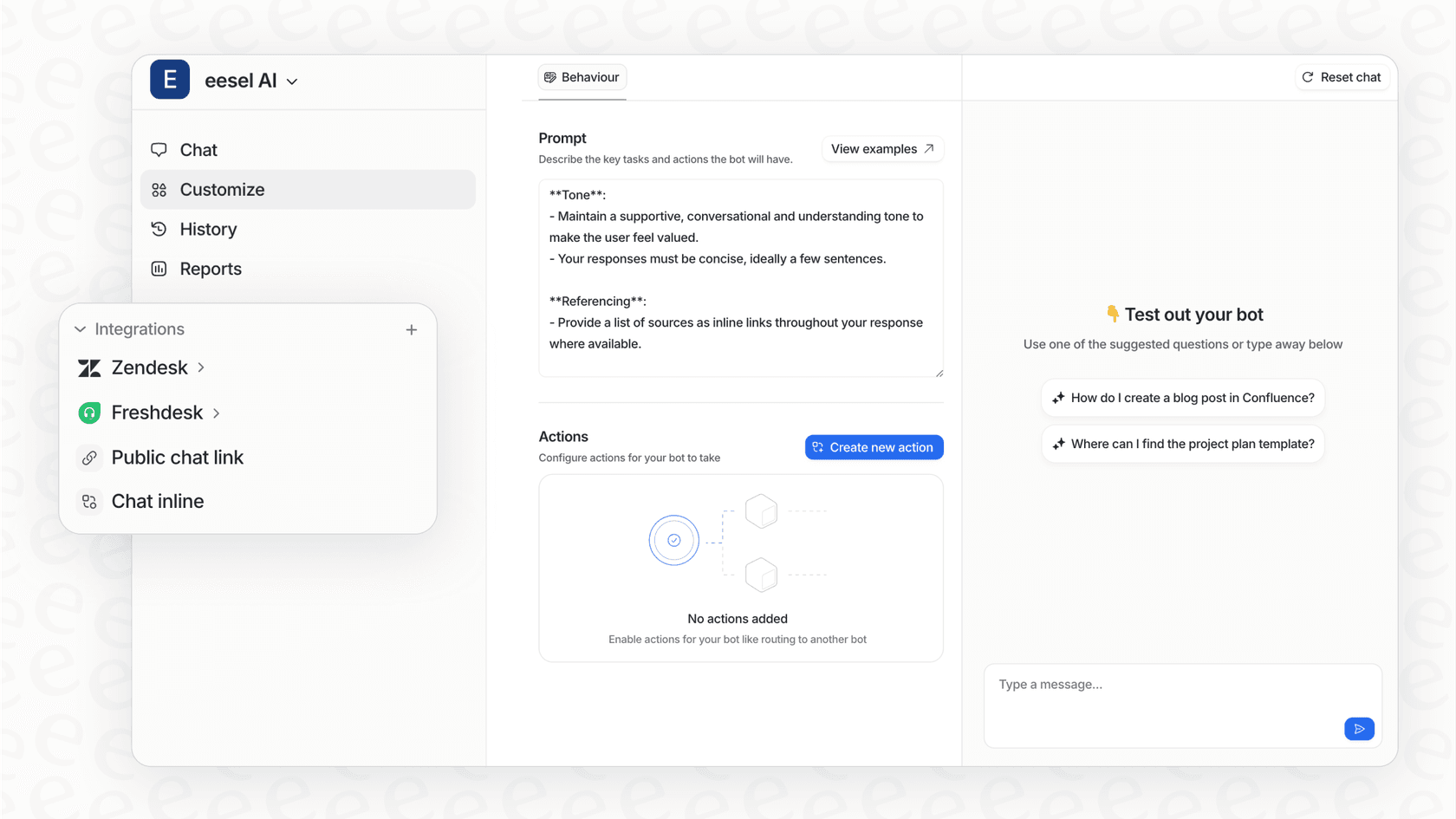
What really makes it different is how simple it is. You can sign up, connect your sources, and launch a working AI assistant in minutes, not months. There are no mandatory sales calls or long onboarding processes. You’re in full control from the very beginning. eesel AI’s simulation mode lets you see exactly how the AI would have answered past questions, so you can measure its impact before you even turn it on. When you're ready, you can roll it out slowly, maybe starting with just one team, and expand as you get more comfortable.
Salesforce AI assistant comparison: Salesforce Agentforce vs. integrated assistants
To make the choice a bit clearer, here’s a straightforward comparison of the two approaches across the things that matter most.
| Feature | Salesforce Agentforce (Native) | Integrated Assistant (eesel AI) |
|---|---|---|
| Setup Time | Weeks to months for any custom work | Go live in minutes |
| Required Skills | Salesforce Admin / Developer (Flows, Apex) | No-code, easy for any team member to configure |
| Knowledge Sources | Mostly just Salesforce CRM & Data Cloud | Salesforce + 100+ sources (Confluence, GDocs, Zendesk, etc.) |
| Testing & Rollout | Limited native testing options | Powerful simulation on historical data; gradual rollout controls |
| Pricing Model | Complex credit-based or per-conversation fees | Simple, predictable monthly/annual plans |
| Flexibility | Locks you into the Salesforce ecosystem | Works with your existing tools, no lock-in |
Build the right Salesforce AI assistant for your team
A Salesforce AI assistant is quickly becoming a must-have for any team looking to work smarter and keep customers happy. But it’s clear that the "best" assistant isn't always the one that comes pre-installed.
Salesforce Agentforce offers a deep connection to the platform, but that comes with a high price in terms of complexity, knowledge gaps, and being locked into one vendor's world. For businesses that are fully committed to the Salesforce ecosystem and have developer resources on standby, it can be a decent option.
However, for teams that need to be agile, want to empower their non-technical users, and need an AI that understands the full context of their business, an integrated solution is the way to go. Platforms like eesel AI are built for speed, flexibility, and a complete view of your knowledge, giving you a smarter assistant without making you change how you work.
Ready to build a Salesforce AI assistant that connects to all your knowledge and is ready to go in minutes? Get started with eesel AI for free and see how quickly you can automate your CRM tasks.
Frequently asked questions

Share this article

Article by
Kenneth Pangan
Writer and marketer for over ten years, Kenneth Pangan splits his time between history, politics, and art with plenty of interruptions from his dogs demanding attention.