A practical guide to Salesforce AI examples in 2025


Last edited October 7, 2025
Salesforce is a beast in the CRM world, and with tools like Einstein, they’re going all-in on artificial intelligence. You've probably seen the marketing about how AI can revolutionize your sales and support, but what does that actually look like once you're inside the platform? It often feels like a black box of complicated features and even more complicated pricing.
This guide is a straight-talking look at real Salesforce AI examples. We’ll break down what they do, the reality of getting them up and running, and the limitations you won’t find on their glossy marketing pages. We'll also touch on a more flexible and straightforward alternative for teams that don't want to be locked into a single ecosystem.
What is Salesforce AI?
First off, Salesforce AI isn't a single product. Think of it as a collection of AI technologies woven into the platform, mostly under the "Einstein" brand. The whole point is to make the data you already have in your CRM a lot smarter by adding predictive insights, automated content, and workflows.
It's built to help out different departments:
-
For Sales: It tries to help you prioritize leads and get a better handle on your sales forecasts.
-
For Service: It’s all about automating customer replies and routing support tickets.
-
For Marketing: It helps personalize campaigns and predict which customers will engage.
These tools are designed to work with data that lives and breathes inside Salesforce. While that can be powerful, it also means their effectiveness is completely tied to how much of your business runs on Salesforce. Let's be honest, for most companies, knowledge is scattered everywhere, from Confluence and Google Docs to random Slack threads. When that's the case, the AI can't see the full picture, which is a pretty big blind spot for modern teams.
The reality of setting up Salesforce AI
Salesforce pitches its AI as a seamless add-on, but getting started is usually a major project. It's definitely not a plug-and-play solution you can switch on over a coffee break.
The implementation process
Rolling out Salesforce AI isn't as simple as flipping a switch. You're looking at a multi-step process that requires some serious technical know-how.
First, you have to get your data in order. The AI's predictions are only as good as the information it's fed, which means you need clean, well-structured data inside your Salesforce account before you even begin.
Next, you have to actually configure the AI using tools like Agent Builder, Prompt Builder, and Model Builder. This isn't for the faint of heart. It requires a solid understanding of Salesforce's architecture, and you'll likely need to write custom code for anything beyond the most basic actions.
And to really get the most out of it, you often need to be fully bought into the Salesforce ecosystem, like using their Data Cloud to pull all your customer information together. The whole process can easily take weeks, if not months, and usually requires a dedicated Salesforce admin or a pricey implementation partner.
A simpler path for agile teams
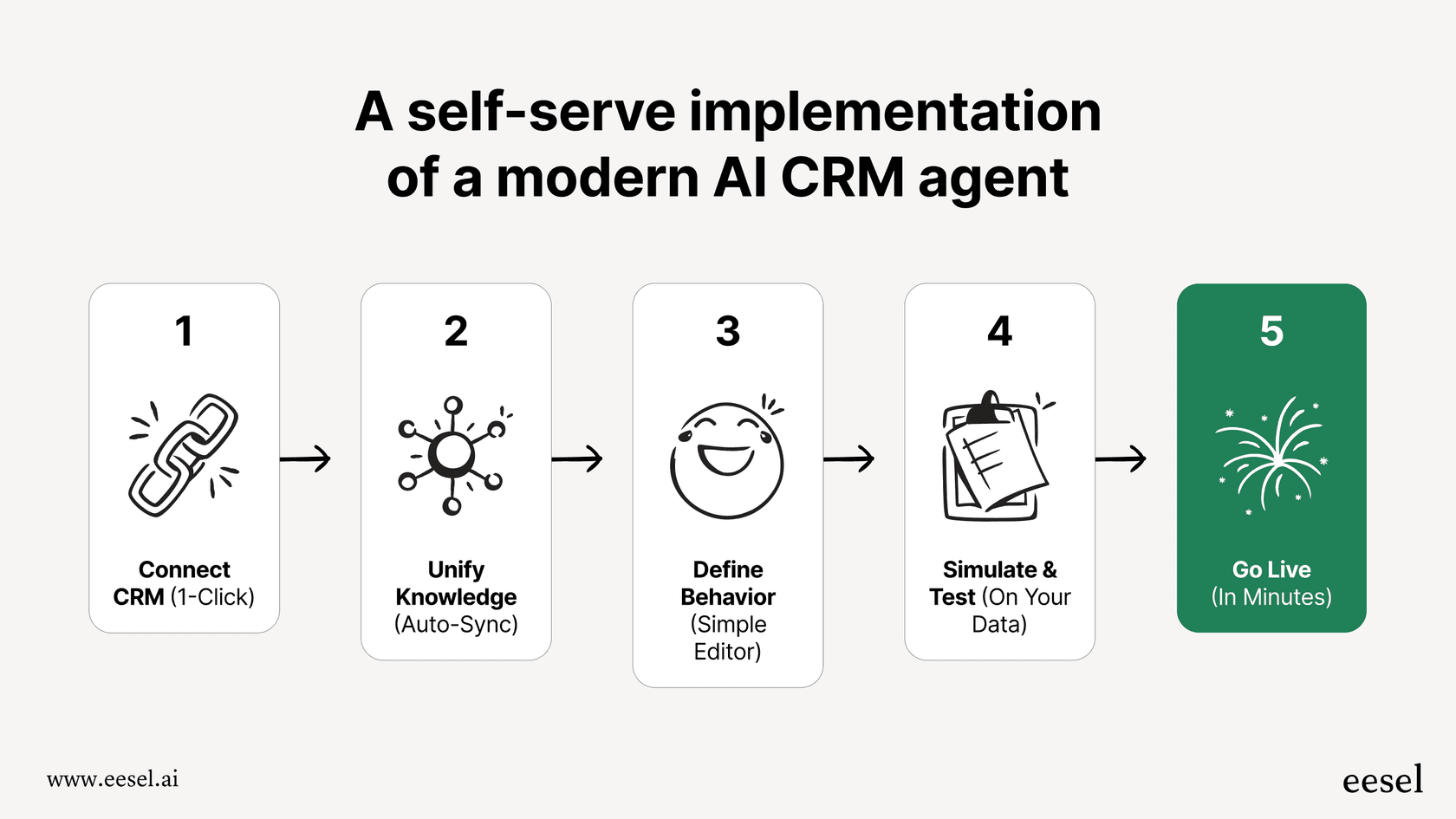
If you need to move faster, that kind of setup process can be a non-starter. In contrast, platforms like eesel AI are built to be incredibly self-serve. You can connect your existing helpdesk (whether it's Zendesk or Intercom) with a few clicks and go live in minutes, not months. Instead of forcing you to migrate all your data into one place, eesel connects to where your knowledge already lives. It instantly pulls together information from your help center, past tickets, Confluence, and Google Docs without a massive IT project.
Key Salesforce AI examples and their limitations
Salesforce has a ton of AI features. Let’s look at some of the most common Salesforce AI examples and, more importantly, where they tend to fall short.
Salesforce AI for sales teams: Einstein Opportunity & Lead Scoring
One of the most talked-about features is Einstein Opportunity Scoring. It digs through your past deals to predict which of your current opportunities are most likely to close, giving each one a score from 1 to 99. It also points out the "why" behind the score. Einstein Lead Scoring does the same thing for new leads, helping your sales team figure out who to call first.
- The Limitation: These scores are based only on what's inside your Salesforce CRM. The AI has blinders on. It can't see the in-depth product discussion happening in a Slack channel, the detailed project plan in Notion, or the technical specs your team shared in a Google Doc. This can lead to some wonky scores for complex deals where the real work happens outside the CRM.
Salesforce AI for service teams: Einstein Service Replies & Case Classification
On the customer support side, Einstein Service Replies uses generative AI to draft answers to common customer questions over chat or email. A similar tool, Einstein Case Classification, automatically reads incoming cases and fills in fields like reason, priority, or type to help route tickets to the right person.
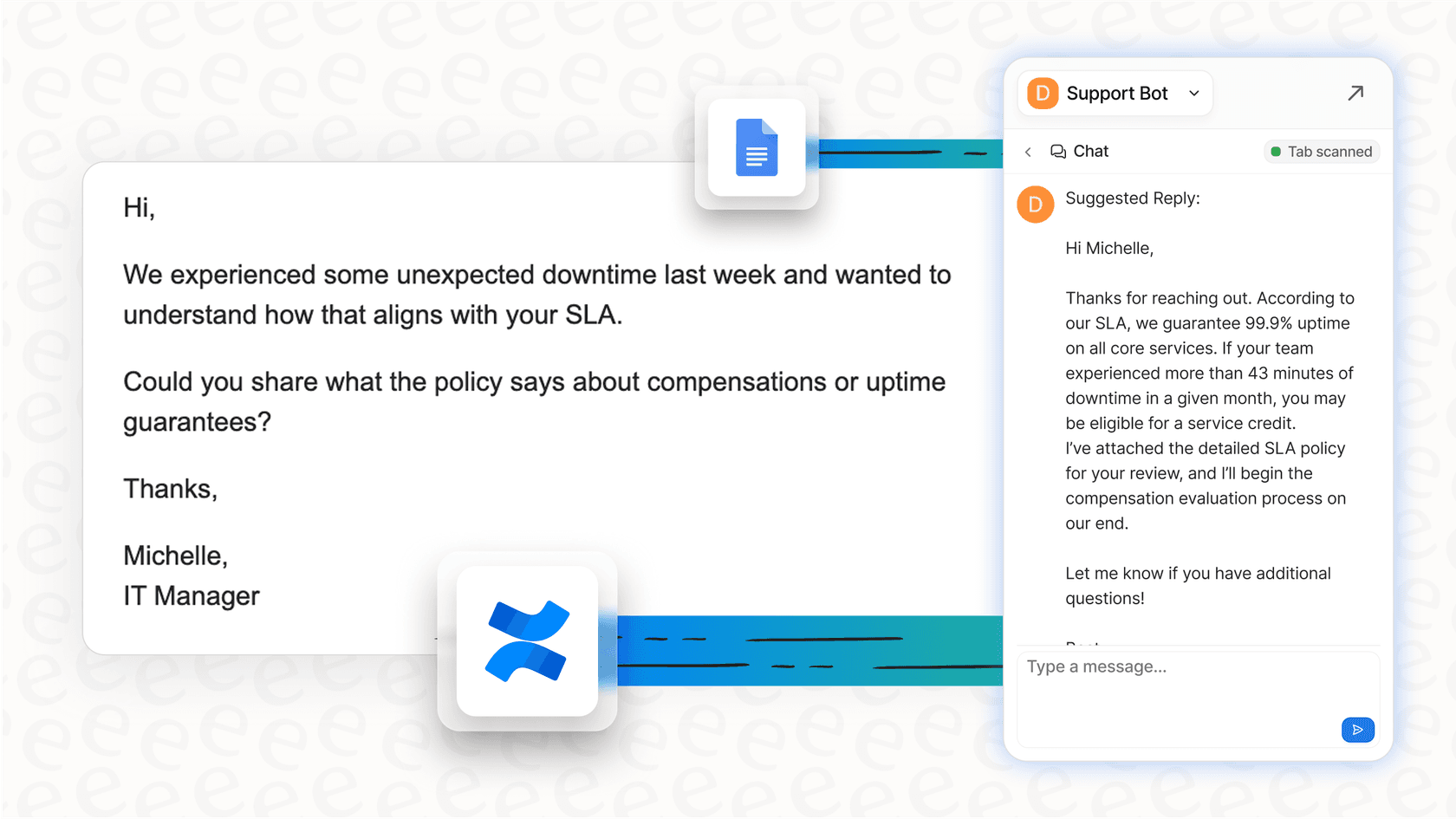
- The Limitation: The AI generates these replies using your Salesforce knowledge base and past ticket history. But what if your most up-to-date information is managed by your engineering team in Confluence or your policy updates live in a Google Docs folder? The AI won't see it. This creates a real risk of giving customers outdated or incomplete answers. An AI solution like eesel AI gets around this by connecting to all your knowledge sources, making sure it always has the most current info, no matter where it's stored.
Salesforce AI for custom predictions: Einstein Prediction Builder
The Einstein Prediction Builder is a cool tool that lets you create your own custom AI models without having to write code. You could, for example, build a model to predict which customers are likely to churn or to calculate a customer's lifetime value based on your Salesforce data.
- The Limitation: While it's flexible, it's still stuck within the Salesforce walled garden. You can't easily build a prediction based on data from other systems unless you go through the hassle of piping all that data into Salesforce first. Plus, there's no simple way to test how your model will perform in the real world before you deploy it. You just have to build it, turn it on, and hope for the best.
That’s a pretty big leap of faith, and it’s where a different approach really shines. For instance, eesel AI offers a powerful simulation mode that lets you test your AI agent on thousands of your past support tickets. You can see exactly how it would have replied, get a solid forecast of your automation rate, and find any gaps in its knowledge, all before a single customer ever talks to it.

The hidden costs: Pricing and challenges
Trying to figure out the true cost of Salesforce AI is one of the biggest headaches for anyone considering it. Unlike tools with simple monthly plans, Salesforce's pricing is tangled up in different product tiers and add-ons.
Good luck finding a price tag
As of late 2024, you won't find a simple pricing page for Salesforce's AI features. Instead, getting access usually depends on a few things:
-
Your Salesforce Edition: Many of the basic AI features are only included in the more expensive editions like Enterprise or Unlimited, pushing you into a pricier CRM plan just to get started.
-
Add-On Licenses: Want the more advanced stuff, like the full suite of service AI tools? That's often sold as a separate, costly add-on.
-
Credit-Based Systems: Some of the generative AI features run on credits. This makes your costs unpredictable, as you'll pay more during a busy month. Good luck trying to budget for that.
This lack of transparency can lead to some nasty surprises on your bill and makes it almost impossible to calculate your return on investment upfront.
eesel AI: Transparent pricing
This is where a different approach can bring some much-needed clarity. eesel AI offers simple, transparent plans based on the features you need and a predictable number of monthly interactions.
Here’s a quick comparison to cut through the noise:
| Feature | Salesforce AI | eesel AI |
|---|---|---|
| Pricing Model | Bundled in editions, add-on licenses, or credits. | Transparent monthly/annual plans. |
| Public Pricing | Not publicly available. You have to talk to sales. | Clearly listed on the website. |
| Billing | Often requires annual contracts. | Flexible month-to-month options available. |
| Per-Resolution Fees | Can exist through the credit system. | None. Just a predictable cost with no surprises. |
With eesel AI, you know exactly what you're paying for. You're not penalized for having a successful, high-volume support month. You can even start with a monthly plan and cancel anytime, giving you the kind of flexibility that big enterprise platforms rarely offer.
Are Salesforce AI examples right for you?
Look, Salesforce AI offers a powerful set of tools if your business is 100% committed to the Salesforce platform. The Salesforce AI examples we've walked through, from lead scoring to case automation, can definitely make a difference if all your data and workflows are already in that ecosystem.
But for many modern companies, that's just not the case. If your team values flexibility, speed, and knowing what you're paying for, the drawbacks of Salesforce AI become pretty clear. The difficult setup, dependency on one platform, and confusing pricing can be major roadblocks.
For teams that want an AI solution that works with their existing tools, not against them, a more agile platform is a much better fit. A tool that connects all your scattered knowledge and plugs right into the helpdesk you already use can start delivering value in minutes, not months.
Ready to see what a truly flexible AI support solution can do? Get started with eesel AI for free and launch your first AI agent today.
Frequently asked questions

Share this article

Article by
Kenneth Pangan
Writer and marketer for over ten years, Kenneth Pangan splits his time between history, politics, and art with plenty of interruptions from his dogs demanding attention.