A practical guide to the Salesforce chatbot: Einstein vs. third-party AI


Last edited October 2, 2025
So, you're thinking about adding AI and automation to your Salesforce setup to make customer service a bit smoother. It’s a great idea. But as soon as you decide to go for it, you hit your first major fork in the road: do you stick with Salesforce's own tool, Einstein Bots, or check out one of the many third-party options that plug right in?
It’s a classic dilemma. Do you go with the tool that’s built-in, promising a perfect fit? Or do you pick a specialized platform that might be quicker to set up, more intelligent, or easier on the budget?
This guide is here to lay it all out for you, plain and simple. We’ll get into what both options can do, how much work it takes to get them running, and what they actually cost. By the end, you’ll have a much clearer picture of which way to go.
What is a Salesforce chatbot?
At its core, a Salesforce chatbot is an AI-powered assistant that chats with your customers, answers their questions, and handles simple tasks for them. The key is that it’s connected directly to all your Salesforce data. You can think of it as a virtual team member who takes care of the repetitive stuff, letting your human agents focus on trickier problems.
You’ve got two main paths to get a chatbot working with Salesforce:
-
The native solution (Einstein Bots): This is the chatbot built by Salesforce, for Salesforce. It’s designed to work hand-in-glove with Service Cloud and all the customer info you already have stored.
-
Third-party integrations: These are specialized AI tools from other companies that connect to Salesforce. They often come with their own unique features and pricing and, crucially, can often learn from more than just your Salesforce data.
The right choice for you usually comes down to your budget, how much tech help you have, and whether you need an AI that can pull answers from places outside the Salesforce ecosystem.
Exploring Salesforce Einstein Bots
Let's start with the home team. Einstein Bots is Salesforce's own AI for automating customer conversations. It’s built to live and breathe inside your Salesforce environment.
Einstein Bot features and capabilities
The biggest draw for Einstein Bots is how deeply it's woven into Salesforce. It can easily look up customer records, create new support cases, and even trigger automated processes using Salesforce Flows. This means it’s not just a chat tool; it can actually do things inside your CRM.
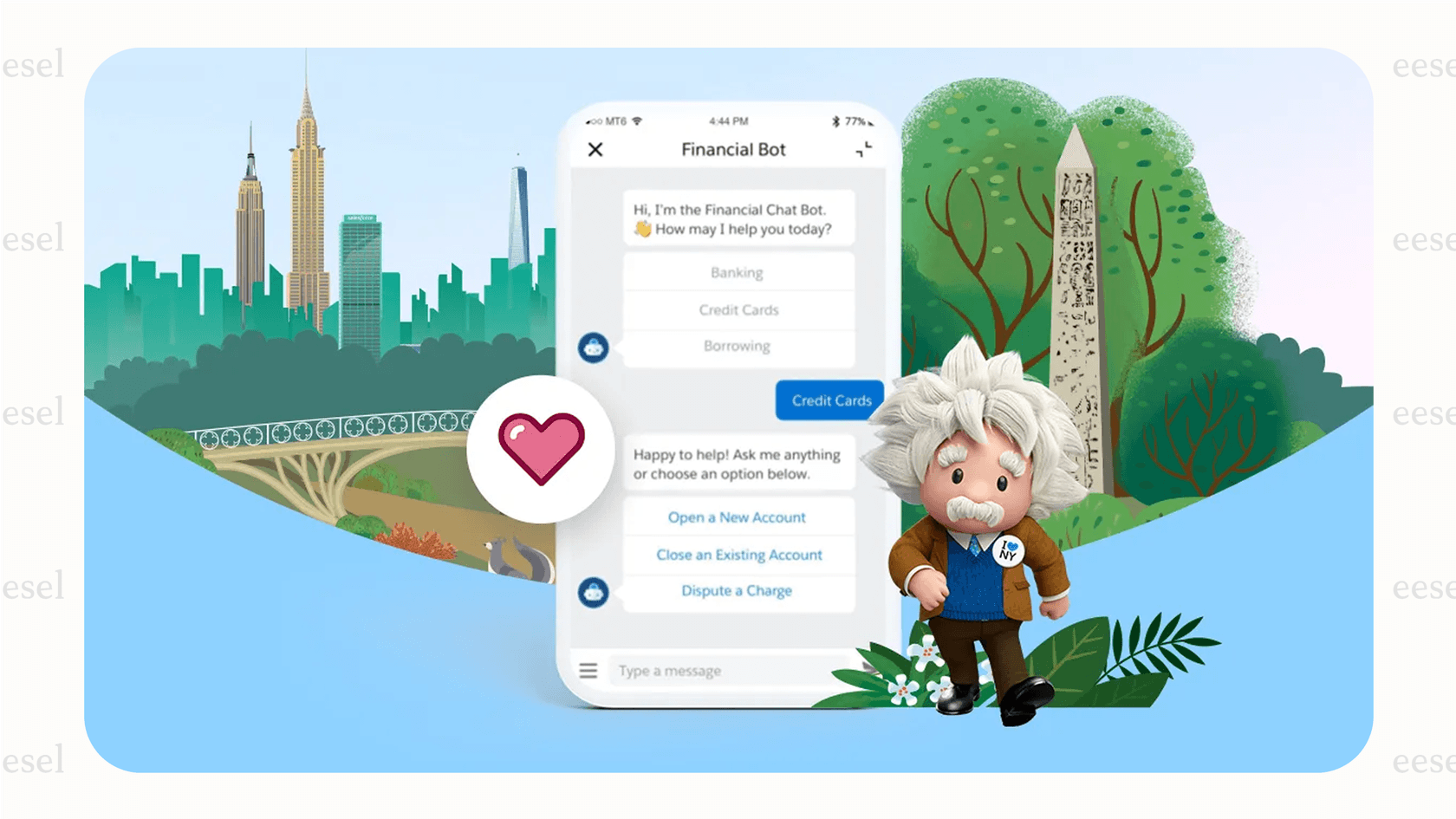
It uses Natural Language Processing (NLP) to understand what customers are trying to say, which lets it handle jobs like:
-
Answering common questions.
-
Collecting basic info from a customer (like their name and email) before passing them to a human.
-
Guiding customers through simple, step-by-step processes.
The setup and implementation process
While it's powerful, getting an Einstein Bot going isn't as simple as flipping a switch. The entire setup is done inside Salesforce and takes a fair amount of planning and technical work.
A Salesforce admin or developer has to build out the bot's logic piece by piece, using a few key components:
-
Dialogs: These are the conversation scripts the bot follows. You have to map out every question, answer, and potential detour the chat might take. It's like building a very detailed flowchart.
-
Intents: This is what you teach the bot to recognize. For instance, if a customer types "where's my stuff?", you train the bot to understand this as a "Check Order Status" intent.
-
Entities & Variables: These are the specific details the bot needs to grab from the conversation, like an order number or email address, to get the job done.
This process gives you a lot of control, but it requires a serious investment of time. For anything more than a basic FAQ bot, you're probably looking at a dedicated project for your admin or dev team, which pulls them away from other work.
Pricing and licensing considerations
And here’s where things get a little complicated. You can't just go out and buy Einstein Bots as a standalone product. It’s bundled into the more expensive tiers of Salesforce Service Cloud, and even then, there are strings attached.
The cost structure can feel like a maze. To get access, you generally need to be on one of the pricier plans.
| Service Cloud Plan | Price (per user/month) | Einstein Bots Included? |
|---|---|---|
| Enterprise | $175 | No, it's an add-on (often around $75/user/month) |
| Unlimited | $350 | Yes |
| Agentforce 1 Service | $550 | Yes |
But the price on the sticker isn't the whole story. The real kicker is the conversation limit. According to Salesforce's own documentation, you only get 25 Einstein Bot conversations per month for each user license. If you have a busy website, you could blow through that allowance in a couple of days, leading to unpredictable extra charges.
The case for third-party integrations
Given the cost and complexity of Einstein Bots, it’s not surprising that a lot of people start looking elsewhere. While Einstein might feel like the default choice, specialized third-party tools are often built to solve the very problems that make the native option a headache.
Why look beyond Einstein Bots?
Teams usually start exploring other options when they hit one of these common walls:
-
The bundled costs are high. Many businesses don't need every single feature in the top-tier Salesforce plans but feel forced to upgrade just to get a chatbot. That’s a steep price to pay for one feature.
-
The setup is a huge project. The time and technical skill it takes to build, test, and maintain a genuinely useful Einstein Bot can be a major drain on your team's resources.
-
The bot's knowledge is stuck in a silo. This is a big one. Einstein Bots are great with knowledge stored inside Salesforce. But what about all the helpful information in your company's Confluence pages, Google Docs, or the answers buried in thousands of past support tickets? A company’s real knowledge is usually spread all over the place, and a native bot can't see any of it.
Key advantages of third-party tools
Specialized AI platforms are designed to jump over these hurdles. Here’s what they usually offer instead:
-
They get you up and running faster. Most modern AI tools are built to be incredibly user-friendly. You can often launch a working chatbot in a few hours, not a few months, without having to sit through a lengthy sales process.
-
They connect all your knowledge sources. This is where things get really interesting. Third-party tools can plug into dozens of apps at once: your help desk, internal wikis, public help centers, and even old conversations from Slack. They pull all of that together to build one single, comprehensive brain for the AI, which leads to much smarter and more accurate answers.
-
Their pricing is straightforward. Standalone chatbot platforms tend to have much clearer pricing models. Instead of tying costs to expensive CRM licenses for each of your users, they often charge based on how many conversations the bot has. This makes your costs predictable and much easier to manage.
How integration works without the complexity
The phrase "third-party integration" might sound a little scary, bringing up images of long, code-heavy projects. But that's really not the case anymore.
Modern AI platforms like eesel AI are built with simplicity at their core. They offer one-click integrations that connect securely to help desks like Zendesk or, yes, even Salesforce, without needing a developer to get involved. You can plug them into your existing workflow without causing a major disruption, getting all the perks of a specialized tool without the pain.
A smarter, simpler Salesforce chatbot alternative: eesel AI for Salesforce
So, what does a modern alternative actually look like? A tool like eesel AI is designed to give you the power of a deep integration without the usual setup headaches. It brings together a smart AI brain with a platform that just about anyone can use.
Go live in minutes with a self-serve platform
Forget about mandatory demos and drawn-out sales calls. With eesel AI, you can sign up, connect your tools, and get an AI agent running all on your own, sometimes in just a few minutes. It’s genuinely self-serve.
The one-click helpdesk integration means you can link eesel AI to your systems almost instantly. There’s no complicated configuration or need to overhaul your current support process. It just works.
Unify all your knowledge, not just Salesforce data
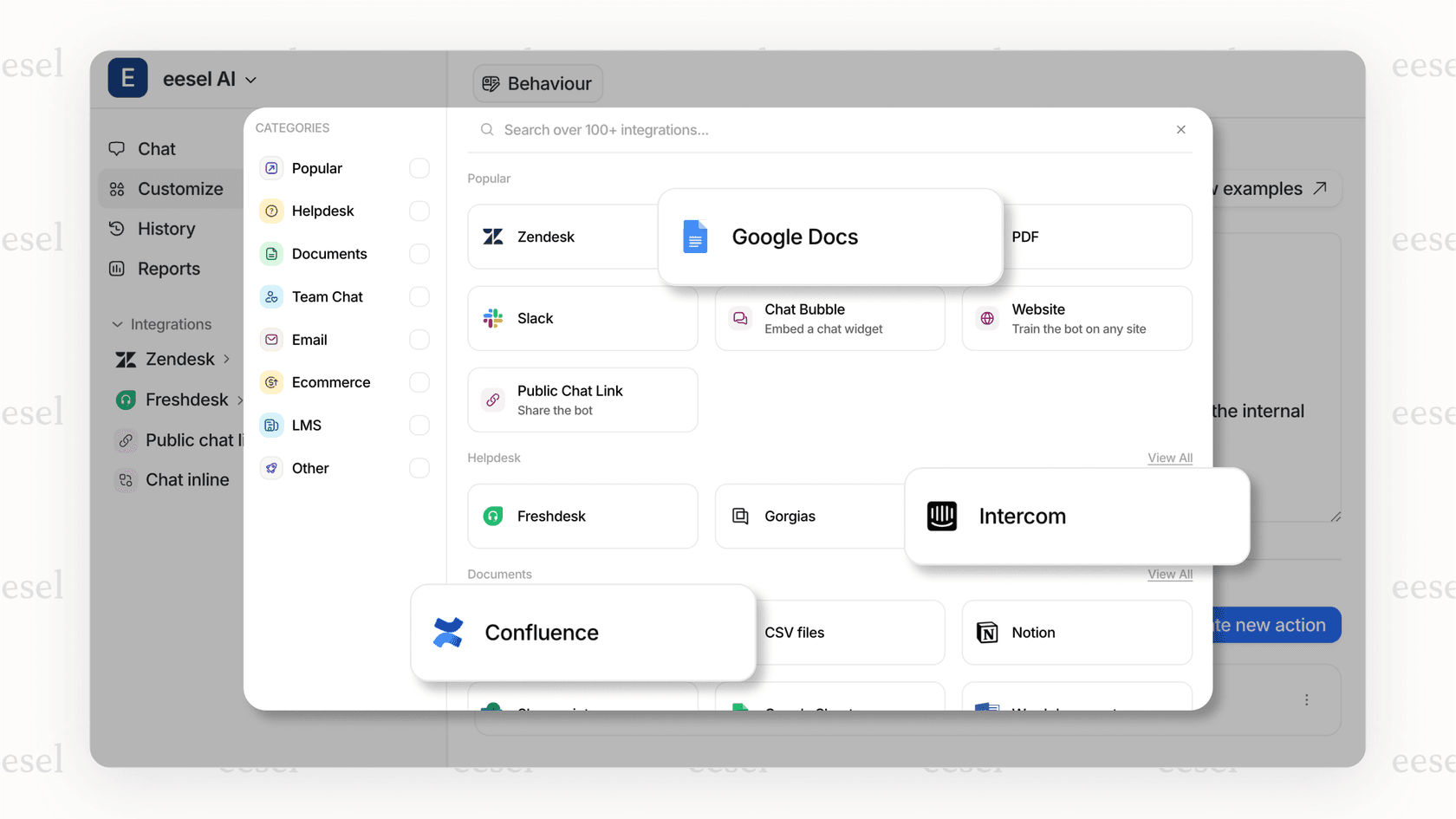
The real secret sauce of eesel AI is its ability to learn from everything. It doesn't just read your official Salesforce Knowledge articles. It connects to all the places your team's actual knowledge is stored:
-
Your entire history of past support tickets
-
Your public help center and FAQs
-
Internal wikis in tools like Confluence or Notion
-
Shared documents living in Google Docs
This creates a single source of truth that makes the AI truly helpful. It can dig up answers to obscure questions that a bot trained only on official documentation would never have a clue about.
Simulate and deploy with confidence
Launching a new chatbot can feel like a bit of a gamble. Is it going to work properly? Is it going to annoy customers? eesel AI takes the guesswork out of the equation with its powerful simulation mode.
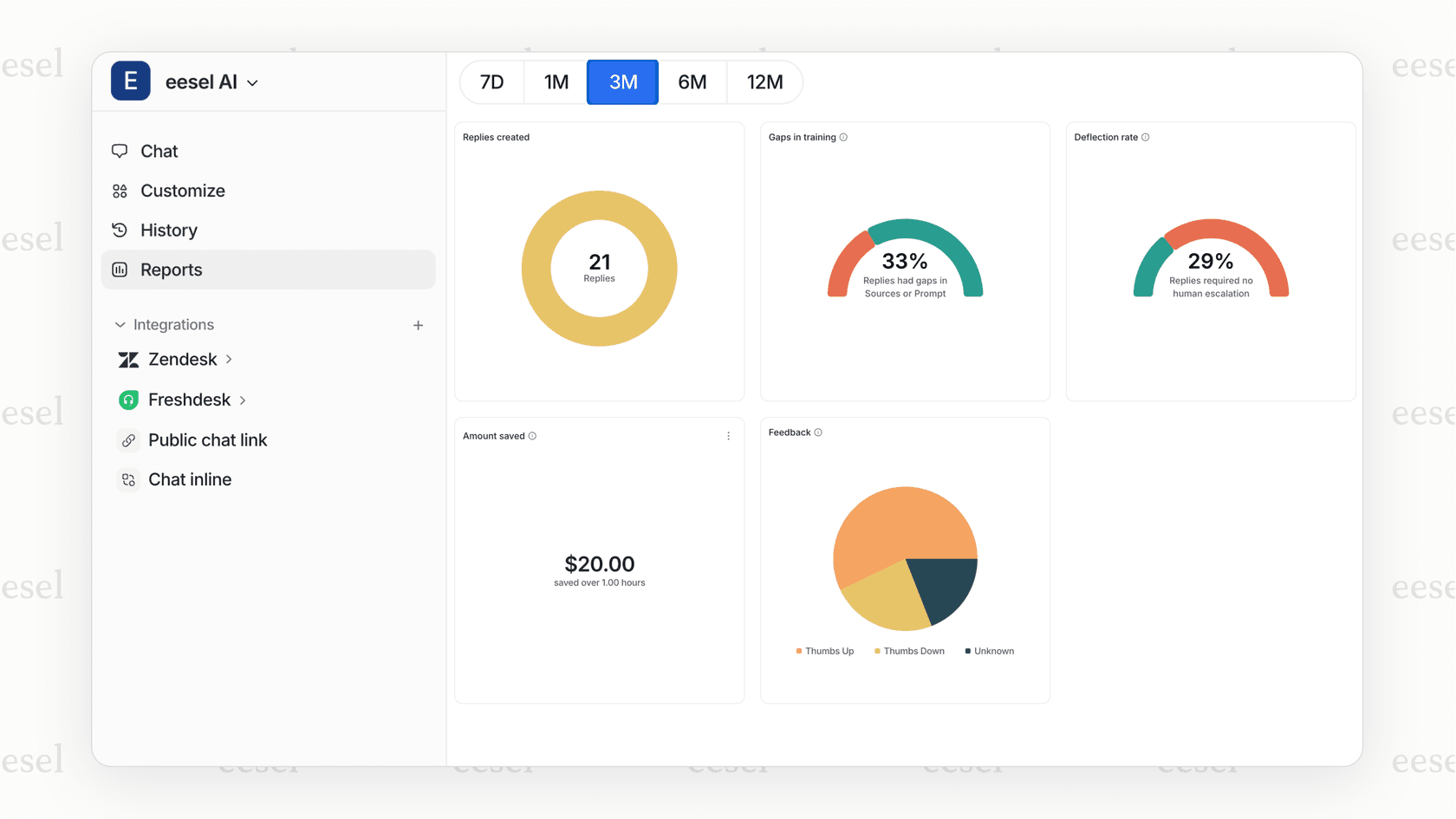
Before the bot ever chats with a live customer, you can test it against thousands of your past support tickets. The dashboard shows you exactly how the AI would have answered each one, giving you a clear forecast of its resolution rate and how much time and money it could save you. This lets you tweak its behavior and launch it when you're completely confident.
Transparent pricing without the surprises
With eesel AI, you won't be bracing for a surprise bill at the end of the month. The pricing is based on the number of AI interactions, not how many user seats you have or how many tickets it resolves.
This model is simple, predictable, and grows with you. Plus, with flexible month-to-month plans, you aren't roped into a long-term contract. It’s a straightforward approach that keeps you in control of your spending.
Making the right Salesforce chatbot choice for your team
A Salesforce chatbot can be a massive help for your support team, but it’s pretty clear that the one you choose makes a big difference.
Einstein Bots promises that seamless, native integration, but it often comes with a high price, a steep learning curve, and an AI that’s limited to the knowledge you’ve formally documented inside Salesforce.
For most teams who want a fast, flexible, and affordable solution, modern third-party platforms are often the better way to go. An AI agent like eesel AI not only makes the setup process painless but also creates a much more intelligent bot by learning from all the different tools your business already depends on.
Start automating your Salesforce support today
Ready for a smarter Salesforce chatbot that you can get up and running in minutes? eesel AI connects to all your knowledge sources and lets you simulate its performance before you go live.
Try it for free or book a demo to see how it works.
Frequently asked questions

Share this article

Article by
Stevia Putri
Stevia Putri is a marketing generalist at eesel AI, where she helps turn powerful AI tools into stories that resonate. She’s driven by curiosity, clarity, and the human side of technology.