A guide to Shopify Magic Theme Block Generation in 2025


Last edited November 14, 2025
Shopify has been getting serious about AI with its "Shopify Magic" set of tools, and one feature, in particular, is getting a lot of attention. I'm talking about the ability to generate custom theme blocks just by typing out what you want. It's pitched as a way for merchants to get unique storefronts without having to hire a developer.
But to get the most out of it, you need to know what it does well and, just as importantly, where it falls short.
This guide will walk you through everything you need to know about Shopify Magic Theme Block Generation. We'll cover what it is, how to use it, its strong suits, and its weak spots.
What is Shopify Magic Theme Block Generation?
Shopify Magic Theme Block Generation is an AI-powered feature built right into the Shopify theme editor. Put simply, it lets you describe a content block you want, like a testimonial slider, a feature grid, or a promotional banner, in plain English. Shopify's AI takes your description and whips up the Liquid, HTML, CSS, and JavaScript code for you.
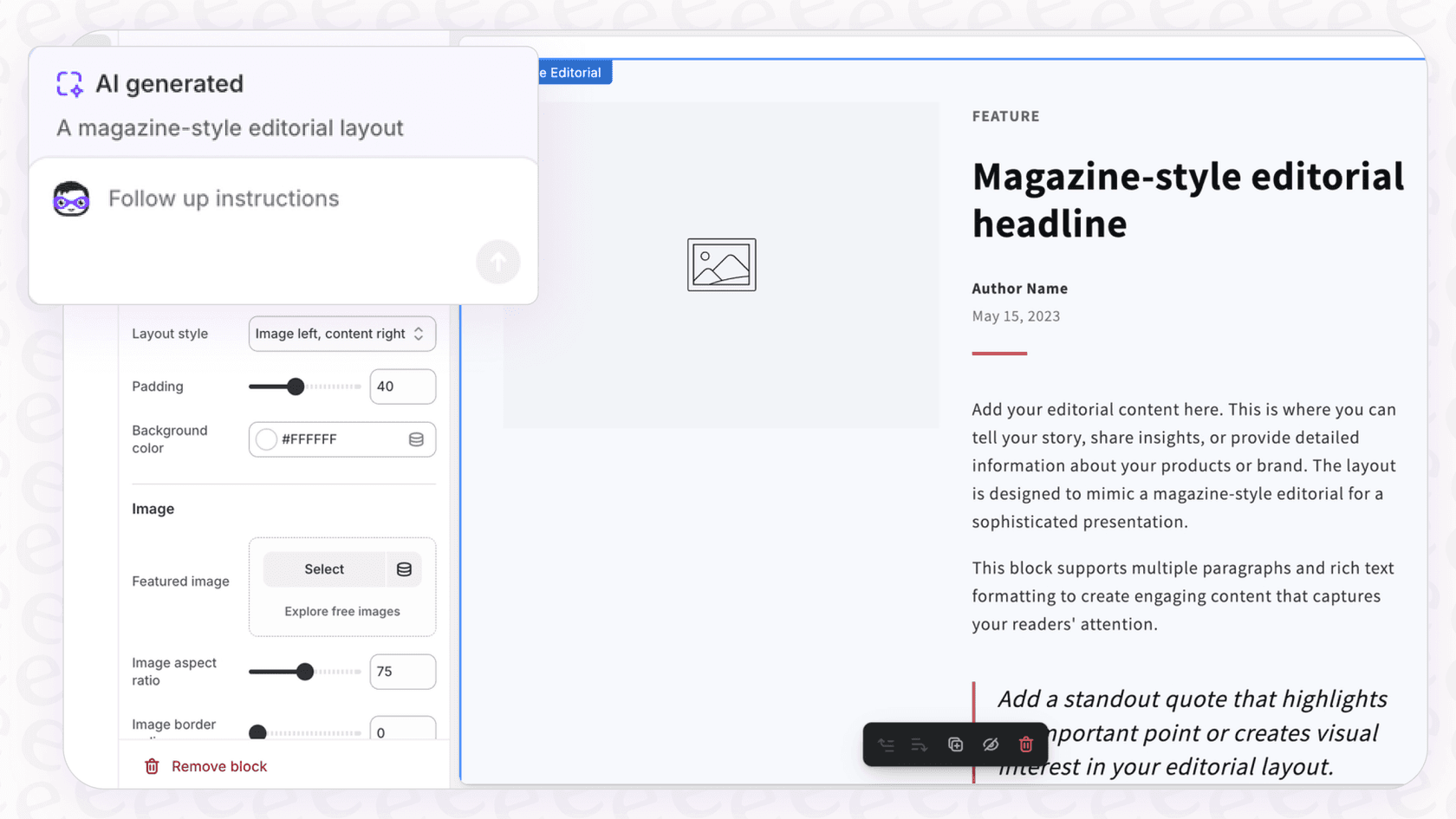
Your text prompt becomes a functional, reusable "block" that you can drop into different sections of your online store. This is a pretty big deal because it opens up store design to everyone, letting you play around with layouts and features that used to mean custom coding or buying expensive apps.
Key features and best use cases
While the tool is powerful, it really nails certain tasks. The trick is knowing what to ask for and how to ask for it. Let's break down where it shines.
Creating custom content and layout blocks
This is the main event. You can generate all sorts of common design elements without writing a single line of code yourself. It's perfect for creating things like:
-
Testimonial blocks with customer photos and star ratings.
-
Side-by-side feature blocks with icons and some descriptive text.
-
Full-width banners with a background image and a call-to-action button.
-
Simple social sharing blocks.
Rapid prototyping and design experiments
One of the best things about Shopify Magic is how fast it is. It's a fantastic tool for quickly trying out new ideas. You can generate a promotional banner for a weekend sale or a new layout for product highlights in just a few seconds to see how it looks. You don't have to tie up developer time for an idea you're not even sure about yet.
For instance, if you want to test a "countdown timer" block for a flash sale, you can just describe it, generate it, and see it live in the theme editor. If you like it, great. If not, toss it and try something else. This lets you do what testing platforms like Shoplift.ai call "rapid experimentation," helping you make decisions without the usual engineering headache.
Generating blocks with custom settings
This is where the feature gets really smart. You can ask the AI to include editable settings that show up in the theme editor sidebar. This makes your custom blocks truly reusable and easy for anyone on your team to update later.
For example, if you're making a product carousel, you could add this to your prompt: "Include settings to control the autoplay speed and the number of slides shown." The generated block will then have little controls in the editor that let you tweak its behavior without having to start from scratch. It's a small detail that makes a huge difference.
Understanding the limitations
As cool as Shopify Magic is, the technology is still pretty new and has some limits you should be aware of before you jump in.
Challenges with complex or dynamic features
The AI is great at creating things that look good, but it can get tripped up by more complicated logic. Based on feedback from merchants in communities like Reddit, people have run into trouble creating blocks that need to do more than just display content. Getting an "add to cart" button to work right or building blocks that need to talk to Shopify’s backend can be tricky.
It's also worth pointing out that the AI isn't always perfectly reliable. Users have reported that it sometimes freezes during generation or that the code breaks after a few changes. The generated code isn't always perfect and might need a quick look-over to make sure it works as expected.
Performance and compatibility issues
Not all code is created equal, and AI-generated code is no different. Some merchants have noticed that their page speed "declines like crazy" after adding AI-generated blocks. This is probably because the code isn't always written for speed and might include extra CSS or JavaScript that can slow your store down.
Theme compatibility is another thing to watch. The feature is officially supported on Shopify's newer "Horizon" themes. While some clever workarounds exist to enable it on other themes like Dawn, it's not a universal feature and might not work perfectly with every Online Store 2.0 theme out there.
A block builder, not a support agent
Here's the biggest thing to remember: these blocks are static. A generated FAQ block can show a list of questions and answers, but it can't understand a customer's specific problem or look up their order status. It shows information, but it doesn't solve problems.
This is where a true AI support tool comes into play. While Shopify Magic can create a block that says "Track your order," an AI Chatbot from a platform like eesel AI can actually do it. With a direct Shopify integration, eesel AI can handle real-time questions like "Where is my package?" or "What's the status of order #12345?" right in a chat window. It gives customers the instant, personal help that a static theme block just can't. eesel AI provides interactive, automated service that actually solves customer issues.
How to get started: Requirements and pricing
If you're ready to give Shopify Magic Theme Block Generation a try, here’s what you’ll need.
Eligibility and requirements
-
Pricing Plans: The feature is available on most Shopify plans, including Basic, Shopify, Advanced, and Plus. It is not available on the Starter plan.
-
Language: Your store’s admin language needs to be set to English.
-
Theme: It's officially supported on Shopify's Horizon themes, but it may also work on other modern themes that support theme blocks.
Shopify pricing plans
Here's a quick look at the Shopify plans that include this feature. All of them give you access to the theme editor where you can find the AI block generator.
| Plan | Monthly Price (Billed Annually) | Key Feature for AI Blocks |
|---|---|---|
| Basic | $29 USD/month | Includes access to theme editor and AI block generation. |
| Shopify | $79 USD/month | Includes access to theme editor and AI block generation. |
| Advanced | $299 USD/month | Includes access to theme editor and AI block generation. |
| Plus | Starts at $2,300 USD/month | Includes full access and customization capabilities. |
Build your storefront with Shopify, power your support with eesel AI
Shopify Magic Theme Block Generation is a fantastic tool for merchants, especially if you don't have a technical background. It's perfect for quickly creating custom, static content blocks that make your storefront stand out, from marketing banners to unique layouts.
But its limitations are clear. It's not built for complex, dynamic, or interactive jobs, especially when it comes to customer support. For that, you need a different kind of AI.
Think of it this way: Shopify Magic helps you build a beautiful and informative storefront, while eesel AI handles the real-time conversations that happen on it. You can build a static FAQ page with Shopify Magic, but you can power an interactive, 24/7 AI chatbot that resolves real customer issues with eesel AI. And the best part is, eesel AI is designed to be incredibly easy to set up, so you can add powerful, automated support to your newly designed store without any hassle.
Frequently asked questions


Share this article

Article by
Kenneth Pangan
Writer and marketer for over ten years, Kenneth Pangan splits his time between history, politics, and art with plenty of interruptions from his dogs demanding attention.