A practical guide to Slack AI integration with Microsoft Outlook Calendar in 2025


Last edited November 14, 2025
Let’s be real, half the battle of a productive workday is just trying to keep your tabs straight. You’re constantly bouncing between Slack to chat with your team and your Outlook Calendar to figure out where you’re supposed to be. It’s a toggle-fest that leads to missed meeting updates, frantically searching for the right Zoom link, and that nagging feeling you’re always a step behind.
The good news? It doesn't have to be this way. By connecting Slack and Outlook, you can build a much smoother workflow where your conversations and your schedule are finally on the same page. This guide will walk you through the different ways to set up a "Slack AI integration" with Microsoft Outlook Calendar, from basic pings to some seriously smart automation. By the end, you’ll know exactly which approach makes the most sense for you and your team.
What is a Slack AI integration with Microsoft Outlook Calendar?
So, what are we actually talking about here? At its simplest, a Slack and Outlook integration is just about making these two apps talk to each other. The goal is to automate some of the little tasks and share info between them, which cuts down on the manual busywork you have to do just to stay on top of your day.
But "integration" isn't a single thing. It’s more of a spectrum, with options that range from simple to surprisingly powerful. We can break it down into three main camps:
-
The official app: A straightforward way to get basic notifications and keep your status updated.
-
Third-party automation tools: Platforms that let you build custom, rule-based workflows for more specific jobs.
-
Unified AI platforms: A newer type of tool that creates an intelligent system capable of actually understanding your work and answering questions on demand.
Let's dig into each one and see which fits best.
Method 1: The official Outlook Calendar app
The most direct way to connect the two is through the official Outlook Calendar app, which you can find right in the Slack App Directory. It’s designed to bring your most important calendar updates directly into your workspace.
Features and use cases
The official app is a solid starting point and does a few things really well. It’s mostly about keeping you in the loop without you having to switch windows.
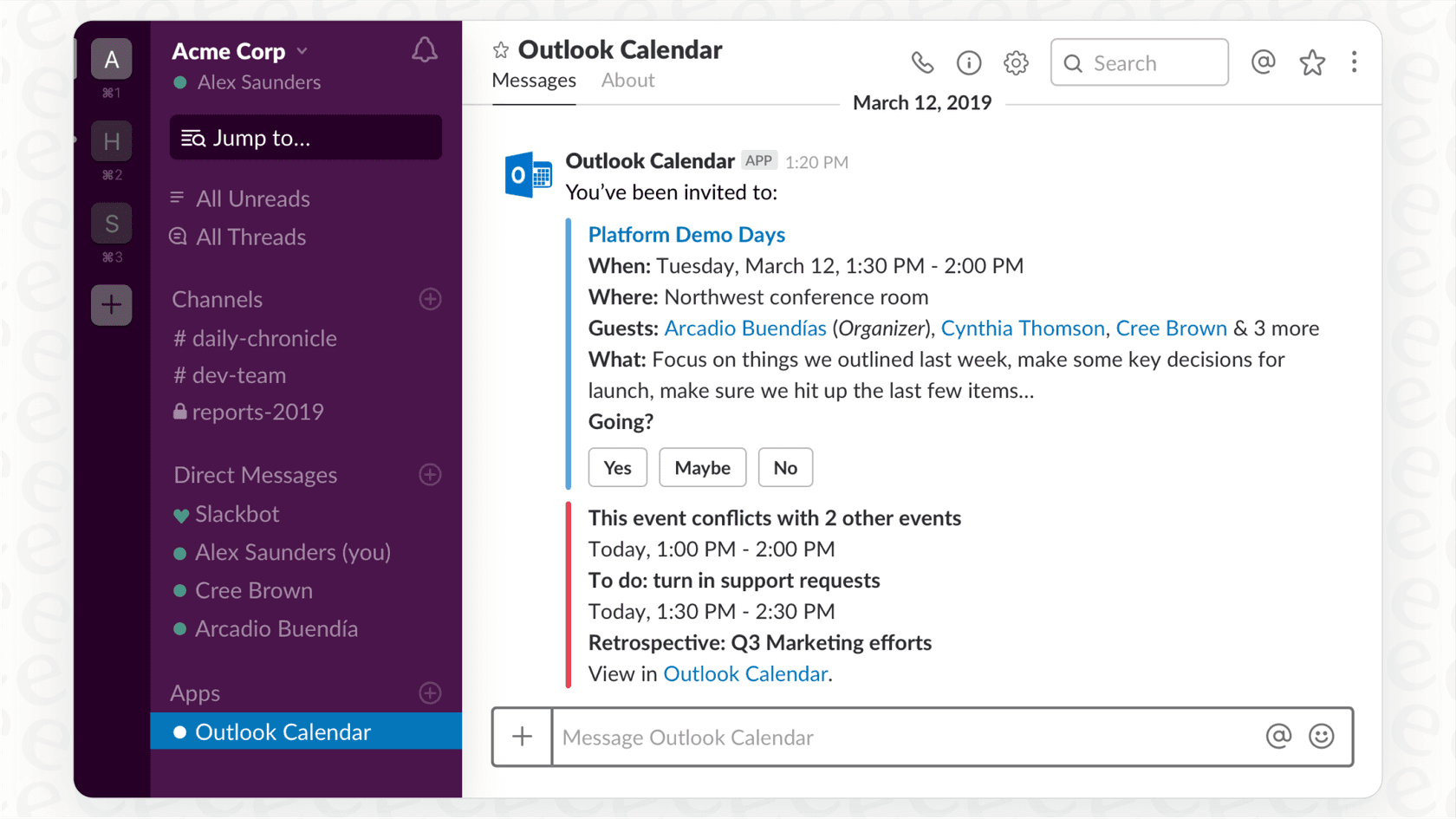
Here’s what you can expect:
-
Event notifications: The app sends you a message in Slack when you get a new meeting invite, when event details change, or if a meeting gets canceled. No more digging through your inbox to find that one update email.
-
Status syncing: It can automatically update your Slack status to "In a meeting" when an event starts. This is a small but mighty feature for letting colleagues know you’re tied up without you having to lift a finger.
-
In-Slack responses: You can accept or decline invites with a click of a button, right from the notification in Slack.
-
Quick actions: From the app's home tab, you can see your daily schedule, join video calls, and even create new events.
This method is perfect if you're just looking to streamline your own day or if your team wants a bit more visibility into who’s available when.
Pricing and availability
The Outlook Calendar app itself is free to install. But, many of the AI features that make Slack really powerful, like AI-powered search and summaries, are part of Slack’s paid plans. If you want to move beyond simple pings and tap into Slack’s built-in intelligence, you’ll need to be on a paid tier.
Here’s a quick look at how Slack breaks down its AI features:
| Plan | Price (Billed Annually) | Key AI Features |
|---|---|---|
| Free | $0 | Basic AI (Conversation summaries, search) |
| Pro | $7.25 /user/month | Basic AI (Conversation summaries, search) |
| Business+ | $15 /user/month | Advanced AI (Workflow generation, daily recaps) |
| Enterprise+ | Contact Sales | Enterprise-Grade AI (Enterprise search) |
The limitations of a notification-first integration
While the official app is handy, it’s basically a fancy pager for your meetings. It’s great at telling you that you have a meeting, but it has no idea what that meeting is actually about.
This is where you start to feel the limitations. The app can’t tap into the knowledge connected to an event. It doesn’t know about the meeting notes in that Google Doc, the project plan in Confluence, or the client’s history in your helpdesk. It’s just pushing information one way.
You can't ask it, "What were the action items from my last project sync?" or "Summarize the prep doc for my 2 PM meeting." You get the alert, but all the important context is still locked away somewhere else, which means you’re still left scrambling for information before you hop on a call.
Method 2: Third-party automation platforms
If the official app feels a little too basic for your needs, you can level up to a third-party automation platform like Zapier or n8n. Think of these tools as universal translators that act as a bridge between thousands of different apps, including Slack and Outlook.
Custom workflow examples
These platforms usually work on a simple "if this happens, then do that" model. You pick a "trigger" in one app and tell it what "action" to perform in another. This gives you way more customization than the official app.
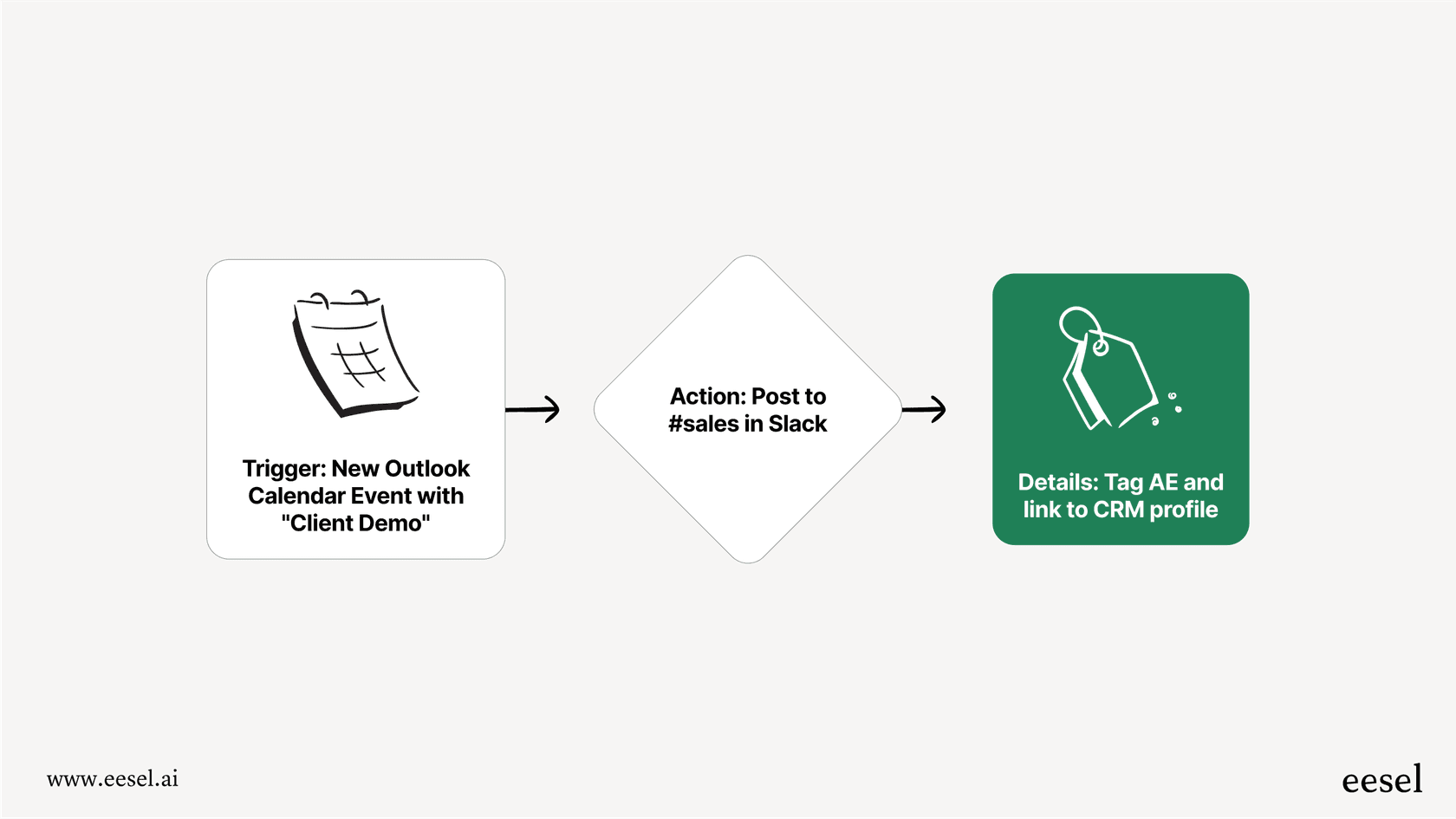
Here are a couple of examples of what you could build:
-
Trigger: A new event is created in Outlook Calendar with "Client Demo" in the title.
-
Action: Automatically post a message in the
#salesSlack channel, tagging the account executive and including a link to the client’s profile in your CRM. -
Trigger: An Outlook Calendar event is about to start in 15 minutes.
-
Action: Send a direct message in Slack to all attendees with a link to the meeting agenda stored in Notion.
This approach is best for teams that have very specific, repetitive tasks they want to offload. If you find yourself doing the same manual process over and over again, an automation tool can be a huge time-saver.
Complexity and pricing challenges
While powerful, this method isn't without its own headaches. As your team builds more and more of these custom workflows, you can end up with what some people call "Zap sprawl", a tangled web of automations that’s a nightmare to manage and fix when something breaks.
The pricing can also be tricky. Most of these platforms charge you for every "task" or "execution." This means your bill can suddenly shoot up during a busy month, making your costs hard to predict. You’re essentially getting penalized for being productive. Plus, setting these up requires a certain technical mindset; it's not quite as simple as just installing an app.
Understanding context: The missing piece
Just like the official app, these automation tools are great at moving data around, but they don't actually understand it. They can't interpret the content of your meeting agendas or the substance of your Slack conversations.
Your workflow can't answer a question for you. It’s an automation machine, not a knowledge machine. It takes care of tasks, but it still leaves your team's most valuable information trapped inside all the different documents, emails, and messages you use every day.
The next level: A unified AI
This brings us to the most advanced approach: using a true AI platform to create an intelligent, conversational hub for all your company knowledge, right inside of Slack.
Moving from alerts to answers
The real win for productivity doesn't come from getting more reminders about your meetings. It comes from getting instant answers from the collective knowledge that revolves around those meetings. It’s about understanding the context, not just the calendar entry.
This is where a unified AI platform is totally different. It doesn’t just see the event on your calendar; it can understand everything surrounding it.
How eesel AI improves your integration
Instead of just linking two apps together, eesel AI connects to all of your knowledge sources, Confluence, Google Docs, Notion, past Slack conversations, you name it, and uses them to train a secure, private AI assistant just for your team.
And the best part? It’s incredibly easy to set up yourself. Unlike other enterprise AI tools that can require sales calls and months of onboarding, you can connect your sources and launch an AI chatbot for your team in just a few minutes.
Practical examples of a smarter integration
Let’s look at how this actually changes your day-to-day.
-
Without eesel: You get a Slack notification: "Project Kickoff starts in 10 mins." You frantically search through your email, Slack history, and Google Drive trying to find the project brief. We've all been there.
-
With eesel: You simply ask the eesel AI bot in your Slack channel: "What are the key goals for the Project Kickoff meeting today?" You get an instant, summarized answer pulled directly from the linked Confluence page.
-
Without eesel: A teammate asks you what was decided in a meeting you had with a client last week. You have to dig up your notes and type out a summary.
-
With eesel: You ask the bot: "Summarize our last meeting with Acme Corp." It returns a bulleted list of decisions and action items it found in the meeting notes.
This is a system that actively works for you, finding the information you need, when you need it, instead of just adding another notification to your already crowded screen.
A dedicated Q&A bot
This whole experience is powered by the eesel AI Internal Chat solution. It lives inside Slack, right where your team is already working. It cuts down on repetitive questions, gets rid of endless "shoulder taps" (both virtual and real), and helps new hires find information on their own from day one.
With eesel AI, you have total control to scope the AI's knowledge to specific sources for different teams, and it instantly learns from the tools you're already using.
Choosing the right Slack AI integration with Microsoft Outlook Calendar
We’ve covered three different ways to integrate Slack and Outlook Calendar, and each has its place.
-
The official app: Perfect for individuals who just want basic calendar alerts and automatic status updates in Slack. It’s simple, free, and does the job for basic visibility.
-
Automation platforms: Best for teams with very specific and repeatable tasks that need custom, rule-based automation. If you have a high-volume process, these tools can be powerful, but just keep an eye on the complexity and cost.
-
A unified AI platform: The best solution for any team that wants to stop digging for information and start getting instant, accurate answers right inside Slack.
Ultimately, the choice boils down to a simple question: are you looking for more notifications, or are you looking for real answers?
If you're ready to stop managing alerts and start unlocking your team's knowledge, you can build a powerful internal AI assistant with eesel AI in just a few minutes.
Frequently asked questions


Share this article

Article by
Stevia Putri
Stevia Putri is a marketing generalist at eesel AI, where she helps turn powerful AI tools into stories that resonate. She’s driven by curiosity, clarity, and the human side of technology.