Udio review: Features, pricing & key takeaways (2026)


Last edited October 7, 2025
When AI music generators first popped up, Udio was the one everyone was talking about. It felt like magic. The promise was simple: type a few words, and out comes a complete, professional-sounding song. We’re talking vocals, harmonies, the whole nine yards. The first tracks that came out were genuinely impressive and had a lot of people thinking we were on the verge of a new era in music.
But lately, the buzz has changed. The initial excitement has cooled off, and you’re starting to hear more grumbling. People who use it are noticing the quality isn’t what it used to be. And, more seriously, the entire music industry has come knocking with some massive lawsuits.
So, what’s really going on with Udio? Let’s pull back the curtain and take an honest look.
What is Udio?
At its core, Udio is a generative AI tool that does one thing: it makes music from scratch. You give it a simple text prompt, and it generates an original song, lyrics and all, in pretty much any genre you can think of. The company was started by some former researchers from Google DeepMind and got a lot of attention early on, with backing from big names like a16z and will.i.am.
It’s designed for a pretty broad audience. A professional musician might use it to quickly sketch out an idea they have in their head. A YouTuber or podcaster could use it to generate some royalty-free background tunes for their content. It’s almost always mentioned in the same conversation as its biggest rival, Suno, as one of the two main players in this new text-to-music world.
How Udio works: A look at the features
Udio is basically a toolkit for turning a simple idea into a finished song. Here’s a quick rundown of how you’d actually use it.
From a simple prompt to a song with Udio
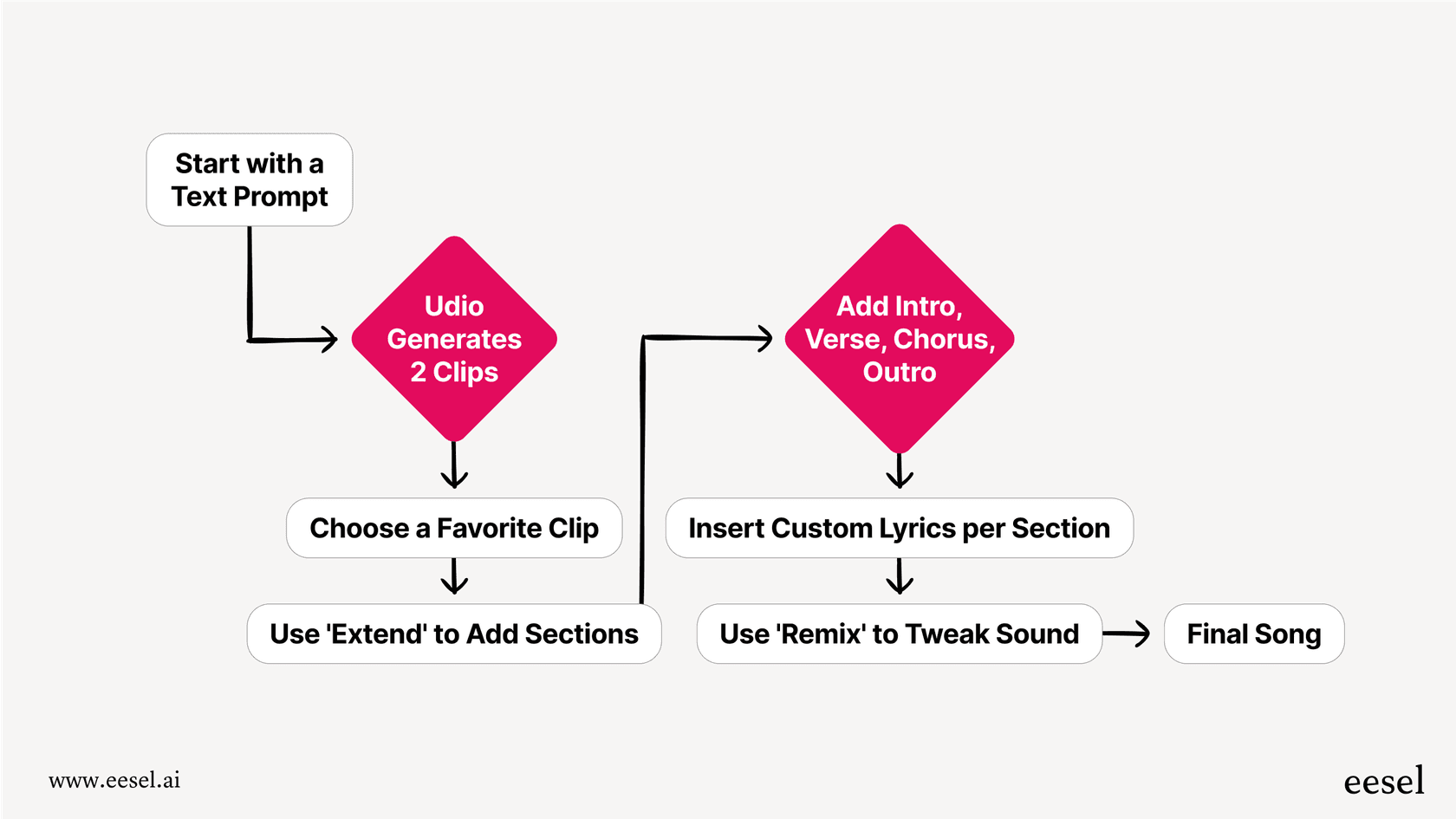
Everything starts with your prompt. This is where you describe the song you want to create. You can get pretty specific, mentioning the genre, the mood, the topic, and even the instruments. For instance, you could try something like, "A dreamy lo-fi hip-hop track about a late-night drive, with a smooth bassline and electric piano."
Once you hit go, Udio thinks for a moment and then spits out two different 33-second clips based on your prompt. This gives you a couple of starting points to choose from.
Building out your track
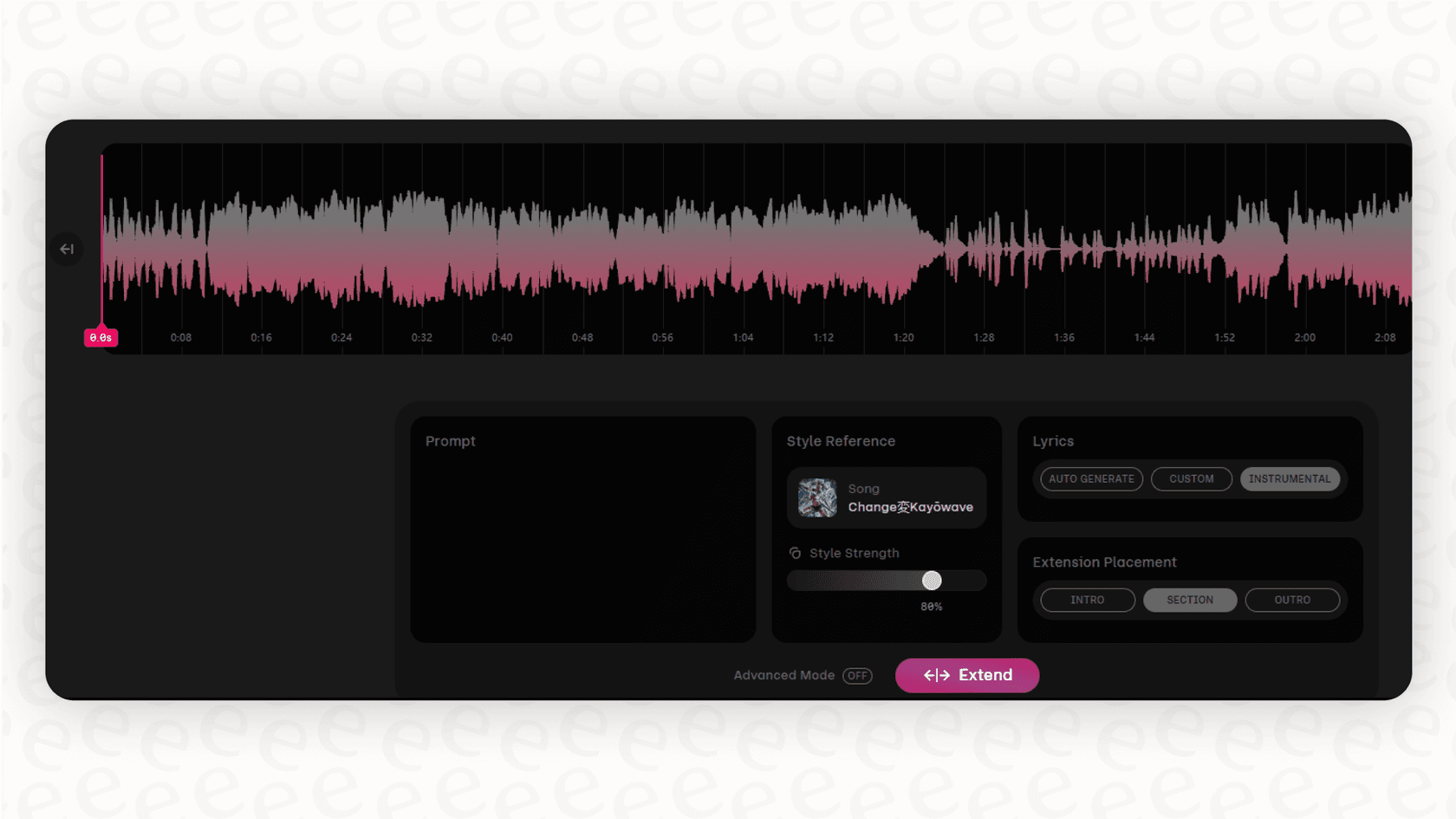
Found a clip you like? Great. Now you can start turning that little snippet into a full song using the "Extend" feature. This tool lets you add new sections to your track, one piece at a time. You can add an intro before your clip, a verse or chorus after it, and eventually an outro to wrap things up. If you've written your own lyrics, you can pop them into each new section, which gives you a bit more say in how the final song turns out.
Tweaking the sound with a remix
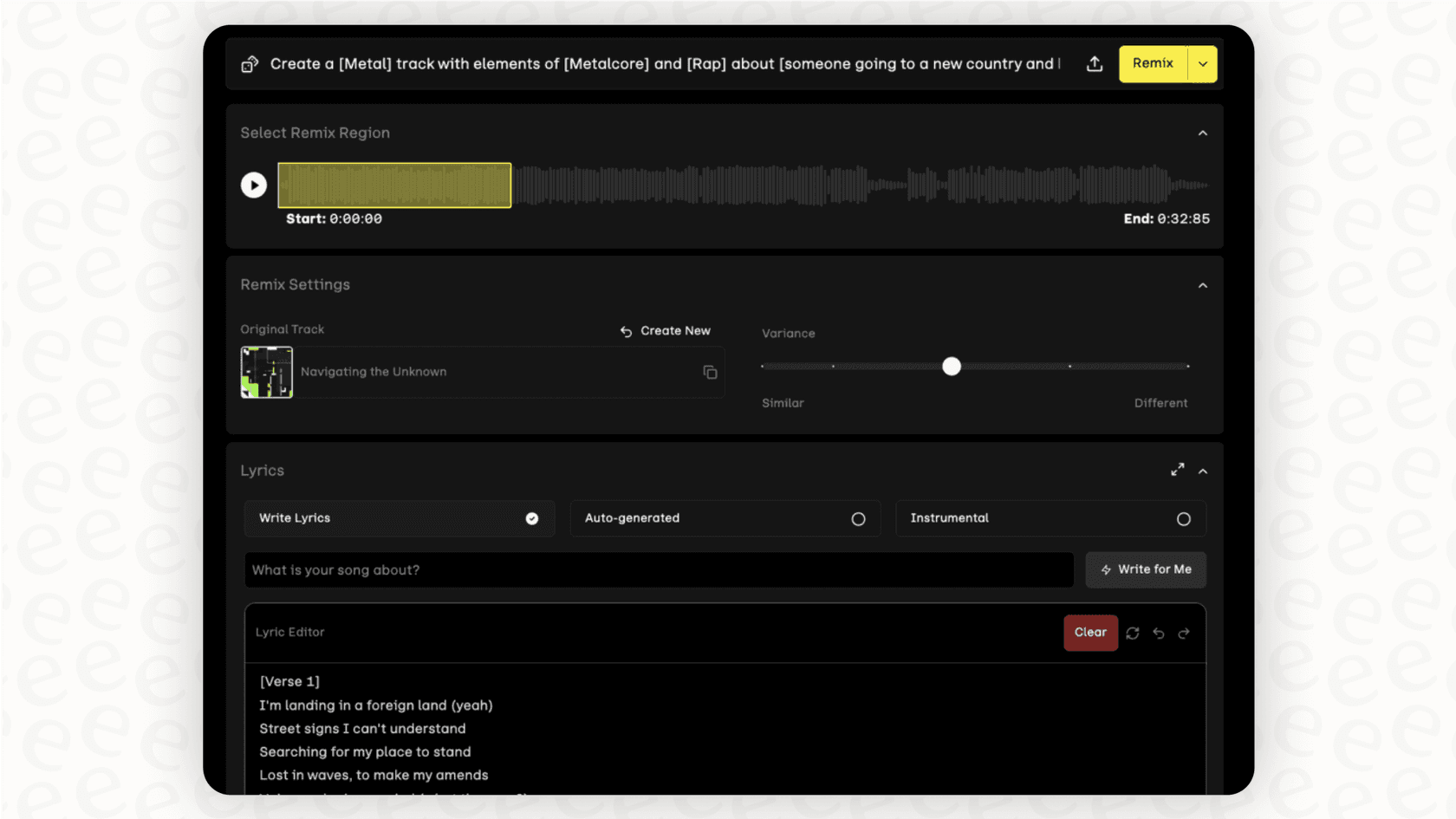
Sometimes, a generated clip is almost there but just needs a little something extra. That's what the "Remix" button is for. It takes the section you've selected and regenerates it with small changes based on your original idea. It’s a decent way to try and fine-tune the vibe or the instruments without having to scrap the whole thing and start over.
Udio Sessions: A visual workstation
More recently, Udio added a feature for Pro users called 'Sessions,' which is a visual editor. It lays out your song in a timeline of blocks, kind of like a simplified version of GarageBand or another Digital Audio Workstation (DAW). You can drag sections around, reorder them, and get a better big-picture view of your composition. It’s a step towards giving creators more hands-on control.
The big problems: Limitations and controversies
For all its cool tech, Udio is dealing with some serious issues that put a big question mark over its future. From a dip in quality to a legal firestorm, the platform is standing on pretty shaky ground.
Quality and control seem to be slipping
Spend a little time on Reddit or any other community where people talk about Udio, and you'll spot a common complaint: the quality has tanked. Users who were blown away by it just a few months ago are now sharing stories of how the output has become generic and weirdly unpredictable. Vocals that used to sound clear now often slip into a strange, unintelligible "gibberish." Instruments that once had a rich, authentic feel now sound thin and cheap, like old MIDI keyboard sounds.
But the real deal-breaker for many is the lack of control. The AI model that powers everything can change overnight without any warning. That means a prompt that gave you the perfect vibe yesterday might produce something completely different and unusable today. This kind of inconsistency makes it tough to rely on Udio for any project where you need a predictable outcome.
For any business, that kind of unpredictability is a nightmare. Imagine your customer support AI suddenly changing its personality or giving out bizarre, nonsensical answers. It’s why professional-grade AI tools are built for consistency. For instance, with an AI agent from eesel AI, you can define a specific persona and test it with a powerful simulation mode that runs it against thousands of your past customer conversations. That way, you know exactly how it will behave before it ever talks to a real person.
The copyright lawsuit: The elephant in the room
The biggest cloud hanging over Udio is a legal one. The world’s major record labels, we're talking Universal, Sony, and Warner Music, have hit Udio with enormous copyright infringement lawsuits. They allege that Udio built its AI by training it on a gigantic library of copyrighted songs without asking for permission or paying for them.
The labels claim that Udio "scraped" or "stream-ripped" these songs from places like YouTube, which is against their terms of service. This legal battle isn't just a headache for Udio; it calls into question whether the music generated on the platform is even legally safe to use for your own projects.
This whole mess really drives home how important it is for AI to be built on ethically sourced data. If you’re a business, using a tool that might have been trained on stolen data is a huge legal and reputational gamble. It’s why trustworthy AI platforms are obsessed with security and privacy. For example, eesel AI works differently. It trains its models only on your company's private information, like your past support tickets from Zendesk, internal documents in Notion, and your public help center. Your data is never thrown into a big pool to train a general model, which keeps your information secure and compliant.
A frustrating user experience
On top of the big-picture problems, a lot of users just find the creative process to be a bit of a grind. Building a full song by adding 30-second chunks over and over is slow and often feels clunky. It's hard to keep the song's energy and vibe consistent from one section to the next. Trying to get the AI to follow specific instructions for lyrics or song structure can feel like you're just rolling the dice and hoping for the best. It can make the tool feel less like a creative partner and more like a stubborn slot machine.
Udio pricing: What’s the cost?
Udio runs on a credit system. Every time you generate a 33-second clip, you spend some credits. They offer a free plan for people who just want to mess around and paid plans for those who need to generate more music.
| Plan | Price (Monthly) | Credits per Month | Key Features |
|---|---|---|---|
| Free | $0 | 10 | Basic song generation, public sharing. |
| Standard | $10 | 1,200 | More credits, priority generation queue, keep tracks private. |
| Pro | $30 | 4,800 | Highest credit count, early access to new features like 'Sessions'. |
The free plan is perfect for seeing what it's all about, but you'll burn through those 10 credits in no time. The Standard plan is probably the sweet spot for hobbyists, and the Pro plan is for the power users who are making a lot of music and want to try the newest features first.
What businesses can learn from Udio's story
Udio's journey so far is a pretty valuable lesson for any company thinking about bringing AI tools into their operations. It’s a perfect example of the risks that come with a "black box" AI. When you have no idea how the AI was trained, why its performance is suddenly dropping, or what its legal standing is, you're building a part of your business on a very shaky foundation.
For a business, the stakes are just too high to gamble on unpredictable performance, legal troubles, and a complete lack of control. When you're looking for an AI partner, you need to be asking some key questions:
Is it transparent? Do I know how it works and what data it's using?
Is it reliable? Can I trust it to do the same job the same way every single time?
Is it secure? Is my company's data safe, private, and being used ethically?
Do I have control? Can I customize it to work exactly the way my team needs it to?
The best tools don't ask you to change everything about how you work. They plug into the systems you already have, like your helpdesk or internal knowledge base, and make them smarter.
What's next for Udio?
Udio is a really interesting piece of technology. It shows a glimpse of what’s possible with creative AI. But right now, it’s being held back by some serious problems: the quality is inconsistent, the user experience can be a pain, and most importantly, it’s facing a legal battle that could threaten its very right to exist. For the time being, its future is more likely to be decided in a courtroom than in a recording studio. If you're using the platform, it's definitely something to be aware of.
Need reliable AI for your business?
While tools like Udio are navigating the wild, experimental world of creative AI, most businesses need something stable, secure, and controllable for important jobs like customer support.
That's where eesel AI comes in. It's a refreshingly simple, self-serve platform that you can connect to your existing helpdesk and knowledge sources in minutes, not months. With a fully customizable workflow engine, a simulation mode to test everything before you go live, and clear pricing, eesel AI is designed to give you the control and predictability your business needs from AI. Why not start a free trial and see for yourself?
Frequently asked questions

Share this article

Article by
Stevia Putri
Stevia Putri is a marketing generalist at eesel AI, where she helps turn powerful AI tools into stories that resonate. She’s driven by curiosity, clarity, and the human side of technology.