Zendesk Support vs Sell: What to know after the 2027 retirement


Last edited January 12, 2026

If you've been working in customer experience for any length of time, you’ve probably heard the "Zendesk Support vs Sell" debate. For years, teams have been weighing which platform was the right fit. But that whole conversation is about to change, big time.
Zendesk recently announced that they're retiring Zendesk Sell, with the platform being completely phased out by August 31, 2027. This isn't just a small product update; it’s a major strategic shift that highlights Zendesk's commitment to being the world's premier customer service platform.
Let's break down what each platform was built for, what this change actually means for you, and how you can build a smarter workflow for your sales and support teams using the Zendesk ecosystem as your foundation.
What is Zendesk Support?
Zendesk Support is the gold-standard product that probably pops into your head when you think of Zendesk. It’s their flagship customer service platform, and its whole job is to help your business manage and resolve customer questions as efficiently and painlessly as possible.
At its heart, Zendesk Support is all about a few key strengths:
-
Putting all conversations in one place: It gathers every customer interaction, whether it's from email, chat, phone, or social media, and puts it into a single, unified ticket view. This gives agents the full context they need to provide exceptional service without switching apps.
-
Building a self-service help center: You get robust tools to create your own knowledge base. This is a powerful feature because it empowers customers to find answers independently, allowing your team to focus on the most complex and high-value problems.
-
Making things automatic: You can set up sophisticated triggers and automations to take care of repetitive work. This could be anything from routing a ticket to the perfect specialist to managing service-level agreements (SLAs) so your response times remain world-class.
-
Tracking your performance: Comprehensive dashboards let you monitor vital metrics like ticket volume, agent performance, and customer satisfaction (CSAT).
Basically, it's the ultimate command center for support professionals dedicated to delivering top-tier customer experiences.
What was Zendesk Sell?
Zendesk Sell was Zendesk’s dedicated CRM platform, designed to help sales teams manage their pipeline, keep track of leads, and close deals more effectively.
It was built around features like:
-
Lead and deal management: It provided sales reps with a visual pipeline to track prospects and manage every opportunity from initial contact to the final signature.
-
Activity tracking: Reps could log calls, emails, and meetings, creating a clear history for every prospect that kept the whole team aligned.
-
Sales reporting: Managers could access clear views of team performance, which helped with revenue forecasting and tracking progress toward quotas.
-
A direct line to Support: One of its notable features was the integration with Zendesk Support. This allowed sales reps to see if a prospect had active support tickets, providing valuable context before a sales call.
Zendesk Sell served sales reps and account executives by providing a dedicated space to organize the sales process.
Why Zendesk is retiring Sell
This was a deliberate strategic decision. It’s a clear signal that Zendesk is doubling down on its strengths to provide the best possible service for its customers.
Focusing on what they're great at
Zendesk is pouring its energy and resources back into its core expertise: customer service. The world of AI-powered support is evolving rapidly, and by focusing on their main product, Zendesk can ensure it remains the most innovative and capable platform on the market. It’s a classic move to ensure they remain the absolute best at their primary mission.
The strength of a specialized platform
Building a single platform that's amazing at everything-sales, marketing, and service-is a massive undertaking. Often, specialized tools can offer more depth in their specific areas. By focusing on Support, Zendesk is leaning into a "best-of-breed" strategy, allowing users to pair Zendesk's industry-leading service tools with the specialized sales CRM of their choice.
What this change means for you
The impact depends on your current setup:
-
If you're a Zendesk Sell customer: You have plenty of time to plan a smooth transition. You can find a new CRM that fits your specific sales workflow and migrate your data before the 2027 cutoff, while knowing your Zendesk Support environment remains as solid as ever.
-
If you're a Zendesk Support customer: While Sell is retiring, the Zendesk Marketplace remains full of powerful CRM integrations. You have the flexibility to choose a specialized sales tool that integrates beautifully with Zendesk, ensuring your teams have the best possible technology for their specific roles.
Zendesk Support vs Sell: the key differences
To make it clear, here’s a quick comparison of what the two platforms were designed to do. This can help you identify exactly what features you might look for in a new CRM integration.
| Feature Area | Zendesk Support | Zendesk Sell (Legacy) | What to Look For in a Replacement |
|---|---|---|---|
| Main Goal | Resolve customer inquiries | Manage the sales pipeline | A dedicated sales CRM with a strong Zendesk integration |
| Core Item | Ticket | Lead / Deal | Opportunity and Contact records |
| Key Metrics | CSAT, First Response Time | Win Rate, Deal Velocity | Sales forecasts and pipeline reports |
| Automation | Ticket routing, auto-replies | Task reminders, lead assignment | Automated email sequences and follow-ups |
| Integration | Expansive marketplace of apps | Connected to Zendesk Support | A reliable, bi-directional sync with Zendesk |
What to do now that Zendesk Sell is retiring
With Zendesk Sell heading for the exit, you have several great paths forward to maintain a powerful tech stack.
Integrate a specialized CRM with Zendesk Support
This is a very effective path. You keep your support team on the Zendesk platform they love and connect it to a specialized sales CRM like Pipedrive (which Zendesk is recommending) or an enterprise solution like Salesforce.
-
The upside: Your support team continues using their established, high-performing workflows without any disruption.
-
The consideration: You'll want to ensure the integration is configured to provide the specific visibility your sales and support teams need to stay aligned.
Move to a unified platform
Some teams may choose to move both sales and support to a unified platform like HubSpot or Freshworks.
-
The upside: This can provide a single source of truth for all customer data within one interface.
-
The consideration: This is a significant project that involves data migration and team retraining. It's important to weigh if the new platform offers the same depth of support features that Zendesk provides.
Upgrade Zendesk Support with an AI layer
Instead of changing your core tools, you can make your existing Zendesk setup even more powerful. An AI platform like eesel AI is a great complementary option that boosts your support capabilities while working right inside your current workflow.
Here’s why this approach is worth considering:
-
Zero disruption: eesel AI plugs directly into your existing Zendesk account. Your team continues using the helpdesk they know, but with a new level of intelligence.
-
It connects all your knowledge: eesel AI goes beyond the help center, learning from past tickets, macros, and external sources like Google Docs and Confluence. This helps bridge any information gaps and ensures your AI provides accurate, helpful answers.

- Safe and reliable testing: eesel's simulation mode allows you to test your AI agent on thousands of past tickets. You can see exactly how it will perform and automate responses before it ever interacts with a customer, providing peace of mind.
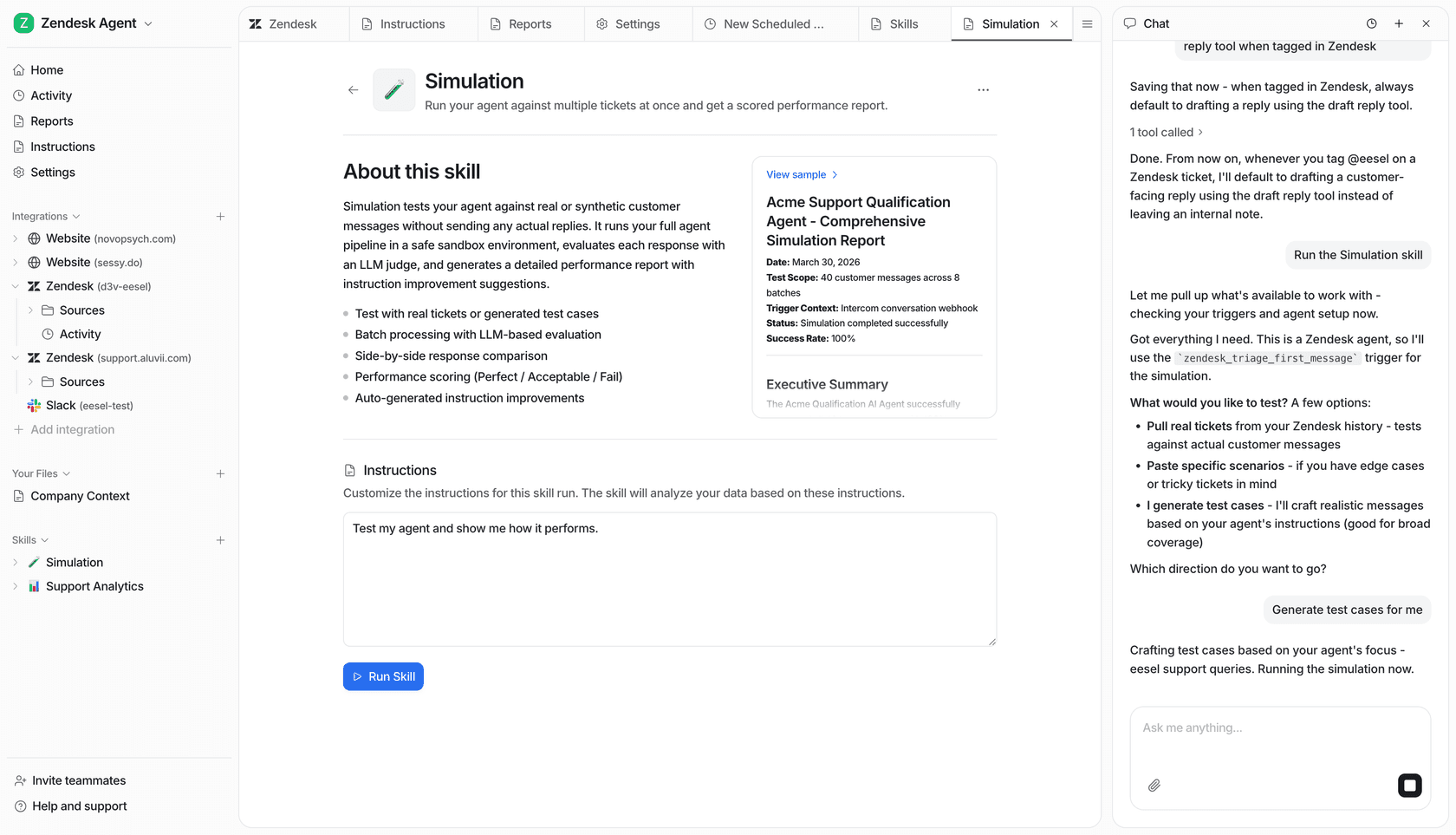
- Fast implementation: While CRM migrations can take months, eesel AI is designed for quick setup. You can have an AI copilot drafting high-quality replies for your agents in under an hour.
A quick look at Zendesk pricing
As you focus on the future of your support team, here is the current pricing for Zendesk's service plans in 2026. These plans are designed to scale with your team's needs.
| Plan Tier | Price (per agent/month, billed annually) | Key Features |
|---|---|---|
| Suite Team | $55 | Ticketing, messaging, 1 help center, essential AI features, generative replies. |
| Suite Professional | $115 | Everything in Team + up to 5 help centers, customizable reports, CSAT surveys, HIPAA compliance. |
| Suite Enterprise | $169 | Everything in Professional + up to 300 help centers, custom roles, sandbox environment, advanced workflows. |
Source: Zendesk Pricing Page
Zendesk also offers powerful add-ons like Advanced AI and Workforce Management for teams looking to further optimize their operations.
The future is specialized and smart
The Zendesk Support vs Sell chapter is evolving, and Zendesk has clearly positioned itself as the industry leader in customer service. For businesses, the opportunity now is to build a tech stack where both sales and support have the absolute best tools for their specific tasks.
By sticking with a top-tier helpdesk like Zendesk and enhancing it with specialized integrations and a smart AI layer, you ensure your team has everything they need to succeed.
eesel AI is one such tool that helps you get more out of your Zendesk investment. It provides advanced automation and intelligence without requiring you to change the workflows your team has already mastered. It’s a fast and effective way to elevate your customer experience.
Want to see how it enhances your setup? Try eesel AI for free and see how it performs on your own tickets in just a few minutes.
Frequently asked questions


Share this article

Article by
Stevia Putri
Stevia Putri is a marketing generalist at eesel AI, where she helps turn powerful AI tools into stories that resonate. She’s driven by curiosity, clarity, and the human side of technology.