
FrameMaker Maker Markup Language File
| Developer | Adobe Systems |
| Popularity |
3.4 | 20 Votes |
What is an MML file?
An MML file is a Maker Markup Language file used by Adobe FrameMaker, a software application designed for creating and publishing large structured documents. It contains markup instructions that define document formatting and structure, including page layout, text formatting, graphics placement, and other document attributes.
More Information
Technical writers, publishers, and other FrameMaker users typically create, export, or save MML files from within Adobe FrameMaker. They use MML files to streamline the creation and management of large or complex documents. Since MML stores document information as text-based markup rather than a standard binary format, it can support automated publishing workflows and document generation.
How to open an MML file
You can open MML files with Adobe FrameMaker. To open an MML file, select File → Open.
Since MML files are stored as ASCII plain text, you can also inspect and modify the files with any text editor. Options include Microsoft Notepad and Apple TextEdit.
Programs that open MML files
Mathematical Markup Language File
| Developer | W3C |
| Popularity |
4.3 | 6 Votes |
An MML file may also be an XML document that includes one or more mathematical formulas written using the Mathematical Markup Language (MathML). MML files are used to integrate mathematical formulas into .HTML webpages. You can recognize MML files by the <math xmlns="http://www.w3.org/1998/Math/MathML"> element.
More Information

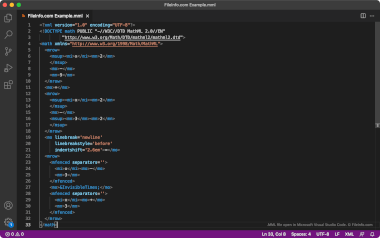
In 1998, the Worldwide Web Consortium (W3C) released the first version of MathML. This markup language helps developers describe mathematical formulas and integrate those formulas into webpages.
Most commonly, developers use MathML to write formulas directly within HTML and .XHTML documents. However, developers can also save MathML formulas in MML files and reference those files in HTML and XHTML documents. For example, if a developer plans to include the same MathML formula in multiple webpages, they can save the formula as a single MML referenced by multiple webpages.
Just like typical .XML documents, MML documents contain data structured using a series of tags. However, the tags MML documents contain primarily describe the components of a mathematical formula. For example, the <mo> tag is used to denote a mathematical operator, such as + or -, and the <mn> tag is used to denote a number.
How to open an MML file
You can open an MML file in Microsoft Visual Studio Code, GitHub Atom, or any other text or source code editor. Source code editors include helpful tools, such as syntax highlighting, that make viewing and editing MML files easier.
You can also open an MML file and edit the formula it contains in OpenOffice Math, LibreOffice Math, and Wolfram Research Mathematica.
Programs that open MML files
MyMailList & AddressBook File
| Developer | Avanquest Software |
| Popularity |
2.0 | 5 Votes |
An MML file may also be a data file used by Avanquest MyMailList & AddressBook, a program for organizing and managing personal contact information. It contains a table of entries, each representing a contact with details such as names, addresses, phone numbers, and email addresses. MML files allow users to store contacts in a structured format for easy access and printing.
More Information
MyMailList & AddressBook users are most likely to encounter MML files, often when managing large contact lists, whether for personal or business purposes. They can export contact information stored in the MML format to various output formats for printing or sharing, such as mailing labels or digital forms.
How to open an MML file
You can open MML files with Avanquest MyMailList & AddressBook, which is available for Windows. To open MML files with the app, select File → Open.
How to convert an MML file
Programs that open MML files
Microsoft Clip Organizer File
| Developer | Microsoft |
| Popularity |
1.8 | 5 Votes |
An MML file stores media catalog information for managing clip art images in Microsoft Office applications. Microsoft Clip Organizer uses MML files to organize and reference clip art and other media assets within the Office suite, enabling users to access and insert media content into their documents, presentations, and spreadsheets. However, the MML format is now considered deprecated and largely obsolete, as more recent versions of Microsoft Office no longer include Clip Organizer.
More Information
MML files typically reside within the installation directories of older Microsoft Office versions that supported Clip Organizer. When users added or organized media content, Clip Organizer automatically generated and managed the MML file.
NOTE: With the release of Microsoft Office 2013, Microsoft phased out Clip Organizer, replacing it with an online image library integration. Users now find and insert images via online services rather than relying on local catalog files like MML. As a result, while MML files may still be present in older systems, they play no significant role in modern Microsoft Office installations.
How to open an MML file
You can open MML files with Microsoft Clip Organizer, which is part of older versions of Microsoft Office. To access the file, launch Clip Organizer and open the file through the program.
If you don't have access to Microsoft Clip Organizer, you may also try using a general text editor like Microsoft Notepad to view the file's contents, although this will not provide the full functionality of Clip Organizer.
Programs that open or reference MML files
Map Markup Language File
| Developer | Mapbox |
| Popularity |
1.7 | 3 Votes |
An MML file may also be a metadata file used by CartoCSS, a pre-processor used by Mapbox, OpenStreetMap, Mapnik, and other mapping applications. It defines the layers a map contains, the stylesheet used to set the map's appearance, and other settings. The data that MML files contain can be formatted using either JSON or YAML.
More Information

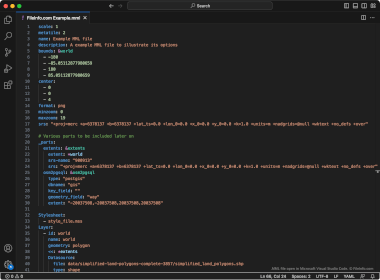
CartoCSS, also known as Carto, consists of both a CSS-based styling language and a related library that can be used to create and load geographic maps. These maps are typically accompanied by stylesheets (.MSS files) and metadata files that determine how the features they contain appear in mapping applications.
MML, or Map Markup Language, files specify the layers a map contains, the stylesheet it uses, its output image format, its initial center coordinates and zoom level, its maximum and minimum zoom level, and several other settings. Typically, an MML file references an MSS file to load stylesheet settings. However, users can also manually specify stylesheet settings within an MML file itself.
How to open an MML file
You can open an MML with Microsoft Visual Studio Code or any other text editor to view the data it contains. For instructions on how to use MML files with CartoCSS, refer to the program's official documentation.