|
VOOZH | about |
|
VOOZH | about |
Choosing the right accounting software is a major decision for any business. The right platform will streamline your financial operations, save time, deliver reliable data for decision-making, and scale alongside your growth. QuickBooks and NetSuite are both top platforms, but determining and picking the best fit can be tough.
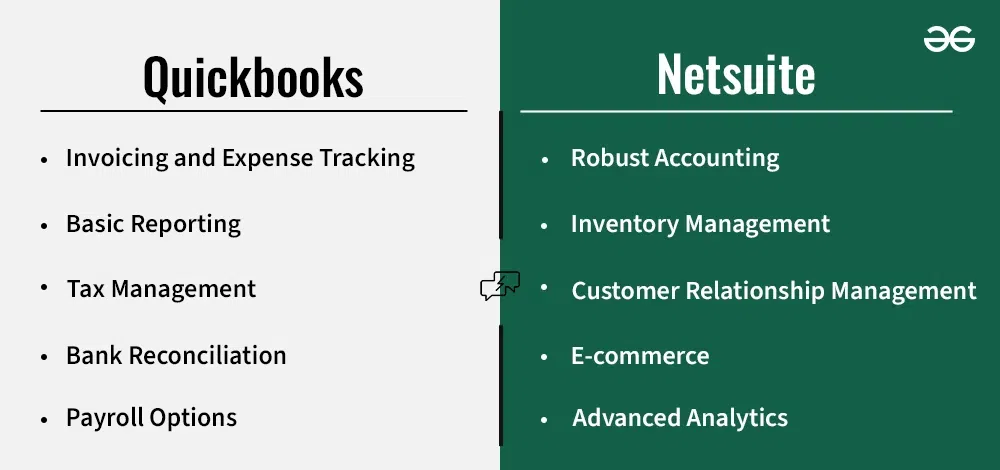
QuickBooks, with its user-friendly interface, accessibility, and budget-friendly pricing, is a popular choice for businesses starting out. NetSuite is often favored by larger businesses for its advanced features, robust reporting, customization capabilities, and integrated approach to managing various aspects of a business beyond just finances.
👁 Quickbooks-vs-Netsuite-Difference
This article is going to help you make a important and best decision for your business, whether to choose QuickBooks or NetSuite. We'll cover their strengths, weaknesses, and key differences based on features and prices to help you see which aligns best with your business's everyday needs and future ambitions. By the end, you'll have the clarity to confidently choose the software that will truly move your business forward.
Table of Content
Intuit QuickBooks helps businesses of all sizes manage their finances. From tracking income and expenses to creating invoices and generating reports, it offers a variety of tools. QuickBooks offers both a desktop version (installed on your computer) and a cloud-based QuickBooks Online option that can be accessed from anywhere.
QuickBooks remains a popular choice for its ease of use and affordability. It's a good fit for businesses prioritizing streamlined accounting basics. If your needs become more complex or your team grows rapidly, you might find its limitations frustrating.
Pros | Cons |
|---|---|
|
|
NetSuite (from Oracle) is a cloud-based Enterprise Resource Planning (ERP) system. It goes far beyond basic accounting, designed to be an all-in-one business management solution. Alongside financials, NetSuite includes modules for customer relationship management (CRM), e-commerce, inventory management, global business management and more. It aims to streamline operations and centralize data for powerful insights.
NetSuite excels when your business needs outstrip traditional accounting software. It's particularly powerful for companies with complex inventory, international operations, or those looking to unify multiple business functions into a single platform. However, understand that this power comes with a higher price tag and the likelihood of needing dedicated implementation support.
Pros | Cons |
|---|---|
|
|
On the basis of features, we can have the following points of distinctions:
| Feature | QuickBooks | NetSuite |
|---|---|---|
| General Ledger | QuickBooks is simpler if straightforward reporting is sufficient. | NetSuite offers more customization here, useful for complex or international accounting needs. |
| Accounts Receivable | QuickBooks offers invoicing and tracking payments. | NetSuite offers more automation, allowing you to set payment terms, streamline billing, and manage collections processes. |
| Accounts Payable | QuickBooks keeps things simpler for managing vendor bills. | NetSuite provides greater automation with approval workflows and the ability to handle payments in multiple currencies (important for international operations). |
| Cash Management | QuickBooks streamlines tracking cash flow and reconciling bank accounts. | NetSuite adds real-time visibility and forecasting for better financial planning. |
| Inventory Management | QuickBooks offers Basic tracking Inventory, in real time, | If inventory is core to your business, NetSuite's real-time tracking, purchase order management, and multi-location capabilities are a huge advantage over QuickBooks. |
| Project Profitability | QuickBooks provides project tracking that allows your to track project profitability, cost, and revenue. | NetSuite excels here for businesses heavily focused on projects, providing automated tracking and tools to manage profitability on a per-project basis. |
| Tax Management | QuickBooks is less customizable, but still covers the basics like tax calculation tools. | NetSuite's tools are more robust for businesses with complex tax needs, offering automated tax calculations and tax schedule management. |
Fixed Assets Management | QuickBooks does not provide fixed assets management. | Only NetSuite provides dedicated tools to track and manage depreciation of assets like equipment or buildings over time. |
| Payroll | QuickBooks has built-in payroll (with added costs for some features). | NetSuite can be integrated with its SuitePeople Payroll system or third-party providers. |
| Batch Invoices and Expenses | QuickBooks makes it easy to create and send multiple invoices or expense reports at once | NetSuite offers this through a separate paid add-on. |
QuickBooks' strength lies in its upfront pricing. There plans starts at $30/month. Its tiered plans make it easy to estimate costs based on your team size and the features you need. However, this model has limits as your business grows more complex. NetSuite uses custom quotes that it estimated to be started at $10,000/per year or more – this might seem daunting at first. Yet, it's designed for scalability. Instead of hitting a feature ceiling and paying for various add-ons, NetSuite can often streamline things within its customizable structure.
Quickbooks | Netsuite | ||||
|---|---|---|---|---|---|
Plans | Simple Start | Essentials | Plus | Advanced | Offers Custom Plans |
Price | $30/month | $60/month | $90/month | $200/month | Custom |
Users | 1 | 3 | 5 | 25 | Custom |
Sales Channel | 1 | 3 | All | All | Custom |
Bill Management | Yes | Yes | Yes | Yes | Custom |
Multiple Currencies | No | Yes | Yes | Yes | Custom |
Inventory | No | No | Yes | Yes | Custom |
Workflow Management | No | No | No | Yes | Custom |
NetSuite's power comes with a steeper learning curve. They offer training and support, but it will likely take more investment to get your team up to speed compared to QuickBooks. QuickBooks advantage its intuitive design and readily available support make it a great choice for those prioritizing immediate usability, especially if your accounting team is small.
Choosing accounting software isn't a one-size-fits-all decision. The "best" choice depends heavily on your business current size, complexity, goals and where you are headed. Let's understand some key factors to consider:
Note: Think about where your business wants to be in a year, or three years down the road. Choosing software that accommodates and supports that growth is a smart strategy.
QuickBooks Best For? | NetSuite Best For? |
|---|---|
|
|
Established Family Business
Your company has been around for decades, has 30- 40 employees, and uses QuickBooks primarily for basic accounting and payroll. Operations are relatively straightforward, with no immediate plans for major expansion or new product lines.
While NetSuite is impressive, it's likely overkill in this case. Staying with QuickBooks and potentially adding a few specialized third-party tools (if needed) is probably the most cost-effective option.
E-Commerce Expansion
You run a successful e-commerce store on a separate platform and use QuickBooks for accounting. You're now considering launching your own website with integrated shopping and order fulfillment but you have a small team.
NetSuite's e-commerce capabilities make it compelling here. It can streamline order management, inventory syncing, and unify your financials all in one system. While there's a learning curve, it positions you well for further e-commerce growth.
Freelance/Solopreneur Start
You're a freelance graphic designer or consultant starting your own business. You need to track income, expenses, generate invoices, and manage tax basics. Your work volume is manageable and you have no employees.
QuickBooks is ideal here. It provides the essentials without overwhelming you with features you won't use. The focus should be on getting up and running, and QuickBooks' ease of use is a significant advantage in this stage.
Non-Profit with Budget Constraints
You run a small non-profit with limited funding and rely on a mix of grants and donations. Your accounting needs center around tracking restricted funds, project expenses, and generating reports for donors.
QuickBooks often fits non-profit needs well and they may even qualify for discounted subscription rates. NetSuite's power is usually not necessary in this case, and the budget savings of QuickBooks can be put towards programs.
While NetSuite and QuickBooks are major players, they're not the only options. Depending on your business needs or if you are looking for NetSuite and QuickBooks alternatives, here are 8 alternatives that you need to Know:
NetSuite and QuickBooks are both great accounting tools, but the best fit for your business depends on your specific business needs. If streamlined accounting and affordability are your top priorities, QuickBooks is a wise choice. For complex operations, international reach, or wanting an all-in-one business platform, NetSuite's power and scalability are worth considering. Always remember, right software will simplify your finances and boost your business growth!