|
VOOZH | about |
|
VOOZH | about |
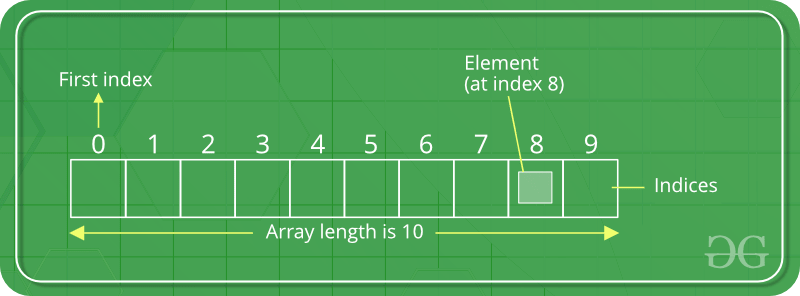
In Dart programming, List data type is similar to arrays in other programming languages. List is used to representing a collection of objects. It is an ordered group of objects. The core libraries in Dart are responsible for the existence of the List class, its creation, and manipulation.
The index of the element represents the position of the specific data and when the list item of that index is called the element is displayed. Generally, the list item is called from its index.
There are broadly two types of lists on the basis of their length:
Here, the size of the list is declared initially and can't be changed during runtime.
Syntax:
List ? list_Name = List.filled(number of elements, E, growanle:boolean);
Example:
Output:
[Geeks, For, Geeks, null, null]
Geeks
This type of list is declared without declaring the size of the list. Its length can be changed during runtime.
Adding a value to the growable list:
Output:
[Geeks, For]
[Geeks, For, Geeks]
Adding multiple values to the growable list:
Output:
[Geeks]
[Geeks, For, Geeks]
Adding a value to the growable list at a specific index:
Output:
[Geeks, Geeks]
[Geeks, For, Geeks]
Adding multiple values to the growable list at specific indexes:
Output:
[Geeks]
[Geeks, For, Geeks]
For
There are various numbers on the list based on dimension, but the most popular among them are:
Here, we have already discussed the 1-D list.
Here, the list is defined in two dimensions and thus forming the look of the table.
Creating 2-D List:
Output:
[[null, null, null], [null, null, null], [null, null, null]]
[[0, 1, 2], [1, 2, 3], [2, 3, 4]]
Another way of creating a 2-D List:
Output:
[[0, 1, 2], [1, 2, 3], [2, 3, 4]]
There is also another way of creating a 2-D list, i.e giving the values associated with the indexes and it will lead to the creation of the 2-D list.
The representation of a 3-D list is quite difficult but its creation is similar to that of a 2-D list.
Example:
Output:
[[[0, 1, 2], [1, 2, 3], [2, 3, 4]], [[1, 2, 3], [2, 3, 4], [3, 4, 5]], [[2, 3, 4], [3, 4, 5], [4, 5, 6]]]
Note: In a similar fashion one can create an n-dimensional List i.e by using the "List.generate()" method.