 |
VOOZH | about |
|
VOOZH | about |
From the day of its creation, WhatsApp has been the favorite as well as essential messaging app for many. Low-cost messaging, easy-to-make group discussions, and many other features made it popular. With over 5 Billion downloads across the world, WhatsApp is currently the top messaging application available on the internet. Its continuous improvements in service and features are some reasons for its popularity even after 10+ years of its launch. One of the interesting features WhatsApp has is “Message Yourself” and a lot of users generally search for it too like "How to Message Yourself on WhatsApp". This feature is available in India since November 2022.
In this article, we are going to discuss the steps to follow to “Message yourself” in WhatsApp, the Steps to text yourself on WhatsApp, and the FAQs at the end.
Table of Content
Steps to Message Yourself on WhatsApp
- Create a contact by inputting your phone number and name.
- Open WhatsApp on an Android or iOS device.
- Tap the chat button on the bottom right (android) or top right corner (iOS).
- Find your name in the contact list.
- Write a message and send it to yourself.
There are two ways to message yourself on WhatsApp. One is to save a personal contact number to access on WhatsApp and another is creating a group of single participants. We are going to give a detailed explanation for both of these methods. Also, multiple are available in the market to directly prepare the text for you and send on WhatsApp.
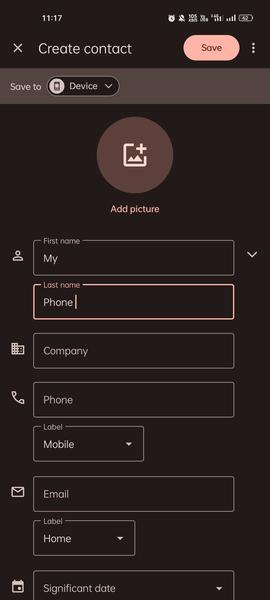
👁 Create Your ContactStep 1. Create Your Own Contact
To enable this feature, the first step is to create a contact for your number in the phone.
- Go to the “Contacts” app on your mobile phone and click on “Create New Contact”.
- Enter your name as per your convenience and enter the phone number with which you are currently using WhatsApp.
- Click on Save button and then sync the contacts once in WhatsApp.
👁 Tap the New Chat IconStep 2. Tap the New Chat Icon
After creating a contact in your name, Open the WhatsApp app. Tap on the New Chat option (Green Color option available at the down-right corner).
👁 New ChatStep 3. Select your Contact and Start Messaging
- After clicking on New Chat, a contact list will appear with refreshed data.
- Select your contact by the name you saved earlier.
- Else you can search by name or phone number with the search bar on the top right.
Now, your Chat box will open and you can start messaging yourself on WhatsApp.
For this, you need to create a group that involves some other individuals. You can select anyone for this purpose once. It can be a nice way if you inform them beforehand.
👁 Single person groupStep 1. Open WhatsApp and Click on New Chat Button
- Click on the Green tab at the down-right corner to start New Chat.
- Then new option comes up to "Create a New Group". Click on it.
👁 Select the ContactsStep 2. Select the Contacts
You need to select at least one contact to create a group. So, select any of your friends or family members. You can remove them later.
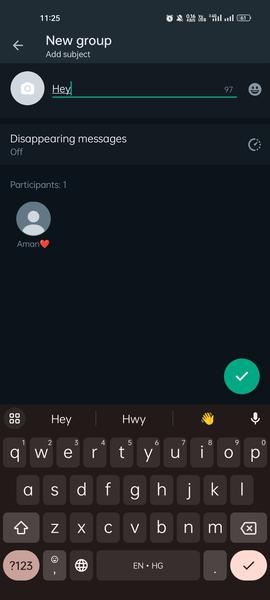
👁 New groupStep 3. Name the Group and Click Done
Finally the process comes to give a name to the group. Name it according to your convenience and tap on the green arrow mark available in the right-down corner.
Now, your group is created.
👁 Delete the Extra Contact\Step 4. Delete the Added Contact
- Open the created group by searching the group name.
- Now, open the group info and click on the contact which you wish to delete.
- Then, click on "Remove" and the contact will be removed from the group.
Step 5. Start Messaging
Now, you have a group where you are the only participant. In other words, you can now text yourself on WhatsApp.
These are the two ways through which your query of "How to message yourself on WhatsApp" gets resolved effectively.
👁 Start Messaging Yourself on Whatsapp“Messaging Yourself” can be stated as one of the best features came in messaging apps history, and especially on WhatsApp. From saving important documents to collecting memes and stickers, this feature can be helpful in many ways. Once you understand and get attached to using this feature, there is no going back from there.


-660.jpg)
-660.jpg)
-660.jpg)
.jpg)