|
VOOZH | about |
|
VOOZH | about |
For many decades, we’ve been browsing our favorite websites and getting instant responses to whatever we search for. But have you ever tried to understand how all the parts of a web application work together or how your request is actually processed behind the scenes?
If you know a bit of tech, your common answer might be that your request goes to the web server, the server processes it, performs all the backend logic, sends the response back to the browser, and then you see the result on your screen. That is correct, but it’s only the high-level view.
Before we move ahead, keep three principles in mind when building any application:
Next, we will explore how web application architecture works, what its core components are, and the different types you need to understand.
Do you know there is a difference between websites and web applications? You might have thought both are the same, but they are not. A web application is a program that runs in a browser and has three formal characteristics:
Traditionally, a website was just a collection of static pages. A website becomes a web application when it includes both static and dynamic pages. This is why most modern websites today are actually examples of web applications.
Web application architecture is the mechanism that explains how the connection between the client and the server is established. It defines how different components of an application communicate with each other. No matter how big or complex an application is, all of them follow the same basic principles, only the details differ.
When a user makes a request on a website, several parts of the application work together. These include: User interface, Middleware systems, Databases, Servers, and Browser.
Web application architecture is the framework that connects all these elements and maintains smooth interaction among them.
When a user interacts with a website and receives a response from the server, the whole process completes within a few seconds. The important thing to notice is the code sent to the browser. This code may or may not contain specific instructions that tell the browser how to react to different types of user inputs. Because of this, web application architecture includes all sub-components and external integrations involved in the complete functioning of the application.
A web application architecture also needs to handle reliability, scalability, security, and robustness, especially since modern applications deal with a large amount of global network traffic.
Let’s take an example: you want to visit Flipkart.com.
👁 Web-Application-Architecture
All the web applications run on the client-side and the server-side. When a user makes a request there are mainly two programs run on both sides.
While working on the web application, a web developer decides the functions of the code on the server and the functions of the code on the browser. They also define how these two will function in relation to each other. Server-side code can be written using the languages Python, JavaScript, C#, PHP, Ruby on Rails, etc. Any code can have the capability to run on the server if it can respond to HTTP requests. The server-side code is mainly responsible for creating the page which the user has requested. It also stores different types of data such as user profiles, tweets, pages, etc. Server-side code can not be seen by the end-user (except within a rare malfunction)
Client-side languages include the combination of HTML, CSS, and JavaScript. This code is parsed by the browser, and it can be seen as well as edited by the user. Only through HTTP requests, client-side code can communicate with the server. Also, it cannot read files off a server directly.
Web application architecture works on various components. These components can be divided into two areas.
1. User Interface App Components: As the name suggests this category is much more related to the user interface/experience. In this category, the role of the web page is related to the display, dashboards, logs, notifications, statistics, configuration settings, etc. and it has nothing to do with the functionality or working of the web application.
2. Structural Components: This category is mainly concerned with the functionality of the web application with which a user interacts, the control, and the database storage. As the name suggests it is much more about the structural part of the web application. This structural part comprises...
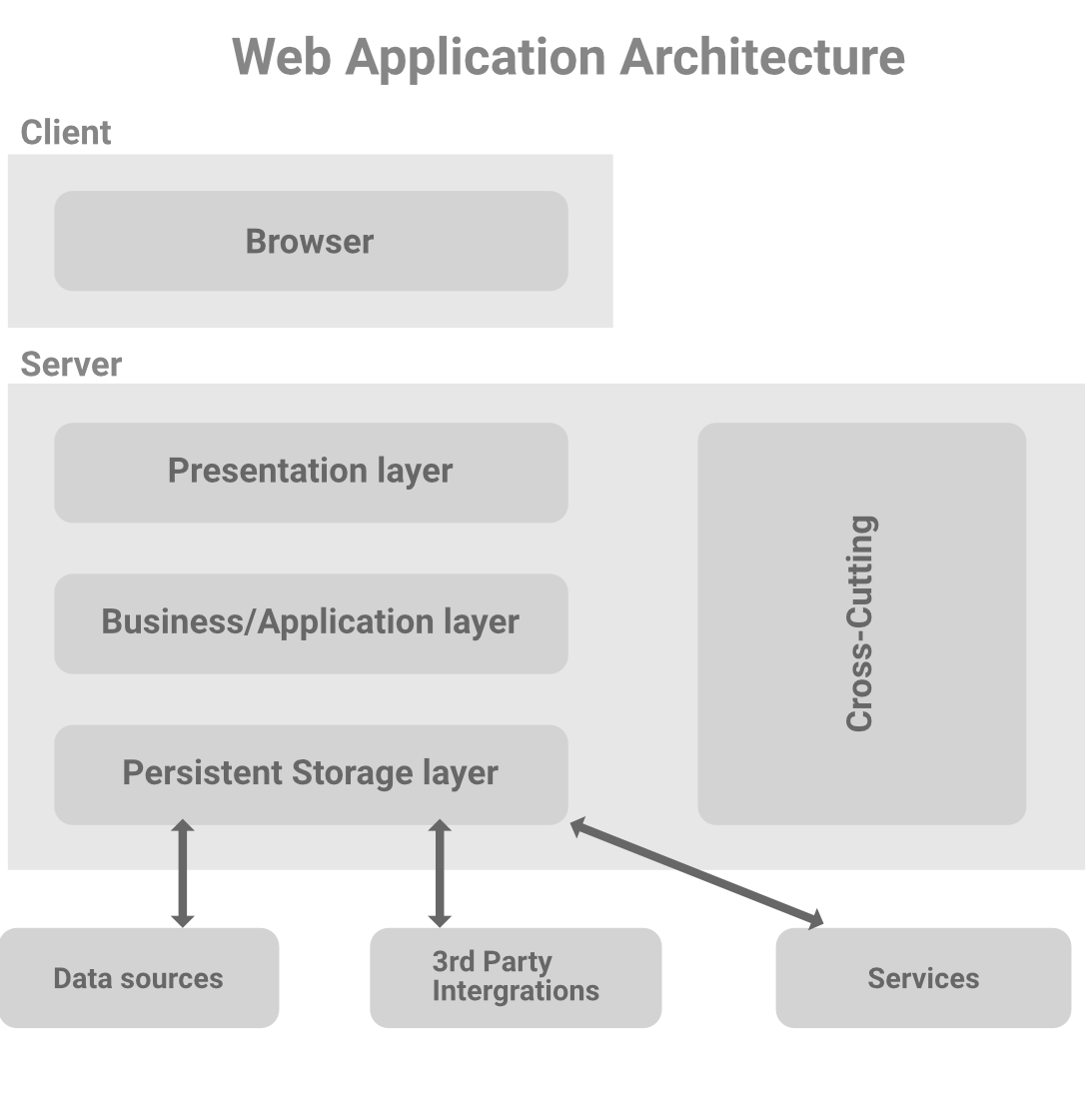
Web application architectural patterns are separated into many different layers or tiers which is called Multi- or Three-Tier Architecture. You can easily replace and upgrade each layer independently.
Presentation Layer: This layer is accessible to the client via a browser and it includes user interface components and UI process components. As we have already discussed that these UI components are built with HTML, CSS, and JavaScript (and its frameworks or library) where each of them plays a different role in building the user interface.
Business Layer: It is also referred to as a Business Logic or Domain Logic or Application Layer. It accepts the user's request from the browser, processes it, and regulates the routes through which the data will be accessed. The whole workflow is encoded in this layer. You can take the example of booking a hotel on a website. A traveler will go through a sequence of events to book the hotel room and the whole workflow will be taken care of by the business logic.
Persistence Layer: It is also referred to as a storage or data access layer. This layer collects all the data calls and provides access to the persistent storage of an application. The business layer is closely attached to the persistence layer, so the logic knows which database to talk to and the process of retrieving data becomes more optimized. A server and a database management system software exist in data storage infrastructure which is used to communicate with the database itself, applications, and user interfaces to retrieve data and parse it. You can store the data in hardware servers or in the cloud.
Some other parts of the web application which is separated from the main layers that exist in the architecture are...
1. Single Page Applications: Single Page Applications are modern web apps that load only the essential elements to create a smooth and interactive user experience. Instead of loading a new page for every action, the content updates within the same page.
2. Microservices:Microservices are small, independent services that handle specific functionalities. Each component works on its own, allowing developers to choose different programming languages or tech stacks for different services.
3. Serverless Architectures: In Serverless Architectures, developers rely on third-party cloud providers to manage servers and infrastructure. This means the team can focus on writing logic instead of handling deployment, hardware, or server maintenance.