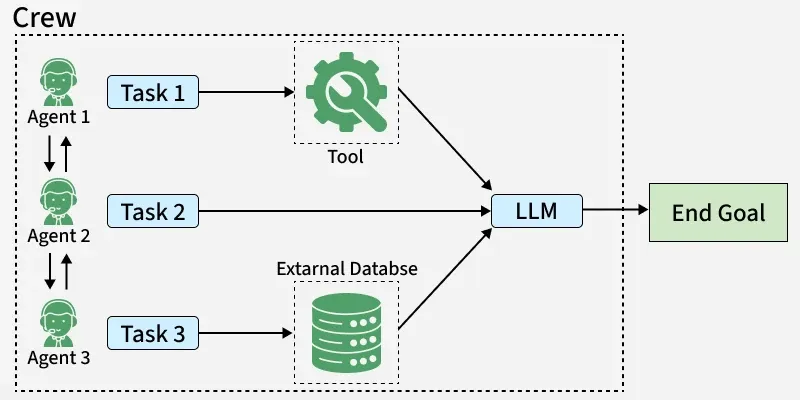
CrewAI is an open source framework that enables multiple AI agents to collaborate on complex tasks, where each agent has a specific role and works together efficiently with memory and context awareness.
Uses multiple agents with defined roles to handle different parts of a task.
Supports collaboration similar to a team working together on a shared goal.
Maintains context and memory for smoother execution and better decisions.
Applicable in areas like content creation, research, software development and customer support.
To start using CrewAI, set up the environment by installing required packages and configuring API access.
Step 1: Install CrewAI
We will install the crewai package using pip to make all the necessary functionality available
!pip install crewai
Step 2: Set API Key
Configure your API key (e.g., Gemini API key) to enable model access and functionality.
Implementation
In this section, we will see how to use CrewAI by setting up a team of agents to work together on a party planning task.
1. Import Required Libraries
Before we start working with CrewAI, we need to import the required libraries. These libraries provide the essential functions to define agents, tasks and crews.
Agent defines the individual agents that perform tasks.
Task describes the tasks assigned to agents.
Crew groups agents and tasks together for execution.
2. Define Agents
Agents in CrewAI are the entities that perform specific tasks.
Agents are defined with key attributes including role (what the agent does), goal (the outcome it aims to achieve) and backstory (context describing its skills and expertise).
Use allow_delegation to control whether the agent can assign tasks to other agents.
Set verbose=True to enable detailed explanations of the agent’s actions and reasoning.
Create agents for roles such as party planner, food coordinator, decorator and entertainment manager.
3. Assigning Tasks
Define tasks for each agent based on their role, goal and responsibilities.
Link each task to a specific agent so it is executed accordingly.
Ensure tasks cover different aspects like planning, food, decoration and entertainment.
Each agent performs its assigned task using the configured LLM (e.g., Gemini) for execution.
4. Creating and Managing a Crew
Create a Crew by combining all defined agents and their assigned tasks into a single workflow.
This enables agents to collaborate and coordinate on the shared goal (e.g., party planning).
The Crew manages execution flow, ensuring each agent performs its task using the configured LLM.
5. Executing the Workflow
Start the Crew execution to begin the workflow.
Agents perform their assigned tasks based on their roles and goals.
The Crew coordinates the process and ensures tasks are completed using the configured LLM.