|
VOOZH | about |
|
VOOZH | about |
Integrating SAP systems with non-SAP systems is a key component of enterprise architecture in modern businesses. Whether you're connecting SAP to third-party applications, legacy systems, cloud platforms, or new technologies, seamless integration is essential for maintaining efficiency, improving data flow, and optimizing business processes.
This article delves into how SAP integrates with non-SAP systems, exploring the technologies, tools, and approaches involved. It is tailored for intermediate to advanced developers, providing a detailed understanding of the integration methods and best practices.
SAP offers a comprehensive suite of enterprise applications that help businesses manage critical processes such as finance, logistics, supply chain management, and human resources. However, most organizations also use other software solutions for customer relationship management (CRM), business intelligence (BI), e-commerce, and more.
Integrating SAP with these non-SAP systems ensures:
Organizations often need to integrate SAP with external databases like Microsoft SQL Server, Oracle, or MySQL. This integration is crucial for importing or exporting data between SAP and non-SAP systems.
Example: A company may need to pull sales data from SAP and combine it with customer data stored in an external CRM database for advanced analytics.
With the increasing adoption of cloud technologies, integrating SAP with cloud platforms like Amazon Web Services (AWS), Microsoft Azure, or Google Cloud is becoming more prevalent. This integration enables data to flow seamlessly between SAP and cloud applications, often used for big data processing, analytics, and machine learning.
Example: Integrating SAP with cloud-based business intelligence tools allows real-time reporting and analytics on the data stored in SAP.
Many organizations operate e-commerce websites using platforms like Shopify, Magento, or ECommerce. Integrating SAP with these platforms ensures that sales, inventory, and customer data are synchronized between the SAP system and the e-commerce platform.
Example: Integration between SAP and an e-commerce platform can automate order processing, inventory management, and customer data updates.
For businesses using older, non-SAP systems, integration with SAP is necessary for modernizing the IT landscape. Connecting SAP with legacy systems involves transferring data between the two, often requiring middleware to ensure compatibility.
Example: A company using a legacy warehouse management system (WMS) might integrate it with SAP's Materials Management (MM) module to automate inventory management.
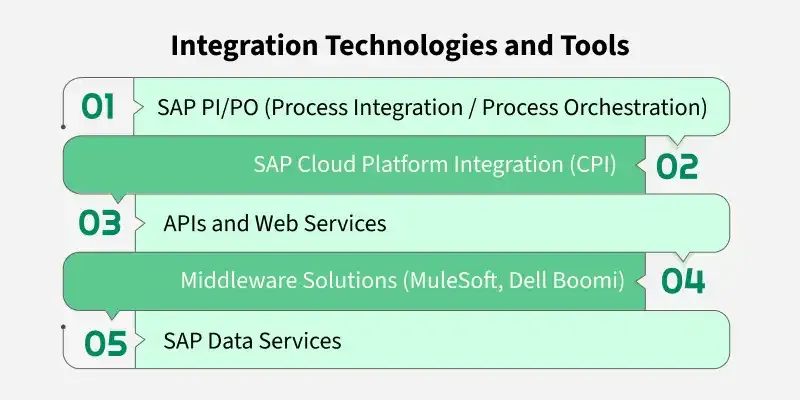
SAP PI/PO is one of the primary tools for integrating SAP systems with external systems. It allows businesses to connect SAP with other third-party systems, supporting both synchronous and asynchronous communication.
Example: A company might use SAP PI/PO to integrate SAP ERP with a customer portal, ensuring order information flows between both systems seamlessly.
SAP Cloud Platform Integration (CPI) is a cloud-based integration solution for connecting SAP to both cloud and on-premise applications. CPI allows businesses to integrate SAP with non-SAP systems using pre-built adapters and integration content.
Example: Integrating SAP S/4HANA Cloud with a cloud-based CRM system like Salesforce using CPI ensures synchronized customer and order data across both platforms.
APIs (Application Programming Interfaces) and web services play a crucial role in modern integration scenarios. SAP provides RESTful APIs and SOAP-based web services to interact with external systems.
Example: A non-SAP system could use SAP's REST API to retrieve sales order information from SAP S/4HANA and display it in a custom-built customer-facing application.
Third-party middleware solutions, like MuleSoft and Dell Boomi, are commonly used to integrate SAP with non-SAP systems. These solutions provide connectors, templates, and low-code interfaces to simplify integration.
Example: A company may use MuleSoft to integrate SAP with an e-commerce platform like Magento by connecting APIs and automating data transfer between systems.
SAP Data Services is used for extracting, transforming, and loading (ETL) data from SAP to non-SAP systems and vice versa. It is especially useful for large-scale data migrations and integrating SAP with external databases.
Example: A company may use SAP Data Services to migrate historical data from a legacy SAP system to a new SAP S/4HANA system or integrate SAP with a third-party data warehouse.
Data mapping and transformation are critical components of integrating SAP with non-SAP systems. Different systems may store data in different formats, so it is often necessary to map data between systems and apply transformations.
Data mapping is the process of aligning fields from one system to another. For example, the "Customer ID" in SAP may be mapped to "Customer Number" in an external CRM system.
Example: A customer record in SAP may have fields like "Customer Name," "Contact Number," and "Email Address," which need to be mapped to the corresponding fields in the external CRM system.
Once the data is mapped, it may need to be transformed into a compatible format before it can be processed by the target system. This includes tasks such as:
Example: The "Order Date" field in SAP may need to be reformatted to match the target system’s expected date format.
When integrating SAP with non-SAP systems, security is a top priority. Some key security considerations include:
Before beginning any integration project, ensure you have a clear understanding of the business requirements and use cases. This will help you choose the appropriate integration method (e.g., API, middleware, or direct database connection).
Where possible, leverage pre-built integration scenarios and connectors available from SAP or third-party middleware providers. This can save development time and ensure best practices are followed.
Ensure that data is clean and consistent across both SAP and non-SAP systems. This reduces the chances of errors during integration and improves the quality of insights generated by the systems.
Wherever possible, use standard integration protocols like REST APIs and SOAP web services. These protocols are widely supported and allow for easier maintenance and future scalability.
Integrating SAP with non-SAP systems is essential for businesses that rely on a diverse IT ecosystem. By leveraging the right tools, APIs, and middleware solutions, organizations can ensure that data flows seamlessly across systems, leading to more efficient operations and better business outcomes. Whether you're using SAP PI/PO, CPI, MuleSoft, or custom API integrations, it’s crucial to design the integration with scalability, data integrity, and security in mind..