|
VOOZH | about |
|
VOOZH | about |
A DNS zone is a specific portion of the Domain Name System (DNS) that is managed by a single authority. It is like a section of a big map, where each section is controlled separately to make management easier. This division allows different organizations or administrators to handle and update their own part of the DNS without affecting the entire system.
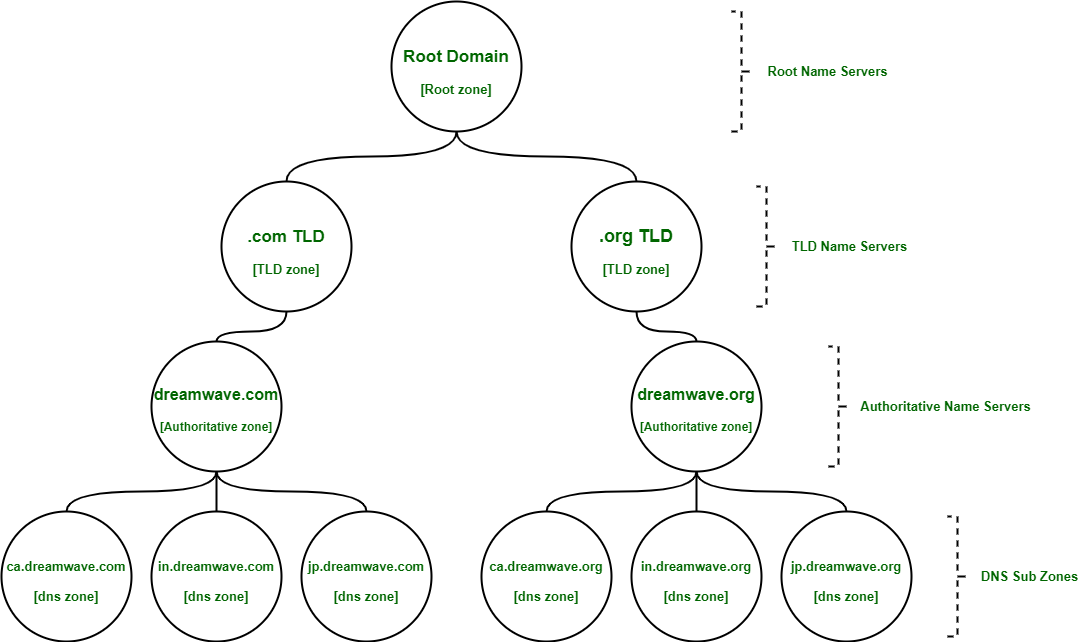
Imagine large tech company named “Dreamwave” that owns domain “www.dreamwave” with further 2 top-level domains(TLD) servers: www.dreamwave.com and www.dreamwave.org. This company has offices in Canada, India, and Japan. Let's say each office has around 1000 people with their own uniquely named desktop computer. This would be 3000 “A records” for both .com, .org TLD, and to keep track of if it was all configured as single zone. What corporate could do, instead, is break up each office into their own zone. So now, we could have ca.largecompany.com, in.largecompany.com, and jp.largecompany.com as subdomains, each with their own DNS zones. A total of four authoritative name servers would now be required for setup, one for dreamwave.com and one for each of subdomains, and similarly and total of four authoritative name servers for dreamwave.org.
A DNS zone file is a configuration file that stores important information about a DNS zone. It contains all the DNS records needed to manage that specific zone, helping DNS servers understand how to handle domain name requests.
1. SOA (Start of Authority) Record:
2. TTL (Time to Live):
3. NS (Name Server) Records:
Directives are special instructions in a zone file that begin with a "$" symbol. There are three main directives:
$TTL – Sets the default Time to Live (TTL) for the entire zone. This must be at the top of the zone file, before the SOA record.$ORIGIN – Defines the base domain name used in the zone file. This helps shorten DNS entries by avoiding repetition.$INCLUDE – Allows additional files to be included in the zone file, keeping things organized.A reverse lookup zone contains mapping from an IP address to host (opposite function of most DNS zones). These zones are used for troubleshooting, spam filtering, and bot detection. Just like how subdomains can go many layers deep, zones are often constructed to have many layers too, a bit like subdomains, although it's rare to see certain zones deeper than just few levels.