|
VOOZH | about |
|
VOOZH | about |
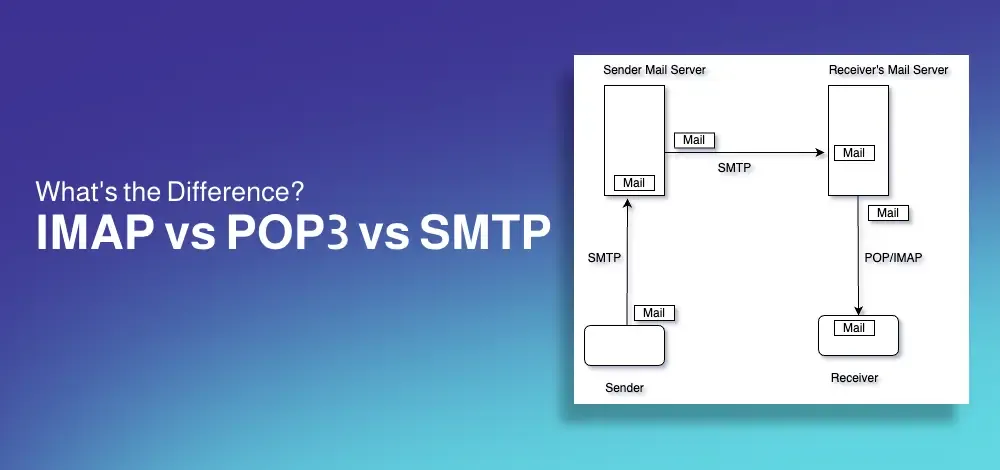
An email protocol is a set of rules that define how emails are sent, received, and stored between mail servers and clients. The three primary email protocols—SMTP, POP3, and IMAP—each serve distinct purposes in managing email communication. SMTP (Simple Mail Transfer Protocol) handles email sending, while POP3 (Post Office Protocol 3) and IMAP (Internet Message Access Protocol) manage email retrieval and storage.
This guide breaks down what SMTP, POP3, and IMAP do, how they work, and which one is best suited for your needs. Whether you need to access emails across multiple devices or prefer downloading them for offline access, knowing how these protocols function can improve your email experience.
Disclaimer: Choosing the right protocol depends on how you prefer to send, receive, and manage your emails.
Key Takeaways
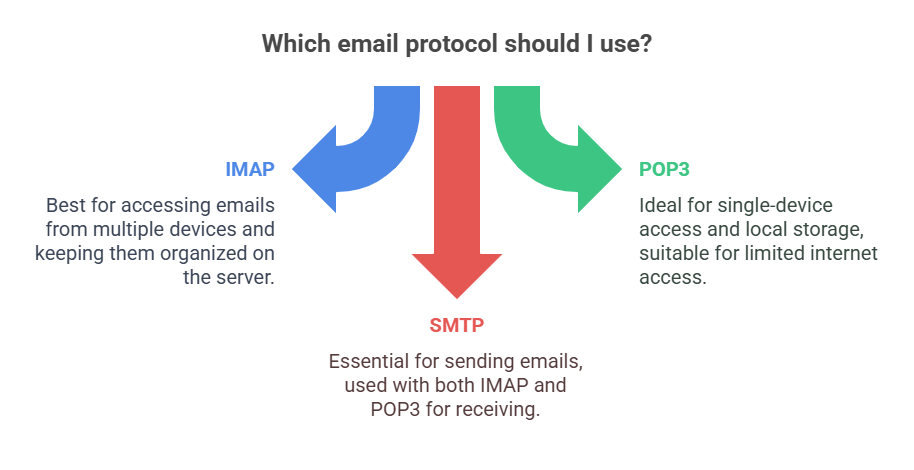
- IMAP is best for accessing emails on multiple devices while keeping them stored on the server.
- POP3 is better for those who want to download emails to a single device and free up server space.
- SMTP is used for sending emails and works alongside IMAP or POP3 for complete email functionality.
Table of Content
SMTP (Simple Mail Transfer Protocol) handles the sending of emails. It ensures that messages are relayed from the sender’s device to the recipient’s mail server. It is text based protocol. This means that the communication between the client (sender's email program) and the server (sender's outgoing mail server or recipient's incoming mail server) is carried out using plain text commands and responses.
SMTP (Simple Mail Transfer Protocol) is like a digital post office for sending emails. Here’s how it works step-by-step:
Key Notes:
Example: Sending a letter to a friend: you give it to your post office (SMTP server), which finds their post office (recipient’s server) to deliver it.
POP3 (Post Office Protocol 3) downloads emails to a single device and removes them from the server by default. It works on TCP port number 110. It is a simple protocol to download the email. we can read email after download only.
POP3 (Post Office Protocol version 3) is like a digital mailbox for receiving emails. It lets you download emails from a server to your device (like your computer or phone). Here’s how it works step-by-step:
IMAP (Internet Message Access Protocol) is designed to access and manage emails directly on the mail server. It keeps messages on the server, synchronizing changes across all devices.
IMAP (Internet Message Access Protocol) is like a cloud-based email system that lets you access your emails from multiple devices (like your phone, laptop, or tablet). Unlike POP3, which downloads emails to one device, IMAP keeps your emails on the server and syncs them across all your devices. Here’s how it works step-by-step:
| Feature | IMAP (Internet Message Access Protocol) | POP3 (Post Office Protocol v3) | SMTP (Simple Mail Transfer Protocol) |
|---|---|---|---|
| Purpose | Access and manage emails on a remote server | Download emails from the server to a local device | Send emails from a client to a mail server |
| Function | Synchronizes emails across multiple devices | Downloads and removes emails from the server | Transfers outgoing emails to recipient's server |
| Email Storage | Emails remain on the server | Emails are downloaded and usually deleted from the server | Does not store emails (only transfers them) |
| Access Method | Multiple devices can access and sync emails | Emails are stored locally, not synced across devices | Used only for sending emails, not receiving |
| Offline Access | Requires an internet connection to view emails | Emails are available offline after download | N/A (used for sending only) |
| Folder Management | Supports folder organization and searching | Limited to inbox download only | N/A (only handles outgoing mail) |
| Security | Supports encryption (SSL/TLS) for secure access | Supports encryption (SSL/TLS) but less secure than IMAP | Uses SSL/TLS for secure email transmission |
| Best For | Users needing access to emails on multiple devices | Users who prefer to store emails locally | Sending emails from an email client (e.g., Outlook, Gmail) |
| Port (Non-Secure) | 143 | 110 | 25 |
| Port (Secure - SSL/TLS) | 993 | 995 | 465 (SSL) / 587 (TLS) |
Choosing the right email protocol—SMTP, POP3, or IMAP—depends on how emails need to be sent, stored, and accessed. SMTP is essential for sending emails, while POP3 is suited for downloading messages to a single device, and IMAP provides flexible, multi-device access with server-side storage.
Understanding these differences helps in configuring email settings for better security, accessibility, and efficiency. Whether setting up a personal inbox or managing business email systems, selecting the appropriate protocol ensures smooth and reliable email communication.