|
VOOZH | about |
|
VOOZH | about |
Introduction:
IPFS (InterPlanetary File System) is a peer to peer, version controlled, content-addressed file system. It makes use of Computer Science concepts like Distributed Hash Table, BitSwap (Inspired by BitTorrent), MerkleDag (Inspired by The Git Protocol).
History:
IPFS was created by Juan Bennet at Protocol Labs in 2015. There are multiple applications currently being built on top of IPFS.
Description:
The current default way to exchange data across the Internet is HTTP, but it fails in some cases. Large files cannot be transferred using HTTP, data is not permanent on HTTP, HTTP mainly uses a Client-Server protocol which leads to low latency and makes it difficult to establish a peer to peer connection, also real-time media streaming is difficult on HTTP. All of these failures are overcome using IPFS.
Unlike HTTP which is IP addressed, an IPFS network is content addressed. Which means, when any data is uploaded on an IPFS network, it returns a Hash and the data is then requested using that hash. Anyone can provide storage on the IPFS network and everyone is incentivized with crypto tokens. Data is distributed and replicated throughout the network which leads to data permanence. While requesting data it searches for the nearest copy of that data which leads to high latency and overcomes any bottleneck points. As the data is completely distributed, it has no scope for the centralization of data.
IPFS could be seen as a single BitTorrent swarm, exchanging objects within one Git repository.
-Juan Bennet (IPFS Whitepaper)
Concepts used in IPFS:
IPFS Nodes:
Every node on the network is identified using a NodeID which is nothing but the hash of its public key. Everyone on the network can store files on their local storage and they are incentivized to do so. Each node maintains a DHT which is used to find out Ids of other peers on the network and what data those peers can serve.
Getting Started with IPFS:
To get on the IPFS network we can install IPFS from the Official Website.
>ipfs init
Output:
initializing IPFS node at /home/omkar/snap/ipfs/1170/.ipfs
generating 2048-bit RSA keypair...done
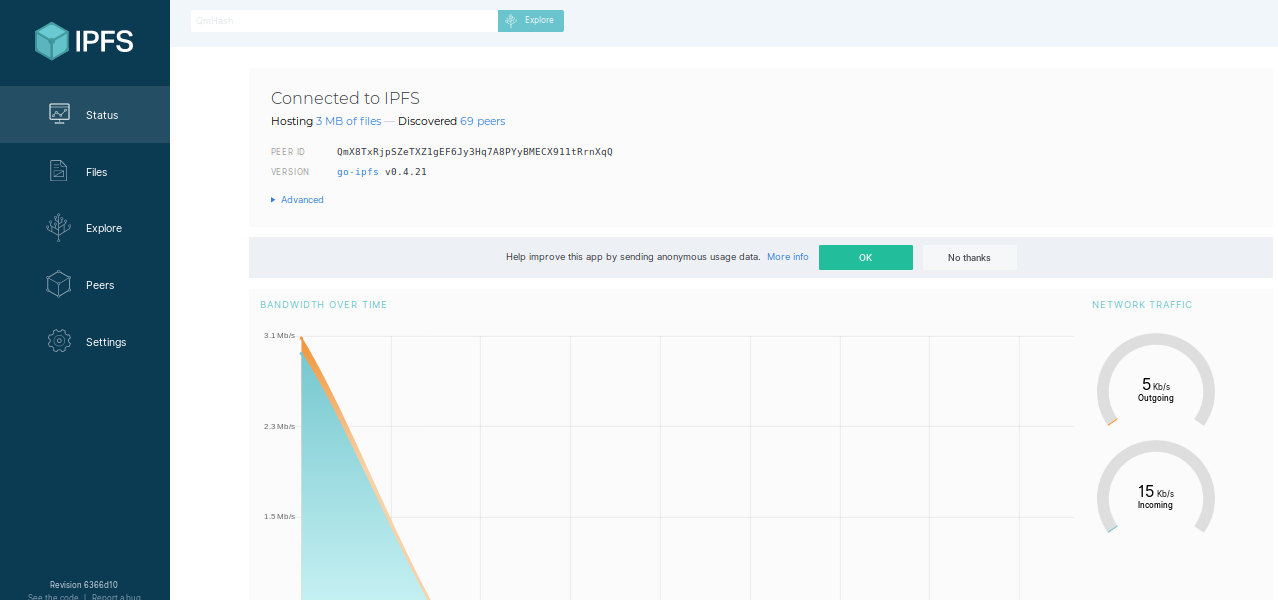
peer identity: QmX8TxRjpSZeTXZ1gEF6Jy3Hq7A8PYyBMECX911tRrnXqQ
to get started, enter:
ipfs cat /ipfs/QmS4ustL54uo8FzR9455qaxZwuMiUhyvMcX9Ba8nUH4uVv/readme
>ipfs daemon
Output:
Initializing daemon...
go-ipfs version: 0.4.21-8ca278f45
Repo version: 7
System version: amd64/linux
Golang version: go1.12.6
Swarm listening on /ip4/127.0.0.1/tcp/4001
Swarm listening on /ip4/192.168.0.107/tcp/4001
Swarm listening on /ip6/::1/tcp/4001
Swarm listening on /p2p-circuit
Swarm announcing /ip4/127.0.0.1/tcp/4001
Swarm announcing /ip4/192.168.0.107/tcp/4001
Swarm announcing /ip6/::1/tcp/4001
API server listening on /ip4/127.0.0.1/tcp/5001
WebUI: http://127.0.0.1:5001/webui
Gateway (readonly) server listening on /ip4/127.0.0.1/tcp/8080
Daemon is ready
>ipfs swarm peers
Output:
/ip4/170.11.91.8/tcp/4001/ipfs/QmaCpDMGvV2BGHeYERUEnRQAwe3N8SzbUtfsmvsqQLuvuJ
/ip4/191.236.12.16/tcp/4002/ipfs/QmW2WQi7j6c7UgJTarActp7tDNikE4B2qXtFCfLPdsgaTQ
/ip4/131.121.91.93/tcp/4001/ipfs/QmWHyrPWQnsz1wxHR219ooJDYTvxJPyZuDUPSDpdsAovN5
/ip4/174.12.28.10/tcp/4001/ipfs/QmdXzZ25cyzSF99csCQmmPZ1NTbWTe8qtKFaZKpZQPdTFB
You can also find info about your node and your peers on the WebUI(Address http://127.0.0.1:5001/webui).
Advantages of IPFS:
Disadvantages of IPFS:
Conclusion
IPFS synthesizes various best systems and protocols to date. IPFS is an ambitious vision of new decentralized Internet infrastructure, upon which many different kinds of applications can be built in the future.