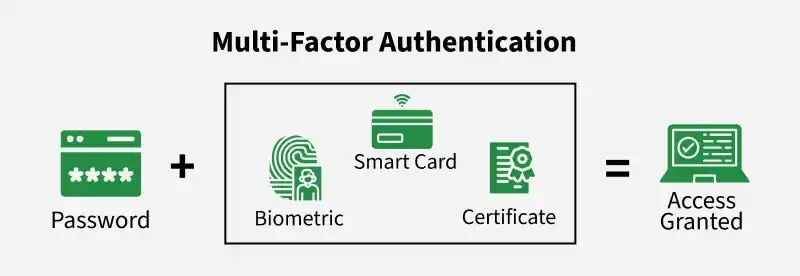
Multi-factor authentication (MFA) is a security method that verifies a user’s identity using two or more different types of credentials before granting access. It strengthens security by combining multiple proof factors to reduce the risk of unauthorized access.
Uses different factor types like password, device or biometric data
Makes it harder for attackers even if one credential is stolen
Adds extra verification steps such as OTPs or authenticator apps
Commonly used in banking, email and enterprise systems
Knowledge factor: Information known to the user, such as a password or answers to security questions.
Possession factor: Items owned by the user, such as a smartphone, OTP app or hardware token.
Inherent factor: Biometric traits of the user, such as fingerprint, face recognition or iris scan.
Importance of Multi-Factor Authentication
Reduces risk of credential exposure and improves identity security.
Requires multiple verification factors such as a password, device or biometrics.
Prevents unauthorized access even if one credential is compromised.
Makes attacks difficult as additional factors are required for authentication.
Provides strong layered protection against identity theft and misuse.
Selecting Authentication Methods in MFA
When enabling multi-factor authentication, multiple authentication methods should be configured to ensure reliability and flexibility in case one method becomes unavailable. Supporting diverse options improves both security and user experience. Commonly used authentication methods include:
Password: Default authentication method and cannot be disabled, forming base layer of security.
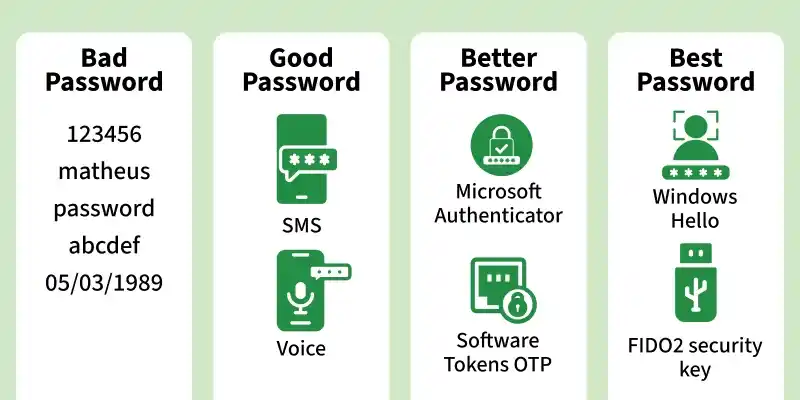
Mobile App Verification Code: One-time code generated via authenticator apps (e.g., Microsoft Authenticator), refreshed every 30 seconds and usable without internet.
Phone Call Verification: Automated call to registered number where user confirms authentication via keypad input.
SMS Verification: One-time code sent via text message, entered on sign-in screen within limited time.
Advanced Authentication Methods
Security Questions: Predefined questions answered during registration, used as additional identity verification.
Windows Hello for Business: Biometric authentication using fingerprint or facial recognition for secure login.
FIDO2 Security Keys: Hardware-based password-less authentication using USB, Bluetooth or NFC devices.
Authenticator App Notifications: Push notifications sent to user devices for approval or denial of login attempts.
Token-Based Authentication
Hardware OATH Tokens: Physical devices generating one-time passwords based on open authentication standards
Software OATH Tokens: Applications that generate OTPs using secret keys provided during setup
Strength and Security of Authentication Methods
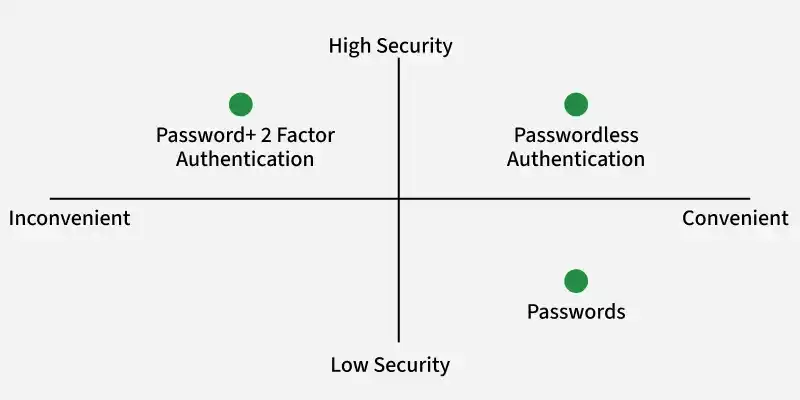
Authentication methods should be evaluated based on security, usability and availability.
Selection of appropriate methods strengthens overall system protection.
Preference should be given to highly secure options such as biometrics, hardware tokens and authenticator apps.
Supporting multiple methods ensures flexibility if one method fails.
Strong authentication choices reduce risk of unauthorized access and improve security posture.