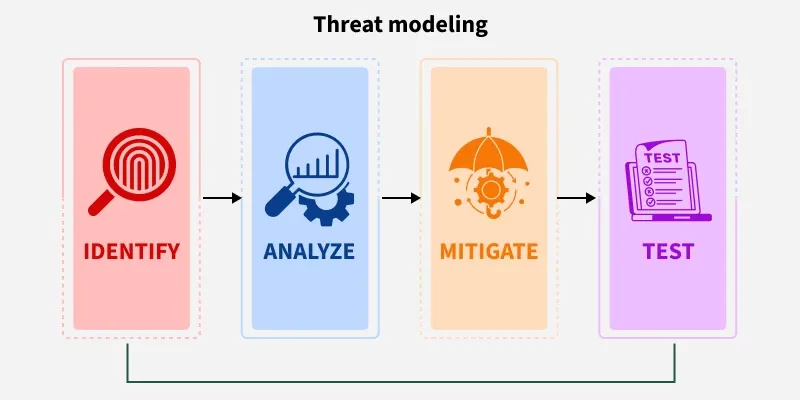
Threat modelling is a structured method to identify, analyze, and mitigate potential threats in systems, applications, or organizations. It helps teams uncover vulnerabilities early and build security into the design before attackers exploit weaknesses.
Identifies what can go wrong before deployment
Helps understand attacker goals, techniques, and entry points
Prioritises risks based on impact and likelihood
Ensures security becomes part of the development lifecycle
It can be applied to a wide range of targets such as:
Software and applications
Systems and networks
Distributed systems and IoT devices
Business processes
The Purpose of Threat Modeling
The purpose of threat modeling is to identify, communicate, and understand threats and mitigations for the organization's stakeholders as early as possible.
Key Components of a Threat Model
Description of the subject being modeled
Assumptions that can be validated or challenged over time
Potential threats relevant to the system or environment
Mitigation actions for each identified threat
Validation steps to ensure mitigations are effective
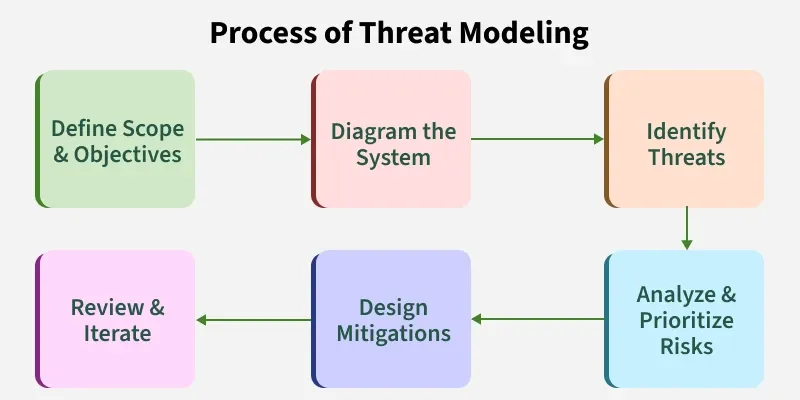
Process of Threat Modeling
This process ensures that security is integrated into the design phase and maintained throughout the application’s lifecycle.
Clarify what part of the system you're analyzing and why.
Identifies what needs protection
Defines assets, boundaries, and goals
Establishes who makes security decisions
2. Diagram the System
Create a visual map of components and data flows.
Shows how users and systems interact
Highlights data movement and trust boundaries
Exposes areas where attacks may occur
3. Identify Threats
Determine what can go wrong in the system.
Reveals attacker entry points and techniques
Uses STRIDE or similar frameworks
Maps threats to assets and workflows
4. Analyze & Prioritize Risks
Rank threats based on impact and likelihood.
Focuses attention on critical risks
Helps estimate real-world damage potential
Supports informed decision-making
5. Design Mitigations
Plan security measures to reduce or eliminate threats.
Defines clear mitigation actions
Aligns controls to specific threats
Strengthens overall system resilience
6. Review & Iterate
Continuously refine the model as the system evolves.
Validates existing controls
Updates diagrams as architecture changes
Ensures ongoing security alignment
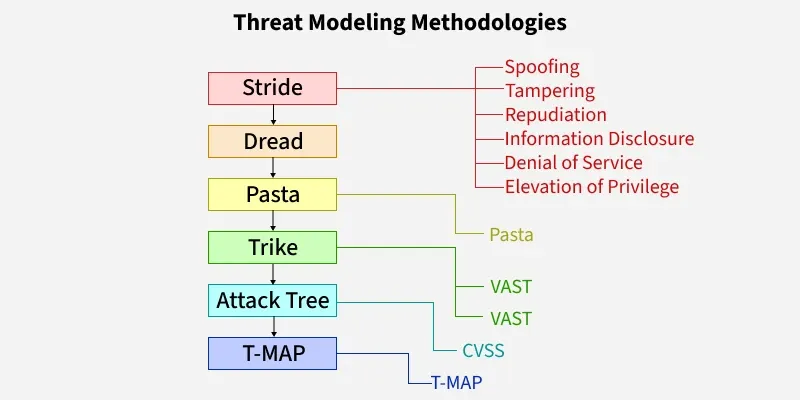
Threat Modelling Methodologies
The development team will be able to implement application security as part of the design and development process by using threat modeling to identify threats, risks, and mitigation during the designing phase.
A Microsoft model that categorizes threats into six major security areas.
Spoofing → pretending to be someone/something else
Tampering → altering data or system components
Repudiation → denying actions without evidence
Information Disclosure → unauthorized data exposure
Denial of Service → making services unavailable
Elevation of Privilege → gaining higher-than-allowed permissions
2. DREAD
A risk-rating system used to score threats based on severity and impact.
Damage Potential → how severe the impact is
Reproducibility → how easily the attack can be repeated
Exploitability → difficulty of launching the attack
Affected Users → number of users impacted
Discoverability → how easy it is to find the weakness
3. PASTA (Process for Attack Simulation and Threat Analysis)
A 7-stage methodology focused on attacker behavior and real-world attack scenarios.
Models threats from attacker’s perspective
Aligns system architecture to possible attack paths
Helps design strong, risk-based security controls
4. Trike
A risk-management–oriented model that defines acceptable risk levels for assets.
Uses stakeholder requirements
Maps actions, roles, and asset permissions
Prioritizes threats based on defined risk boundaries
5. VAST (Visual, Agile, and Simple Threat Modeling)
A scalable approach designed for large enterprises and agile teams.
Uses visual models for applications and infrastructure
Integrates easily into development workflows
Does not require deep security knowledge
6. Attack Tree
A visual diagram showing all possible ways an attacker can reach a goal.
Hierarchical structure with AND/OR logic
Helps analyze multiple attack paths
Supports structured reasoning about attack feasibility
7. CVSS (Common Vulnerability Scoring System)
A standardized scoring method to rate vulnerability severity (0–10).
Uses metrics like impact, exploitability, complexity
Helps prioritize vulnerability patching
Offers consistent, industry-wide scoring
8. T-MAP
A modeling method used for COTS systems using UML diagrams.
Identifies asset vulnerabilities and attack paths
Calculates risk based on asset–threat relationships
Supports structured evaluation for packaged systems
Tools for Threat Modelling
These tools help automate and streamline the threat modeling process, enabling teams to identify, assess, and mitigate security risks more efficiently throughout the software development lifecycle.
Microsoft's Threat Modelling Tool
MyAppSecurity
IriuRisk
securiCAD
SD Elements by Security Compass
Modeling Attack Trees
CVSS 3.0
Tiramisu
How To Create a Threat Model
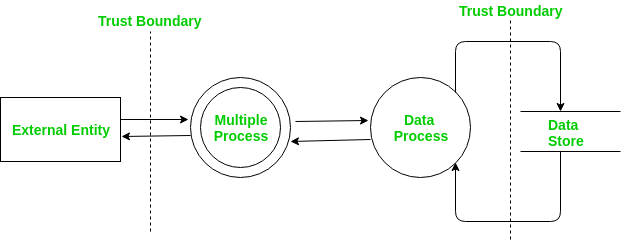
All threat modeling processes start with creating a visual representation of the application or system being analyzed. There are two ways to create a visual representation:
1. Visual Representation Using Data Flow Diagrams (DFD)
DFDs show how data moves, is stored, and is processed within a system.
Used by Microsoft Methodology, PASTA, and Trike
Originated in the 1970s; trust boundaries added in early 2000s for security use
Focuses on viewing the system like an adversary, characterizing components, and identifying threats
Highlights data movement but does not accurately represent real user behavior
Often inconsistent because no standard method exists
Different people may produce very different models for the same system
Limited threat identification → often a weak starting point
2. Visual Representation using Process Flow Diagram
PFDs were introduced in 2011 to overcome DFD limitations and better support Agile teams. They focus on how attackers move through the application, not just data flow.
Models the application from the attacker’s viewpoint
Focuses on abusing normal user actions to reach assets
Used by the VAST methodology
Represents user interactions, transitions, and controls (forms, cookies, protocols, etc.)
Easy to understand and does not require security expertise
Produces a clear process map showing how a user or attacker that navigates the system
PFD-based threat models view applications from the perspective of user interactions. Following are the steps for PFD-based threat modelling:
Designing application's use cases
The communication protocols by which individuals move between use cases are defined
Including the various technical controls – such as forms, cookies, etc
PFD-based threat models are easy to understand and don't require any security expertise.
Creation of process map -showing how individuals move through an application. Thus, it is easy to understand the application from the attacker's point of view.
Threat Modelling Best Practices
Threat modelling fosters a shared understanding of security across the entire team and serves as the first step toward making security a collective responsibility. To get the most value from it, follow these five key best practices when creating or updating your threat model.
Involve the entire team (dev, security, ops, product)
Understand the system fully before modeling
Focus on the highest-value assets and threats
Iterate regularly as the system evolves
Document risks and track mitigations to closure
Validate assumptions through testing (pentests, code reviews, fuzzing)
Use consistent templates and scoring methods to ensure repeatable results