Network Attached Storage is a file-dedicated storage device that is connected to a network and allows only authorized users to store and retrieve data from a centralized location via Ethernet.
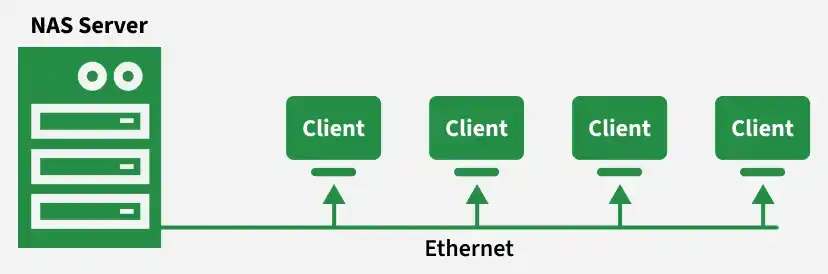
Centralize data for immediate, organization-wide access. Enables effortless storage upgrades. It also ensures data integrity. It provides centralized backup. Multiple users and client devices can access data from a single storage system. NAS Architecture This is a simple NAS Architecture which shows that there exists a Central Storage System and multiple users.
👁 71972257 1. NAS Server This is a centralized device that stores and manages files It consists of hard drives, a processor, memory, and a NAS OS. It handles requests from multiple clients. 2. Clients These are the devices that access the NAS. These send requests to the NAS Server. Multiple clients can access the same storage at the same time. 3. Network Connection It is a medium that connects clients and the NAS Server. Usually uses Ethernet in a local network. Provides fast and reliable data transfer. 4. File Sharing Protocols Components of NAS Processor(CPU): It is the core part of the NAS system, which manages files, data transfer, and user access. RAM: It is the memory which take care of system performance. Network Interface Card (NIC): It connects the NAS to the network by Ethernet or Wi-Fi. Operating System: OS arranges and controls the NAS hardware and makes it accessible to users or clients. Types of NAS solutions 1. Home / Personal NAS These devices are designed for individual users or small households to store and manage personal data.
Usually supports 1–5 drive bays Easy setup and simple management interface Low-cost storage solution for home environments Used for media streaming, file sharing, and automatic backups 2. Small Business NAS These systems provide higher storage capacity and better data protection for organizations with multiple users.
Supports 2–24 or more drive bays Allows multi-user access and centralized file management Suitable for file sharing, backup, and small office applications Provides RAID configurations for data redundancy and protection 3. Enterprise NAS These systems are designed for large organizations that require high performance and scalable storage infrastructure.
Supports high-speed data access for many users Provides large-scale storage capacity and scalability Used in data centers and large enterprise environments Includes advanced security, backup, and data management features Advantages Centralized Storage: All data is stored in one place and is only accessible to the authorized users. Automated Backup: NAS provides automated backup from time to time to prevent data loss. Cost-Effective: Compared to other complex servers or storage services, NAS is more affordable. Enhanced Performance: As NAS operates on the local network, it provides faster data transfer speed. Disadvantages Single Point of Failure: If the NAS server fails, all the data becomes inaccessible. Limited Performance: NAS relies on Ethernet, and high traffic or multiple users at a time can slow down the speed. Initial High Cost: Setting up the NAS architecture is costly as it contains Multiple hardware devices. Maintenance Complexity: Setting up, managing, and troubleshooting a NAS can be complex and may require skilled work. Future Developments of NAS AI Integration: AI will be integrated for better maintenance and to enhance security. Performance and Speed: Adopt Gigabit Ethernet or SSDs, which help in reducing power consumption and increasing speed. Hybrid Cloud Integration: It will unify with public cloud services, which enable flexibility and a hybrid storage architecture. Sustainable Growth: Providing services to small and large businesses.