|
VOOZH | about |
|
VOOZH | about |
All network devices such as routers, servers, firewalls, etc. create or prompt logs about statuses and the events that occur. For a small system tracking these logs is not a problem, the problem arises when we are dealing with big systems where tracking all these logs and information becomes challenging. To overcome this problem we use Syslog with a logging server known as Syslog server (such as Kiwi Syslog server, Graylog, Solarwind Syslog server, etc.).
A Syslog server allows us to send the log information of all our network devices to one centralized place. The log messages are sent on UDP port 514 to the Syslog server. From here we can search, manage and archive all of the log information.
A wide variety of devices supports the Syslog protocol hence, it can be used to log various types of events like logs from a web server, a router, etc.
What is Syslog?
Syslog is a standard protocol for message logging that computer systems use to send event logs to a Syslog server for storage. On network devices, Syslog can be used to log events such as changes in interface status, system restarts, etc. A lot of different types of events can be logged. Logs are essential when troubleshooting issues, examining the cause of incidents, etc.
Working :
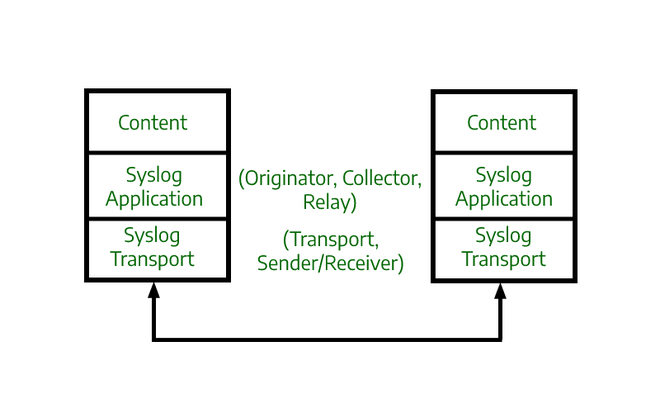
Syslog standard defines three layers i.e., the Syslog transport layer, Syslog application layer, and Syslog content layer.
Syslog message format :
seq:timestamp: %facility-severity-MNEMONIC:description
seq may or may not be shown in the actual Syslog message.
This is a log message that can be seen while configuring routers and switches.
Syslog facility Codes :
Code | Keyword | Description |
0 | kern | kernel messages |
1 | user | user-level messages |
2 | mail system | |
3 | daemon | system daemons |
4 | auth | security/authorization messages |
5 | syslog | messages generated internally by Syslog |
6 | lpr | line printer subsystem |
7 | news | network news subsystem |
8 | uucp | UUCP subsystem |
9 | cron | clock daemon |
10 | authpriv | security/authorization messages |
11 | ftp | FTP daemon |
12 | ntp | NTP subsystem |
13 | security | log audit |
14 | console | log alert |
15 | solaris-cron | clock daemon |
16-23 | local | local use 0-7 (local0-7) |
At the bottom we have codes from 16-23 for local use, these are generally used for network devices.
Syslog Severity levels :
This is important because if we don't have severity values it would send all the log messages to the server altogether which is not recommended as it would clog the server. With the help of the severity level, we can choose which messages are sent based on their severity.
Level | Keyword | Description |
0 | Emergency | System is unusable |
1 | Alert | Action must be taken immediately |
2 | Critical | Critical conditions |
3 | Error | Error conditions |
4 | Warning | Warning conditions |
5 | Notice | Normal but significant condition(Notifications) |
6 | Informational | Informational messages |
7 | Debugging | Debug-level messages |
There are 8 severity levels, each severity level has a number, 0 being the most severe and 7 being the least severe. Each level also has a keyword, which is a name that identifies the severity level. Then there is a brief description of the severity level.
Syslog server :
Syslog servers are used to collect Syslog messages from multiple sources into a single location. A Syslog server can be a physical server or a virtual machine. Few components make it possible for Syslog servers to receive, store and interpret the messages.
Need of logs :