|
VOOZH | about |
|
VOOZH | about |
Have you ever wished to automatically wish your friends on their birthdays, or send a set of messages to your friend ( or any Whatsapp contact! ) automatically at a pre-set time, or send your friends by sending thousands of random texts on WhatsApp! Using Browser Automation you can do all of it and much more!
1) Python Bindings for Selenium ( Browser Automation software )
pip install selenium
2) Chrome web driver
Download Chrome driver from here: Chromedriver download page( choose your specific version ) Extract it in a known location, as we need the location later
If you get stuck somewhere, Refer To the documentation: Documentation link
3) Chromium Web Browser( Open-source version of chrome browser )
sudo apt-get install chromium-browser
That's it! You are all set.
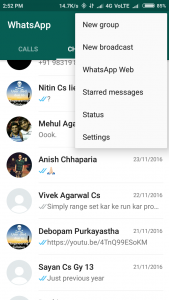
Keep your mobile phone with you. Choose WhatsApp web from the top bar in WhatsApp(3 dots)
👁 Screenshot2
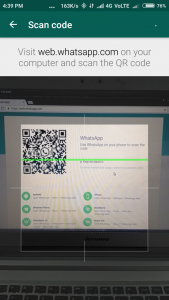
Then Run the script ( make sure that you have added the absolute path for the chrome driver and have replaced the target variable with your friend's name ). Scan the QR code that appears on the screen and enjoy the power of python!
Please use this script only for educational purposes, i am not responsible if your friends ( or even Whatsapp ) block you.
Feel free to modify the code. Try to :
Comment below about your experience!
When it comes to browser automation, this is just the tip of the iceberg. Will write more articles on browser automation to give you a glimpse of its power!
Related Post :