|
VOOZH | about |
|
VOOZH | about |
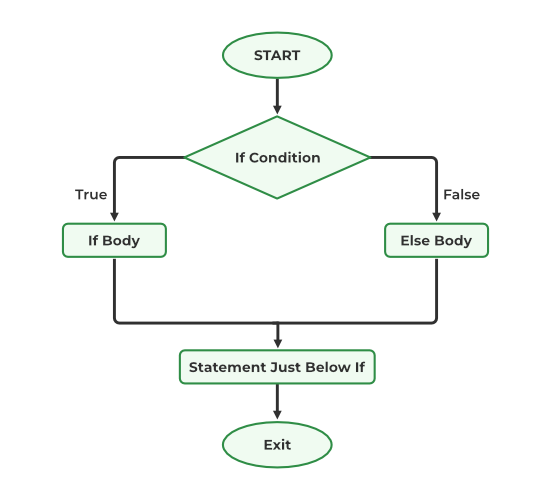
The if statement alone tells us that if a condition is true it will execute a block of statements and if the condition is false, it won’t. But what if we want to do something else if the condition is false. Here comes the C++ ifelse statement. We can use the else statement with if statement to execute a block of code when the condition is false.
Example:
10 is less than 15
Explanation: The condition in the if block checks if 10 is less than 15. Its true so the statement inside if block, “10 is less than 15” gets printed and else block is skipped. If the condition was false, all the statements inside the if block will be skipped and else block will be executed.
if (condition) {
// Executes this block if
// condition is true
}
else {
// Executes this block if
// condition is false
}
The if statement condition can be anything that evaluates to a boolean value or a boolean converted value. We generally use relational and equality operator to specify the condition.
The following are a few basic examples of the if-else statement that shows the use of the if-else statement in a C++ program.
Odd
You may have noticed that we skipped using the braces for the body of the if statement. If we do not provide the curly braces ‘{‘ and ‘}’ after if( condition ) then by default if statement will consider the immediate one statement to be inside its block.
11
Explanation: Finding largest element requires users to compare multiple condition. We can compare multiple conditions by nesting one condition inside other. There is also another way of combining multiple conditions.
The above program can also be written by using compound expressions as:
11
In this code, we are grouping multiple conditions in a single if statement using logical AND operator. (&&)