|
VOOZH | about |
|
VOOZH | about |
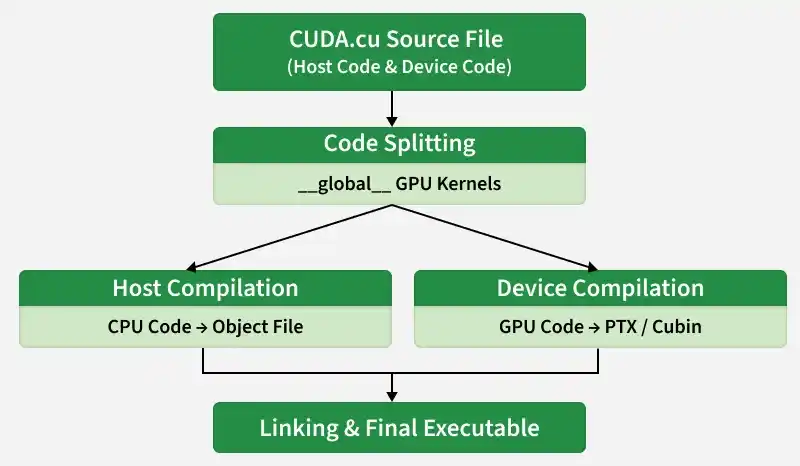
The NVIDIA CUDA Compiler (NVCC) is the specialized driver used to transform CUDA C++ source code into executable programs. Because CUDA programs are "heterogeneous" meaning they contain code for both a Central Processing Unit (CPU) and a Graphics Processing Unit (GPU) the compilation process is more complex than standard C++ development.
A CUDA source file (ending in .cu) contains two types of code: Host code (runs on the CPU) and Device code (runs on the GPU). NVCC acts as a compiler driver that coordinates the compilation of both parts simultaneously.
1. Basic Command: To compile a source file into a runnable program, use the following syntax:
nvcc program.cu -o program
Explanation:
2. Targeting Specific Hardware (-arch): GPU architectures evolve with every generation (e.g., Pascal, Turing, Ampere). To get the best performance, the compiler needs to know which GPU generation you are targeting.
nvcc -arch=sm_75 program.cu -o program
Explanation: -arch=sm_xx stands for "Shader Model." For example, sm_75 targets Turing-generation GPUs (like the RTX 20-series or Tesla T4). This ensures the compiler uses the specific instructions available on that hardware.
3. Optimization and Debugging: One can pass flags to improve performance or help find errors in the code.
4. Running the Program: Once compiled, resulting binary is a standalone file. On Linux or macOS, run it with ./, and on Windows, simply type the filename.
./program
Explanation: This starts the host code on the CPU. If the code includes a cudaDeviceSynchronize() call, CPU will wait for all GPU kernels and printf statements to finish before the program closes, ensuring you see all output in the terminal.