Graphical User Interface (GUI) programming in C++ is used to create applications with visual interfaces that allow users to interact with software through graphical elements rather than text-based commands.
- Uses components such as windows, buttons, text boxes, and menus.
- Provides an intuitive and interactive user experience.
- Commonly used for desktop applications, development tools, and visualization software.
Prerequisites: Fundamentals of C++, C++ OOPs, Some GUI Library.
Core Components of a GUI Application
A GUI application is built using visual components called widgets, layout management techniques, and event-handling mechanisms that allow the application to respond to user interactions.
Widgets
A graphical user interface (GUI) is made up of widgets. For example, these include buttons, text boxes, labels, etc. The properties and behaviors of each widget can be customized in accordance with the specific needs of an application. There are generally the following widgets in a GUI library:
- Window: A top-level window frame that hosts other widgets inside itself.
- Button: A clickable button that has some event associated with its click.
- Label: Simple read-only text.
- Checkbox: A box that provides the options to be on or off.
- Radio Button: A box that provides the options to be on or off, but we can only choose one radio button in a group.
- Dropdown/Combo Box: Opens a dropdown menu when clicked. Only one item can be displayed in the non-opened form.
- Textbox: An editable text area.
- Listbox: A box with multiple items and a scroll bar to go through all of them.
- Slider: A navigation widget used to move around the application.
- Menu: Shown at the top, the menu provides different options to the application user.
- Dialog Box: A box that is displayed on top of a window, sometimes to display a notification.
- Grid: Used for the layout management of the UI.
Layout Management
Layout management determines how widgets are arranged within a window. It helps GUI applications adapt to different screen sizes, resolutions, and window dimensions while maintaining an organized and user-friendly interface.
- Automatically positions and resizes widgets within a window.
- Helps maintain a consistent interface across different screen sizes.
- Reduces the need for manually specifying widget coordinates.
- Organizes widgets using layouts such as grids, rows, columns, or containers.
Event Handling
In GUI programming, events like button clicks or key presses are critical. These events are handled by the app in order that it can follow the user actions. There are different events associated with different widgets. For example, for a clickable button, the associated events are:
- Click Event: Triggered when the user clicks the button.
- Mouse Move Event: Occurs when the mouse pointer moves over the button.
- Focus In Event: Triggered when the button gains focus and becomes the active widget.
- Focus Out Event: Triggered when the button loses focus because another widget becomes active.
Popular GUI Libraries for C++
Several GUI libraries are available for developing graphical applications in C++. These libraries provide pre-built widgets, event handling, and layout management features that simplify GUI development. Some popular GUI libraries are:
- Qt : One of the most widely used cross-platform GUI frameworks with a rich set of widgets and tools.
- wxWidgets : A cross-platform library that uses native operating system controls for a native look and feel.
- gtkmm : The official C++ interface for the GTK toolkit, commonly used on Linux systems.
- Dear ImGui : A lightweight immediate-mode GUI library widely used for tools, debugging interfaces, and game development.
Building a Simple GUI Application Using Qt
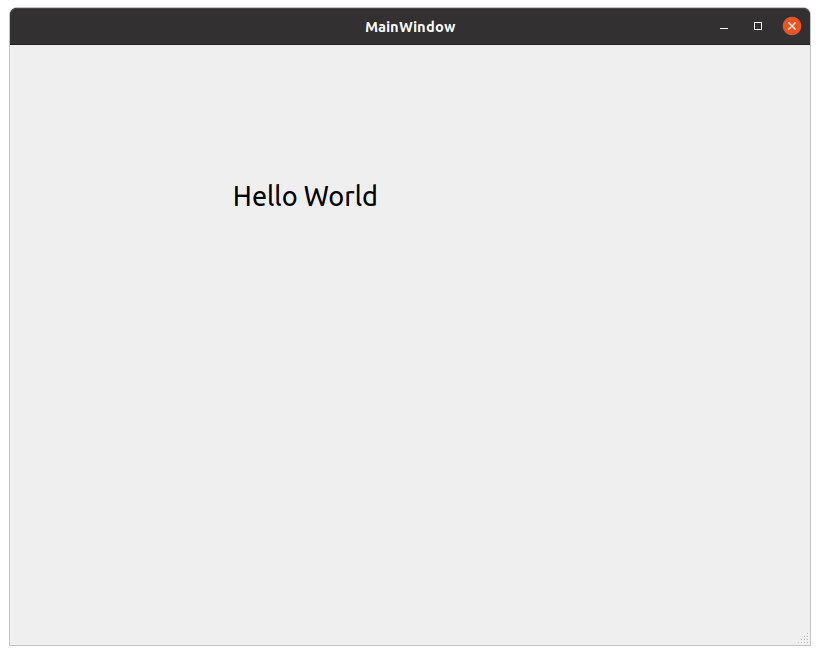
To understand GUI programming in practice, let's create a simple Hello World application using Qt. The application displays a label containing the text "Hello World" inside a window.
The following tools are used in this example:
- Qt Library : Provides the GUI framework and widgets.
- Qt Designer : A visual editor for designing user interfaces.
- Qt Creator : An IDE for developing and running Qt applications.
Step 1: Creat a Qt Project
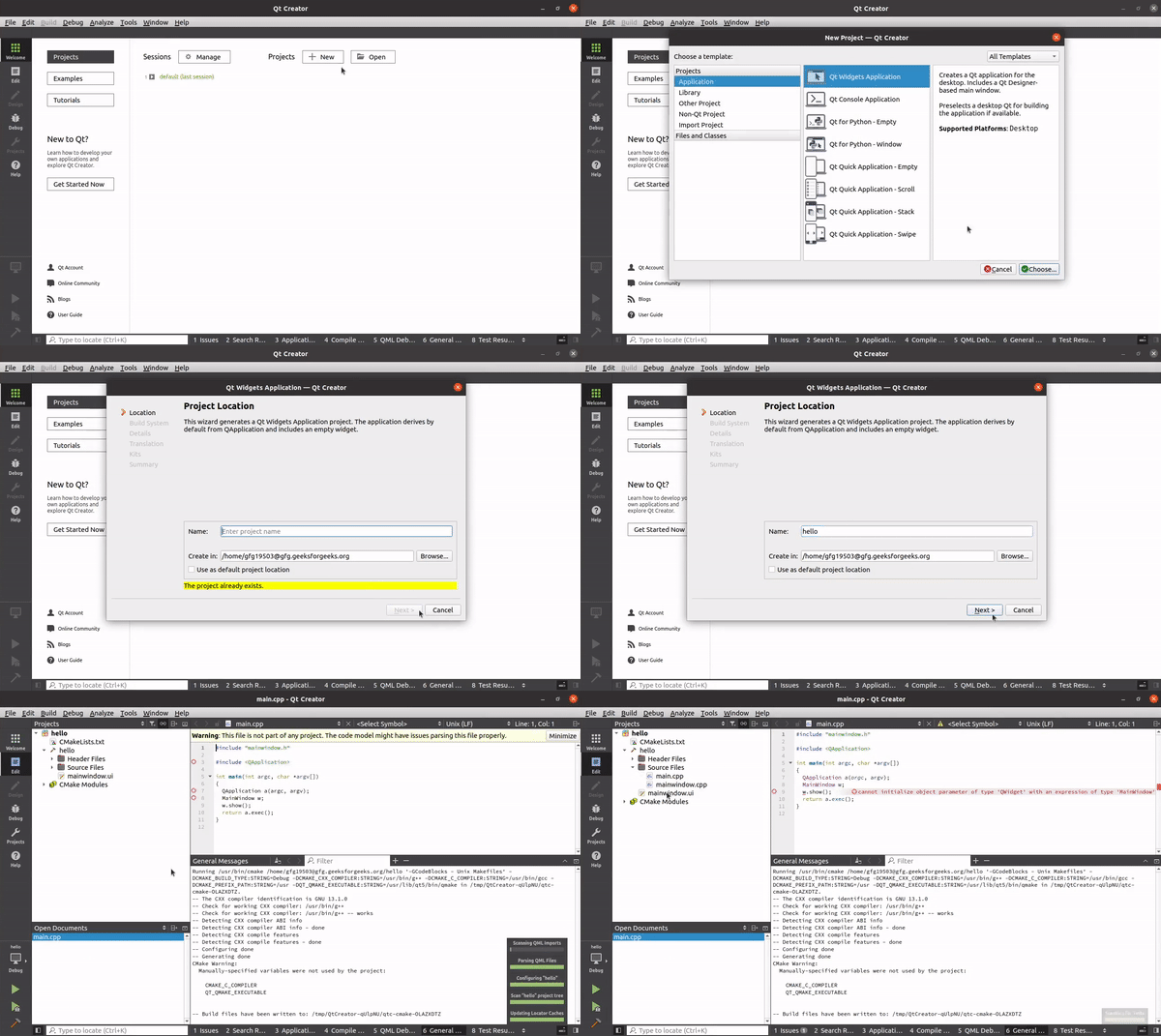
Open Qt Creator and create a new project of type "Qt Widget Application". Enter the project name, choose a location, and complete the setup wizard.
Qt Creator automatically generates the required project files and boilerplate code.
👁 creating-project
Step 2: Design the User Interface
Open the mainwindow.ui file in Qt Designer. This file contains the graphical layout of the application. Add a QLabel widget to the main window and set its text to "Hello World".
👁 designing-ui
The files will contain the following code:
mainWindow.h: declares the window class used by the application.
main.cpp: creates the QApplication object and displays the main window.
mainWindow.cpp: initializes the user interface generated from the UI file.
mainWindow.ui: stores the layout and widget information created using Qt Designer.
Notice that mainWindow.ui is written in XML. It is because Qt writes its UI files in XML.
Step 3: Build and Run
After designing the interface, click Build and Run in Qt Creator. Qt compiles the project and launches the application window.
👁 build-and-run
Output
👁 hello_world
Advantages of GUI Applications
GUI applications offer several advantages, contributing to a better user experience and streamlined development
- User-Friendly Interface: Provides an intuitive way for users to interact with software through graphical elements.
- Enhanced Interactivity: Supports widgets such as buttons, menus, checkboxes, and sliders for better user interaction.
- Cross-Platform Development: Frameworks like Qt allow the same application to run on multiple operating systems.
- Rapid Prototyping: Visual design tools help developers create and test interfaces quickly.
- Improved User Experience: Makes applications easier to learn, navigate, and use efficiently.