|
VOOZH | about |
|
VOOZH | about |
A multi-dimensional array can be defined as an array that has more than one dimension. Having more than one dimension means that it can grow in multiple directions. Some popular multidimensional arrays include:
Example:
1 2 3 4
5 6 7 8
9 10 11 12
Explanation:
where s1, s2,…, sn are the size of each dimension.
Example:
For 1D array, the length of the array is simply its size too. But multidimensional arrays have extra dimensions. So, the size of each dimension is considered separately. The size of multidimensional array is the product of all its dimensions' size. It is similar to calculating area in 2D and volume in 3D.
For example, consider the below array:
To verify the above calculation, we can use sizeof() method to find the size of an array.
32 bytes
We can have any number of dimensions in an array as per requirement, but the complexity of handling them also increases exponentially. That is why, the most widely used multidimensional arrays are:
A two-dimensional array in C++ is a collection of elements organized the form of rows and columns. It can be visualized as a table or a grid.
Like 1D arrays, 2D arrays can also be initialized using a list of values enclosed inside {} curly brackets, but as 2D arrays have two dimensions, the list is nested inside another list to initialize each dimension one by one. It means that each row values are nested inside one big list.
Nesting can also be omitted, and values will still be assigned sequentially.
The above array has 2 rows and 4 columns. The elements are filled in a way that the first 4 elements are filled in the first row and the next 4 elements are filled in the second row. The values will be initialized sequentially.
It is to be noted that the number of values should not exceed the total number of elements an array can store. It can have less values (partial initialization) but cannot have more values.
If all the elements are to be initialized to 0, then this syntax can be used:
This can be only done for 0, not for any other value.
Elements of a 2D array have to be accessed using row and column indices inside [] square brackets. It is similar to matrix element position, but the only difference is that here indexing starts from 0.
The value of any element can be updated by using = assignment operator.
where, i is the index of row, j is the index of the column, and new_value to updated. The range of indexes should be:
Any values other than that leads to the segmentation fault.
Example:
2
4
22
99
Two loops nested inside each other are needed to traverse a 2D array. First loop is used to move though the rows of 2D array, while other is used to move though columns in each row to access all the elements of the row.
0 1 2 3
4 5 6 7
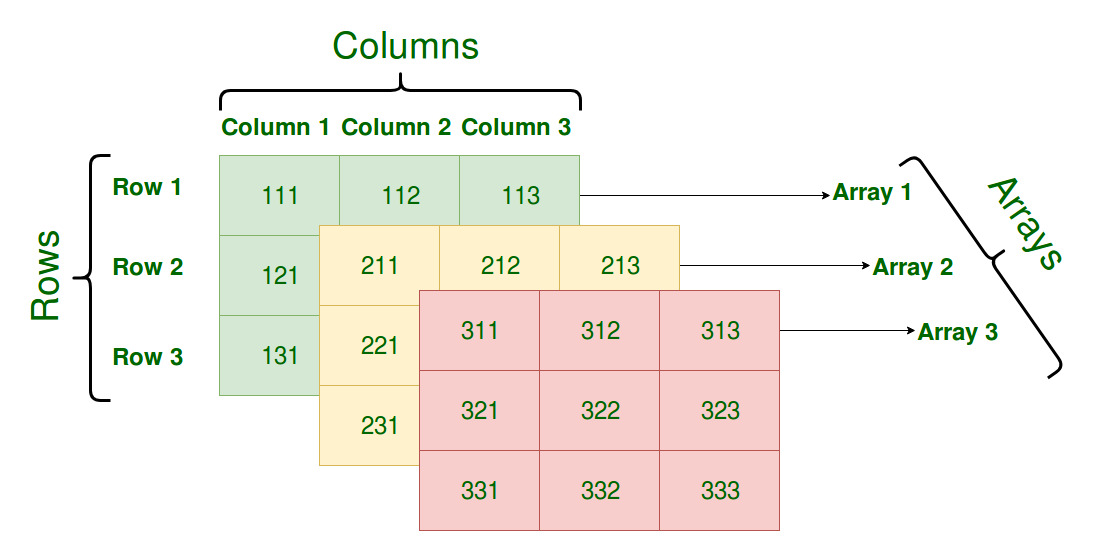
A three-dimensional array in C++ is a collection of elements organized in a 3D cuboid-like structure. It can be visualized as a series of two-dimensional arrays stacked on top of each other.
👁 three dimensional array organization in c++
To declare a 3D array in C++, we need to specify its third dimension along with 2D dimensions.
Like 2D arrays, 3D arrays can also be initialized using a list of values enclosed inside {} curly brackets. However, in a 3D array, the values are grouped into 2D arrays, and each 2D array is nested inside another set of curly brackets.
Alternatively, nesting can be omitted, and the values will still be filled sequentially:
This array has 2 layers (depth), 2 rows per layer, and 3 columns per row. The values are filled sequentially across the layers.
If all the elements are to be initialized to 0, then this syntax can be used:
This can be only done for 0, not for any other value.
The elements of a 3D array are accessed and updated using three indices: depth, row, and column. These indices must be within the following ranges:
Example:
5
7
22
99
To traverse a 3D array, you need three nested loops: one for each dimension (depth, row, column).
Example:
0 1 2
3 4 5
6 7 8
9 10 11
In C++, you can pass multidimensional arrays to functions. Since multidimensional arrays have more than one dimension, the function signature needs to account for all dimensions.
To pass a 2D array to a function, you can specify the number of columns (or other dimensions) in the function signature. The number of rows can be deduced automatically.
1 2 3
4 5 6
To pass a 3D array to a function, you need to specify the size of the second and third dimensions.
1 2 3 4
5 6 7 8
9 10 11 12
13 14 15 16
17 18 19 20
21 22 23 24