|
VOOZH | about |
|
VOOZH | about |
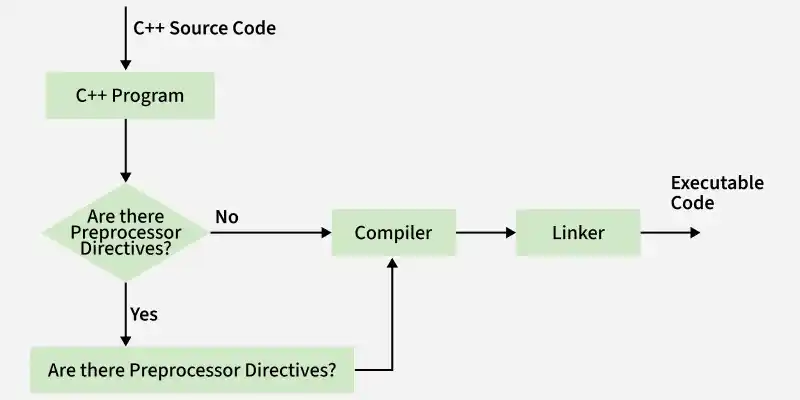
The preprocessor in C++ is a program that processes the source code before compilation begins. It performs tasks like including header files, macro expansion, and conditional compilation to prepare the code for the compiler.
#include and #defineAbove diagram shows the workflow of a C++ program from source code to executable file.
Preprocessor directives are special instruction that are given to the preprocessor, which is a part of the compilation process that runs before the actual code is compiled. These directives:
| Directive | Description |
|---|---|
| #include | Includes header files into the program |
| #define | Defines macros or symbolic constants |
| #undef | Deletes a macro that has already been defined. |
| #if / #elif / #else / #endif | Performs conditional compilation |
| #ifdef / #ifndef | Checks whether a macro is defined or not |
| #error | Displays a custom compilation error |
| #warning | Displays a custom warning message |
| #pragma | Provides compiler-specific instructions |
They are mainly used for:
The #include preprocessor directive is used to include the contents of one file into the current one, use the #include directive. Header files are often included using this directive.
Syntax
Include Standard Header File
#include <header_file>
Include User Defined Header File
#include "header_file"
Note
< >searches files from the system library" "searches files from the current directory first
Example:
GeeksforGeeks
The #define preprocessor directive is used to define macros or symbolic constants in C++. It improves code readability and maintainability by replacing fixed values or code snippets with meaningful names.
Syntax
#define MACRO_NAME value
Example
78.5397
The #undef preprocessor directive is used to undefined a previously defined macro (defined using #define). It is mainly used in the case when we want to redefine an existing macro or eliminate a macro definition associated with it from the code.
Syntax
#undef MACRO_NAME
Example
100
200
The #if, #elif, #else, #endif, and #error are conditional preprocessor directives these are used for conditional compilation. These are used to include or exclude a code based on some conditions specified.
Syntax
#if condition
// code#elif condition
// code#else
// code#endif
Example
PI is defined
Explanation: This code uses preprocessor directives to check whether certain macros (PI and SQUARE) are defined. Since PI is defined, the program prints “PI is defined”, then checks if SQUARE is defined which is not so it doesn't print anything.
The #ifdef and #ifndef are preprocessor directives that are used for conditional compilation. #ifndef verifies that a macro is not defined, #ifdef verifies that a macro is defined.
Syntax
#ifdef macro_name
// Code to be executed if macro_name is defined#ifndef macro_name
// Code to be executed if macro_name is not defined
#endif
#ifdef and #ifndef are often used with the #endif directive to include or exclude portions of code based on whether a certain macro is defined or not.
Example
Debug mode is ON
PI is defined
The #error directive is a preprocessor directive that is used to print a custom error message for compilation error. If any condition is not met or any particular requirement is not satisfied we can stop the compilation process using #error.
Syntax
#error error_message
Here, error_message is the custom error message that you want to print when the #error is encountered.
Example
Output
#error "Neither PI nor SQUARE is defined"The #warning preprocessor directive is used to generate a warning message during compilation. We can write custom warning messages generally used for any informational or debugging purpose.
Syntax
#warning message
Here, the message is any custom message that you want to print as an alert.
Example
Output
main.cpp:8:2: warning: #warning "PI is not defined!" [-Wcpp]
 8 | #warning "PI is not defined!"
 | ^~~~~~~
Hey! geekNote: The warning message is printed when the code is compiled to the compiler output or console. It is compiler dependent. Hence, how the warning is displayed depends on the compiler you are using.
The #pragma directive provides compiler-specific instructions to control compiler behavior such as warnings, optimizations, and header inclusion. Supported pragmas may vary between different compilers.
Syntax
#pragma directive
Commonly Used #pragma Flags
Example
Output
./Solution.cpp: In function 'int main()':
./Solution.cpp:15:38: note: #pragma message: YES! PI is defined.
 #pragma message("YES! PI is defined.")