|
VOOZH | about |
|
VOOZH | about |
Binary Numbers uses only 0 and 1 (base-2), while Decimal Number uses 0 to 9 (base-10). In this article, we will learn to implement a C++ program to convert Decimal numbers to Binary Numbers.
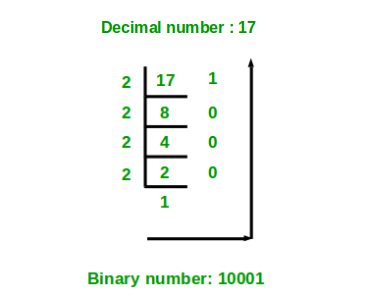
The below diagram shows an example of converting the decimal number 17 to an equivalent binary number.
1010
Explanation:
If the decimal number is 10.
Step 1: Remainder when 10 is divided by 2 is zero. Therefore, arr[0] = 0.
Step 2: Divide 10 by 2. The new number is 10/2 = 5.
Step 3: Remainder when 5 is divided by 2 is 1. Therefore, arr[1] = 1.
Step 4: Divide 5 by 2. The new number is 5/2 = 2.
Step 5: Remainder when 2 is divided by 2 is zero. Therefore, arr[2] = 0.
Step 6: Divide 2 by 2. The new number is 2/2 = 1.
Step 7: Remainder when 1 is divided by 2 is 1. Therefore, arr[3] = 1.
Step 8: Divide 1 by 2. The new number is 1/2 = 0.
Step 9: Since the number becomes = 0.
Print the array in reverse order. Therefore the equivalent binary number is 1010.
C++ Standard Template Library provides std::bitset class that is used to perform bitwise operations on binary numbers. It can be used to convert Decimal Numbers to Binary and vice versa. In the below C++ program, a bitset of size 4 is created and initialized with 10. Now the bitset binaryRepresentation will store the binary representation of 10.
Binary representation: 1010
Refer to the complete article Program for Decimal to Binary Conversion for more methods to convert decimal numbers to binary numbers.