|
VOOZH | about |
|
VOOZH | about |
Obtaining the color information about the screen pixels is a common operation performed by automation software, which relies on activity on the screen. The process is trivial, and such functionality is incorporated into programming languages with the help of Image/Window reading libraries. This article will teach you how to read screen pixels in C++. The <windows.h> header file could help us to get pixel color.
A call to the getpixel function would be made to obtain the color value of the screen pixel, and the coordinates at which the pixel value is to be read would be passed as an argument.
Syntax:
COLORREF GetPixel([in] HDC hdc, [in] int a, [in] int b);
Parameters:
Return value: The return value is the COLORREF value that specifies the RGB of the pixel. If the pixel is outside the clipping region, the return value is CLR_INVALID.
In the following example, the pixel value for a single pixel will be obtained. This method could be extended to the whole display (using a loop) to obtain the color value of a range of pixels.
Example:
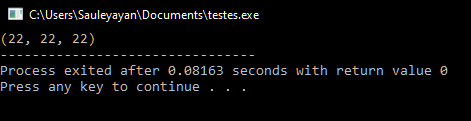
Output:
Explanation: Firstly the device context of the display is obtained using the GetDC function with the NULL argument (for the screen). Then a call to the GetPixel function is made, and the device context, along with the coordinates (horizontal and vertical) of the pixel, is sent as an argument. The return data is stored in a COLORREF variable. Later, the Red, Green, and Blue channel values of the pixel are obtained via the GetRValue, GetBValue, and GetGValue functions, which are typecasted to make them appropriate for output. In the end, the display context is released using the ReleaseDC function.