|
VOOZH | about |
|
VOOZH | about |
The goto statement in C++ is a control flow statement that provides for an unconditional jump to the same function's predefined label statement. In simple terms, the goto is a jump statement transfers the control flow of a program to a labeled statement within the scope of the same function, breaking the normal flow of a program.
In this article, we will learn about the goto statement and its various use cases in C++.
Following is the syntax of the goto statement:
goto label_name;
  .
 .
 .
 // Skipped code
 .
 .
 .
label_name:
 // Execution continues here
The label can be present anywhere in the same scope. For example, in the below code, the label is present before the goto resulting in a loop.
label_name:
 // Some code
 // ...
 .
 .
 .
goto label_name; // Jumps back to the label creating loop
here, label_name is the unique identifier and goto is the keyword.
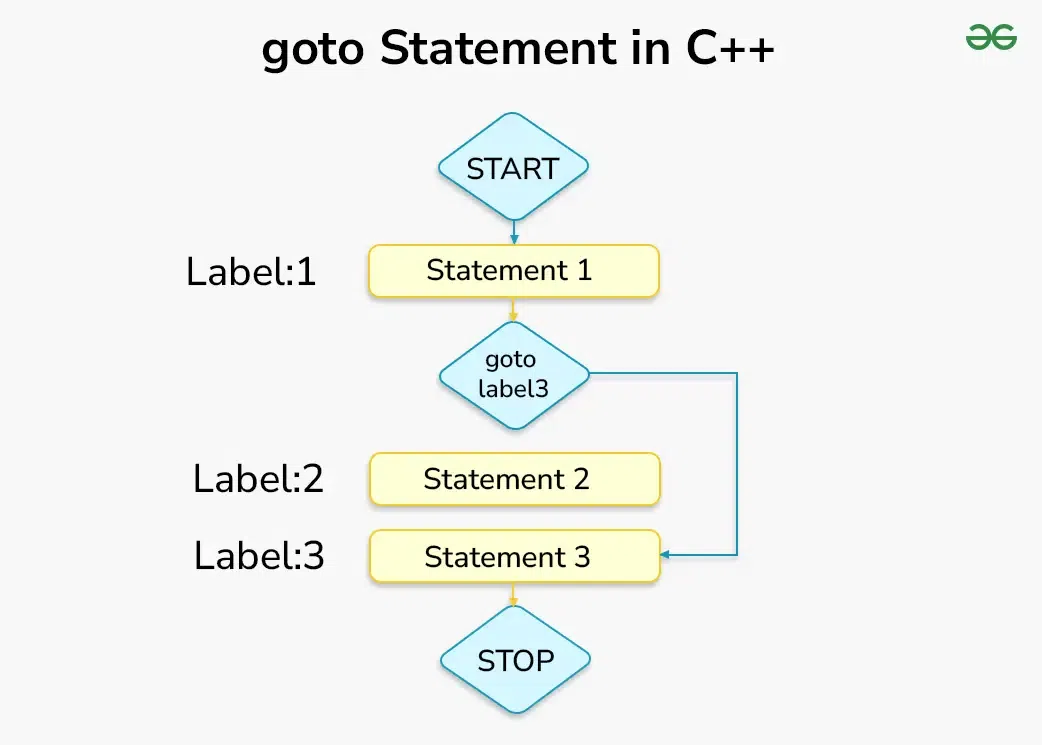
The following diagram represents the workflow of the goto statement:
First Statement
Third Statement
Explanation
Output
Count: 0
Count: 1
Count: 2
Count: 3
Count: 4
Count: 5
... {till infinite}
Nore: It is very easy to create the errors such as infinite loops using goto even by mistake so we need to be extra careful while using it. Although in the programming community, the use of goto is highly discouraged.
Output
Error opening fileExplanation: In the above program goto statement is used for error handling. If the file cannot be opened then the program flow jumps to the error label and prints an error message for the users before returning 1 to the console.
But this can be easily done with the help of if-else statements also at they provide better risk protection as compared to goto.
Using goto, we can only jump within the same function. It cannot transfer control between functions.goto statement using it must be in the same function.goto statement.Code using goto can be difficult to read, understand and maintaining code with goto statements can be challenging, as it introduces non-linear control flow that may lead to spaghetti code, where the program flow becomes difficult to follow.
For example, try to deduce the control flow of the below program:
End of program.
Confusing, isn't it? Now imagine a thousand lines of code with hundreds of goto statements.