|
VOOZH | about |
|
VOOZH | about |
Lua is a high-level, multi-paradigm programming language, mainly used in embedded applications as well as powerful scripting support for existing products. For Example Scripting enhancement of an NGINX, HA Proxy, Wireshark, etc. Another major area where Lua had found application is the game engine frameworks.
Despite all the above advantages, Lua provides a very low-level C API which requires the developer to learn the internals of the Lua engine before he can use it in the applications. However, this has changed with the Lua Cpp library.
LuaCpp: It is a lightweight wrapper for Lua C APIs that provides access to the Lua library of two levels i.e., Accesses through high-level APIs that are hiding the complexity of the C APIs and the engine, and access to the Lua low-level APIs.
The LuaCpp can be installed as a system-wide library, or as a sub-module of your exiting project. Run the below command to install the LuaCpp in ubuntu.
Clone the LuaCpp library from the below link:
=> git clone https://github.com/jordanvrtanoski/luacpp
Change the directory to luacpp, create a new directory as build, and change the directory to build again using the below commands:
=> cd luacpp
=> mkdir build
=> cd build
Now, make the source using the below commands:
=> cmake ../Source
=> make -j `nproc`
Now, install the library using the below command:
=> make install
Once the library is installed, build the file as follows:
=> gcc hello.cpp -I /usr/local/include/LuaCpp -I /usr/include/lua5.3/ -lluacpp -llua5.3 -lstdc++ -o hello
Output the file as:
=> hello
Below is the same program to illustrate the same:
Output:
The example is showing us how to compile and execute Lua code snippet from C++. However, without the ability to pass data from C++ to Lua, and back from Lua to C++, there are not many real-life cases that can be addressed by this pattern.
LuaCpp arrives prepared to establish the bridge between the two execution environments wilt as little as possible knowledge of the internal working of Lua, as well as with minimal code. Let's improve the “Hello World” example by adding a variable that will be shared by both execution environments. This introduces a “String” variable called “world” and populates it with a value from the C++ context. Inside the Lua context, update the value of the variable, and upon return to the C++ context and print the value of the variable.
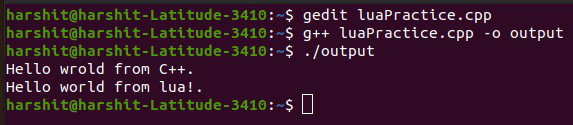
Below is the program to illustrate the same:
Output:
The context allows passing multiple variables from the C++ scope to Lua scope and vice versa. The above pattern allows for adding the scripting support to the C++ project for the majority of the cases. The simple 4-step process is:
The LuaCpp provides the following types of variables that can be passed between the C++ and Lua context: