|
VOOZH | about |
|
VOOZH | about |
C programming is a powerful and widely-used programming language that forms the backbone of many modern technologies. Known for its simplicity and efficiency, it is the foundation for learning advanced programming concepts. C programming is a powerful and widely-used programming language that forms the backbone of many modern technologies. Known for its simplicity and efficiency, it is the foundation for learning advanced programming concepts. This "Last Minute Notes" article is designed to provide a quick and concise revision of the key topics in C programming, including data types, operators, control flow statements, functions, and storage classes.
(a) Integer Types:
(b) Character Types:
(c) Floating Types:
(d) Other:
(a) Derived data type:
(b) User-defined data type:
Note:
read more about - Data Types
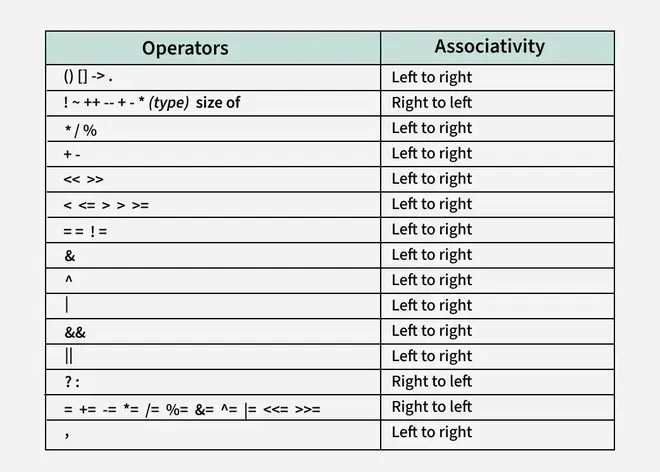
Used for mathematical calculations:
+ (Addition): Adds two operands. Example: a + b- (Subtraction): Subtracts second operand from the first. Example: a - b* (Multiplication): Multiplies two operands. Example: a * b/ (Division): Divides first operand by the second. Example: a / b% (Modulus): Gives the remainder of division (works with integers only). Example: a % bUsed to compare two values, returning true (1) or false (0):
< (Less than)> (Greater than)<= (Less than or equal to)>= (Greater than or equal to)== (Equal to)!= (Not equal to)Used for logical conditions, returning true (1) or false (0):
&& (Logical AND): Returns true if both conditions are true. Example: a > 0 && b > 0|| (Logical OR): Returns true if at least one condition is true. Example: a > 0 || b > 0! (Logical NOT): Inverts the boolean value. Example: !(a > b)Used to assign values:
=Example: int a = 5;
Used to increase or decrease a value by 1:
++x (Pre-increment): Increments the value of x before using it.x++ (Post-increment): Uses the current value of x and then increments it.--x (Pre-decrement): Decrements the value of x before using it.x-- (Post-decrement): Uses the current value of x and then decrements it.Example:
int x = 5;
printf("%d", ++x); // Outputs 6
Operate at the bit level:
& (AND): Sets each bit to 1 if both bits are 1.| (OR): Sets each bit to 1 if at least one bit is 1.^ (XOR): Sets each bit to 1 if the bits are different.~ (NOT): Inverts all the bits.<< (Left Shift): Shifts bits to the left, adding 0s on the right.>> (Right Shift): Shifts bits to the right, removing bits on the right.Example:
int a = 5; // Binary: 0101
int b = a << 1; // Result: 1010 (Decimal 10)
A shorthand for if-else:
condition ? value_if_true : value_if_false
Example:
int a = 10, b = 5;
int max = (a > b) ? a : b; // Assigns the larger value to max
read more about - Operators
Executes a block of code if a condition is true.
Syntax:
if (condition) {
// statements to execute if condition is true
}
Executes one block if the condition is true; another block if false.
Syntax:
if (condition) {
// statements if condition is true
}
else {
// statements if condition is false
}
Used when multiple conditions need to be tested.
Syntax:
if (condition1) {
// statements
} else if (condition2) {
// statements
} else {
// default statements
}
Selects one of many blocks of code to execute based on a specific value.
Syntax:
switch (expression) {
case value1: // statementsbreak;
case value2: // statementsbreak;
default: // default statements
}
The for statement evaluates 3 expressions and executes the loop body until second controlling expression executes to false. It is recommended to use for loop when the number of iterations is known in advance.
Syntax:
for (initialization; condition; increment/decrement) {
// statements
}
while (condition) {
// statements
}
do {
// statements
} while (condition);
Exits the nearest enclosing loop or switch statement.
Example:
for (int i = 1; i <= 5; i++) {
if (i == 3) break;
printf("%d\n", i);
}
Skips the rest of the current loop iteration and moves to the next iteration.
Example:
for (int i = 1; i <= 5; i++) {
if (i == 3) continue;
printf("%d\n", i);
}
Transfers control to a labeled statement.
Example:
int i = 1;
start: if (i <= 5) {
printf("%d\n", i);
i++;
goto start;
}
read more about - Control Flow Statements
A C program's memory is divided into several segments:
1. Code Segment:
2. Data Segment:
3. Stack:
4. Heap:
Used for dynamic memory allocation during runtime (e.g., using malloc() or calloc()).
Storage classes determine the characteristics of a variable such as scope, lifetime, and default value.
Functions are blocks of code designed to perform specific tasks. They improve modularity and reusability in a program.
Syntax:
return_type function_name(parameters);
return_type function_name(parameters) { // function body }
int factorial(int n) {
if (n == 0) return 1; // Base condition
return n * factorial(n - 1); // Recursive call
}
Example:
int a = 10;
void main() {
{
int a = 1;
{
int b;
printf("%d", a);
}
}
}
Example:
int i;
program main() {
i = 10;
call f();
}
procedure f() {
int c = 20;
call g();
}
procedure g() {
print i;
}
read more about - Storage Class and Function