|
VOOZH | about |
|
VOOZH | about |
A macro is a name given to a block of C statements as a pre-processor directive. Being a pre-processor, the block of code is communicated to the compiler before entering into the actual coding (main () function). A macro is defined with the pre-processor directive. Macros are pre-processed which means that all the macros would be processed before your program compiles. However, functions are not preprocessed but compiled.
See the following example of Macro:
Output:
10
See the following example of Function:
Output:
10
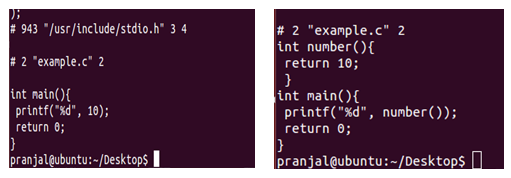
Now compile them using the command:
gcc –E file_name.c
This will give you the executable code as shown in the figure:
This shows that the macros are preprocessed while functions are not.
In macros, no type checking(incompatible operand, etc.) is done and thus use of macros can lead to errors/side-effects in some cases. However, this is not the case with functions. Also, macros do not check for compilation error (if any). Consider the following two codes:
Macros:
Output: Unexpected output
7
Note: This macro is expanded as below
CUBE(1+2) === 1+2*1+2*1+2 which is equal to 7 [correct but unexpected result depending upon the execution of the mathematical operators]
To fix this we need to replace #define CUBE(b) b*b*b as #define CUBE(b) (b)*(b)*(b). With updated macro, CUBE(1+2) will be expanded as
CUBE(1+2) === (1+2)*(1+2)*(1+2) which is equal to 27 [correct and expected result]
Functions:
Output: As expected
27
Conclusion:
Macros are no longer recommended as they cause following issues. There is a better way in modern compilers that is inline functions and const variable. Below are disadvantages of macros:
a) There is no type checking
b) Difficult to debug as they cause simple replacement.
c) Macro don't have namespace, so a macro in one section of code can affect other section.
d) Macros can cause side effects as shown in above CUBE() example.
| Macro | Function |
|---|---|
| Macros are Preprocessed | Functions are Compiled |
| No Type Checking is done in Macro | Type Checking is Done in Function |
| Using Macro increases the code length | Using Function keeps the code length unaffected |
| Use of macro can lead to side effect at later stages | Functions do not lead to any side effect in any case |
| Speed of Execution using Macro is Faster | Speed of Execution using Function is Slower |
| Before Compilation, macro name is replaced by macro value | During function call, transfer of control takes place |
| Macros are useful when small code is repeated many times | Functions are useful when large code is to be written |
| Macro does not check any Compile-Time Errors | Function checks Compile-Time Errors |
See following for more details on macros:
Interesting facts about Macros and Preprocessors