|
VOOZH | about |
|
VOOZH | about |
A multidimensional vector is a vector of vectors that allows us to create 2D, 3D, or higher-dimensional vectors in a similar way as multidimensional arrays but unlike arrays, multidimensional vectors can grow and shrink dynamically.
Let's take a quick look at a simple example of a multidimensional array:
1 2 3
4 5 6
7 8 9
Explanation: We created a 2D vector in which each element is a vector in itself.
Table of Content
A multidimensional vector can be of any type depending on the dimensions, but the most commonly used multidimensional vectors are:
In this article, we will primarily discuss these two multidimensional vectors and how to use them in a C++ program.
In C++, 2D Vectors or Two-Dimensional Vectors are the vectors in which each element is a 1D vector of any type. It is generally used to store the information in the tabular form where each vector element represents a row in the table and each element in this vector represents a column.
The different syntax to create and initialize 2D vectors in C++ are as follows:
vector<vector<T>> v; // Empty 2D vector
vector<vector<T>> v(n, vector<T>(m, val)); // With n rows, m columns, val default value
vector<vector<T>> v = {{v1, v2,....}, // With given values
{x1, x2, ...,
........};
The below example demonstrates these methods of to create a vector:
11 11 11
11 11 11

1 2 3
4 5 6
To know more methods of initialization, refer to this article - Initialize 3D Vector in C++
The basic operations on 2D vectors have to be done by keeping in mind that each element is a vector.
| Operation | Description |
|---|---|
| Access Elements | To access an element, first access the vector at the i-th index, then access the j-th element of this vector. |
| Update Elements | Assign the accessed element a new value using the assignment operator. |
| Insert Elements | The easiest way is to push the whole array using push_back(). But to insert an element at v[i][j], access the vector at the i-th index, and then use vector insert() to add the element at the j-th index. |
| Delete Elements | To delete the element at v[i][j], access the vector at the i-th index, and then use erase() to remove the element at the j-th index. |
| Traverse Vector | Traversal requires iterating through the 2D vector and each of its individual row (member vectors). |
The below example demonstrates how to perform these basic operations on a 2D vector
1 2 3
4 5 6

1 2 10
4 5 6

1 2 10
4 6

1 2 10
4 6
Note: Other vector insertion, deletion methods can also be used but remember to first access the appropriate row (member vector).
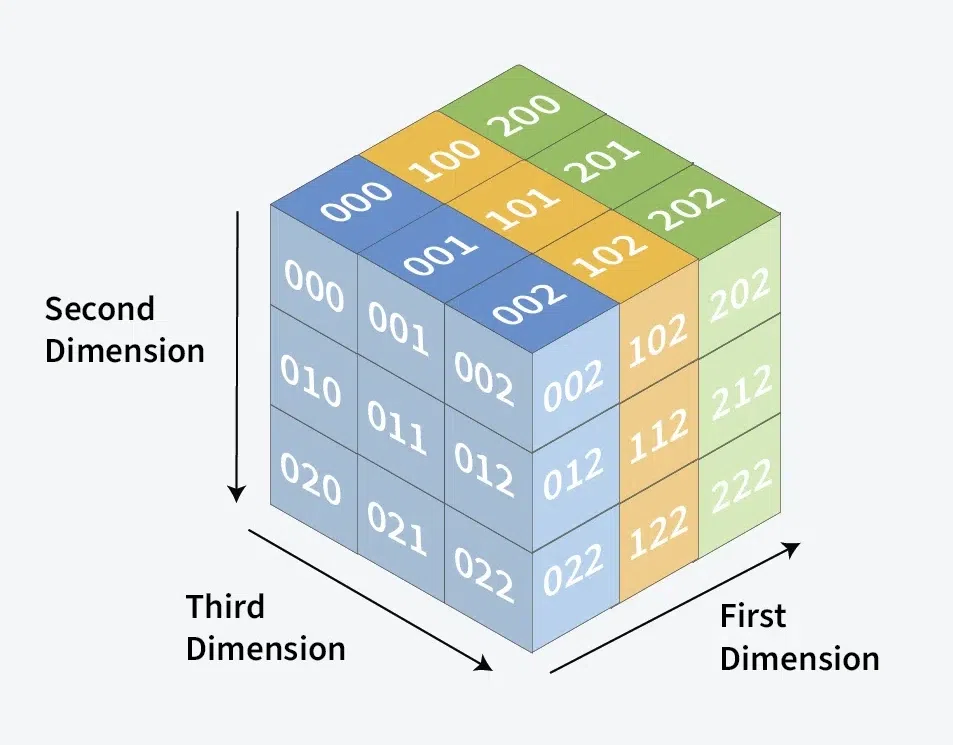
In C++, 3D Vectors or Three-Dimensional Vectors are vectors where each element is a 2D vector. These vectors are used to represent data in a 3D space which can be visualized as the space where each 2D vector can be thought of as a layer, and each element within it represents rows and columns.
The different syntax to create and initialize 3D vectors in C++ are as follows:
vector<vector<vector<T>>> v;
vector<vector<vector<T>>> v(x, vector<vector<T>>(y, vector<T>(z, val)));
vector<vector<vector<T>>> v = {{{...}, {...}}, {{...}, {...}}};
As we can see, the syntax of 3D vector is more complex than 2D vector and this complexity keep growing with additional dimensions. Let's look at a simple example to create a 3D vector.
9 9 9
9 9 9

9 9 9
9 9 9

1 2 3
4 5 6

7 8 9
10 11 12
The below table shows how to perform the basic operations such as insertion, deletion on 3D vectors:
The basic operations on 3D vectors must account for the fact that each element is a 2D vector.
| Operation | Description |
|---|---|
| Access Elements | To access an element, first access the 2D vector at the i-th index, then the row at the j-th index, and finally the k-th element in that row. |
| Update Elements | Assign the accessed element a new value using the assignment operator. |
| Insert Elements | To insert an element at v[i][j][k], access the 2D vector at i-th index, then the row at j-th index, and use insert() to add an element at k-th index. |
| Delete Elements | To delete the element at v[i][j][k], access the 2D vector at i-th index, the row at j-th index, and use erase() to remove the element at k-th index. |
| Traverse Vector | Traversal requires iterating through the 3D vector, each 2D vector (layer), and its individual rows and columns. |
Note: Other vector insertion and deletion methods can also be used, but ensure you first access the appropriate 2D vector (layer) or row.
The following example demonstrates how to create a 3D vector and perform basic operations like accessing, updating, inserting, deleting, and traversing elements.
1 2 3
4 5 6

7 8 9
10 11 12

---------------

99

1 2 3
4 5 99

7 8 9
10 12

---------------
Related Articles
Find Column and Row Size of a 2D Vector in C++
How to Resize a 2D Vector in C++?
Sorting 2D Vector in C++ | Set 1 (By row and column)
How to flatten a Vector of Vectors or 2D Vector in C++