|
VOOZH | about |
|
VOOZH | about |
The switch statement in C++ is a multi-way selection statement that allows a program to execute different blocks of code based on the value of an expression. It provides a cleaner and more organized alternative to long chains of if-else-if statements when multiple conditions depend on the same expression.
A
switch(expression)
{
case value1 :
// Statements
break; // break is optional
case value2 :
// Statements
break; // break is optional
default :
// Statements executed if no case matches
}
Where:
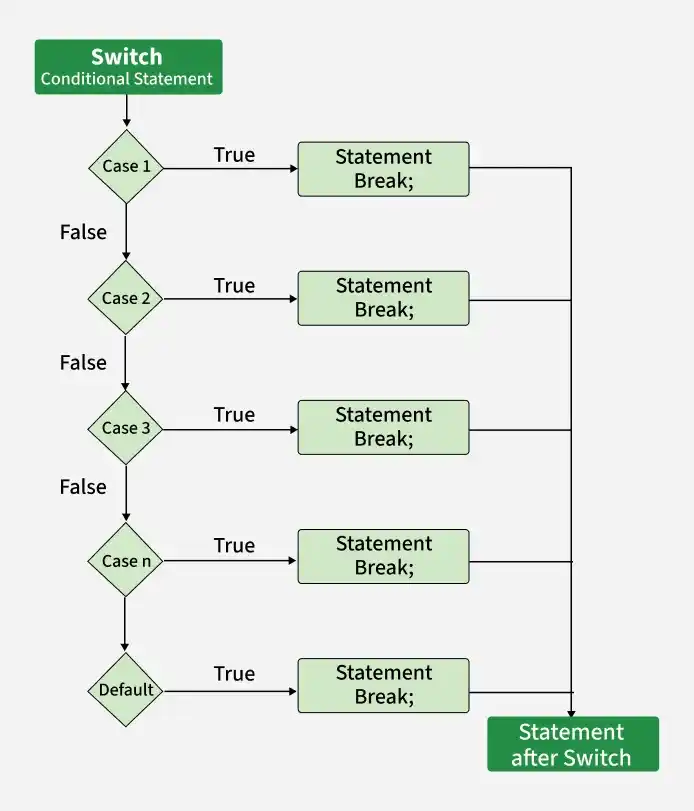
The working of a switch statement is as follows:
The following flowchart illustrates how program control flows through a switch statement based on the value of the controlling expression.
When using the switch statement in C++, there are a few rules to keep in mind:
The break statement terminates the execution of a switch block. Without break, execution continues into subsequent cases until another break or the end of the switch statement is reached. This behavior is known as fall-through.
One
The below program demonstrates the uses of switch statement in C++ programs:
The following program prints the day corresponding to a given day number.
Thursday
The following program performs basic arithmetic operations based on the operator entered by the user.
Output
Enter the two numbers: 10 2
Enter the Operator (+,-,*,/)
Enter any other to exit
+
10 + 2 = 12
A nested switch statement is a switch statement placed inside another switch statement. The inner switch is executed only when control reaches its containing case in the outer switch.
Elective Courses: Machine Learning, Big Data
Explanation: The outer switch first evaluates the value of year. Since year is 2, control enters case 2, where another switch statement is executed. The inner switch then evaluates the value of branch and executes the matching case.
C++ also allows enumeration constants to be used in a switch statement. Using enums improves code readability and makes programs easier to maintain.
Wednesday
The default label specifies the statements that should execute when none of the case labels match the value of the switch expression. The default label can appear anywhere inside the switch block.
Example 1: Default in the Middle
2
3
Example 2: Default at the Beginning
Default
1
Note: The position of the default label does not affect when it is selected. It executes only when no matching case is found. However, because of fall-through behavior, statements after the default label may also execute if a break statement is not encountered.
The switch expression can be a variable or a valid expression. However, every case label must be a compile-time constant expression.
Example 1: Using an Expression in switch
3
Example 2: Case Label Cannot Be a Variable
Output
error: the value of 'x' is not usable in a constant expressionExplanation: Case labels must be constant expressions known at compile time. Variables and variable expressions cannot be used as case labels.