|
VOOZH | about |
|
VOOZH | about |
MATLAB provides many ways to deal with date and time in form of DateTime, calendar duration, and duration data types. These data types do not only support storing and representing date-times but, also allow operations on date time. We shall look at these three data types separately.
The datetime data type specifically records/represents an instant in time. For example, the datetime function alone returns the current datetime, accurate up to the second.
Datetime provides various options; let us look at them.
Example 1:
Output:
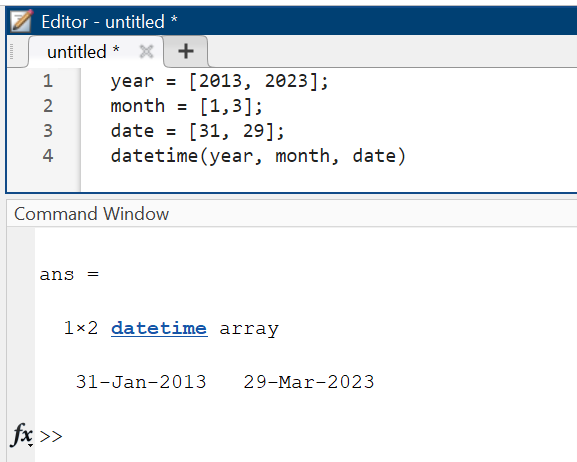
MATLAB also allows users to create DateTime arrays from vectors.
Example 2:
Output:
This data type creates arrays of time elapsed in variable calendar units. This data type provides 5 functions for creating arrays of variable units.
Example 3:
Output:
We can perform operations on DateTime arrays and calendar duration arrays.
Example 4:
Output:
This would create a new array with these values:
The same could be done with different calendar duration arrays.
The duration arrays are similar to calendar duration arrays with the only difference being the length of elapsed time. This data type takes fixed time units and has the following fixed functions of time length:
Example 5:
Output:
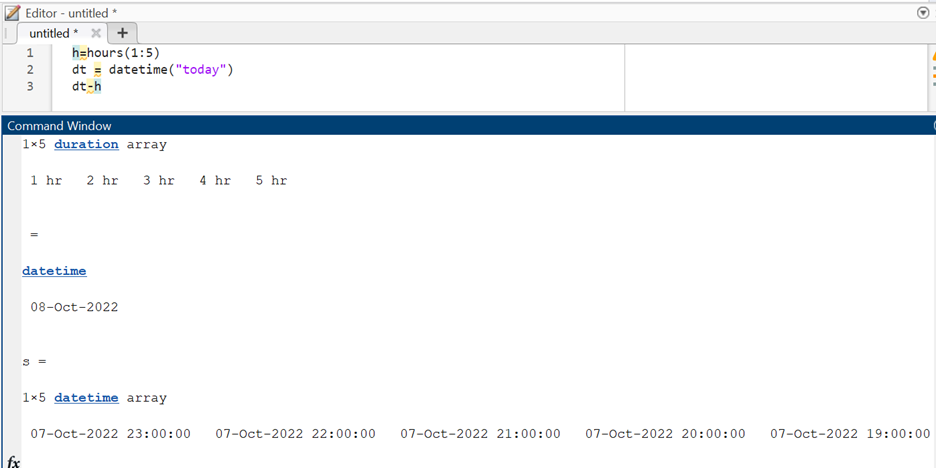
We can also perform operations on these arrays.
Example 6:
Output: