|
VOOZH | about |
|
VOOZH | about |
One should know the differences between a Virtual Private Server (VPS) and a Virtual Dedicated Server (VDS) if the decision about choosing the hosting solution is to be made. VPS and VDS are two similar yet different hosting technologies that give users the ability to host websites and applications virtually with some differences regarding their performance, and resources, and this is a very important factor, price. Aware of these differences it is easier to conclude which of the two services furthers your needs and is affordable to you.
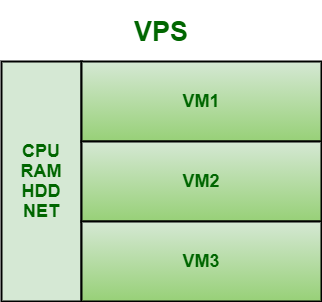
VPS, as the name suggests, is a hosting that virtually mimics a dedicated server environment within the shared server. It uses a virtualization layer that works from the OS level and some popular VPS options like OpenVZ use technology that is based on the Linux Kernel. It offers some scalability I.e., one can start with a limited number of resources and then scale up as necessary.
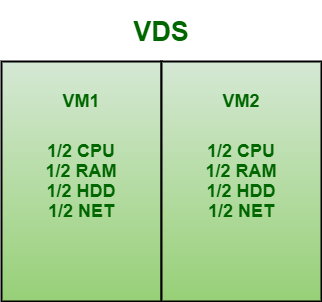
VDS, as name suggests, is a virtual machine that provides users ability to lease a managed but dedicated server to build, deploy and host web applications. It is not shared with other customers therefore it does not offer any multi-tenant environment. Each VDS has their own disk place, CPU allocation, memory, bandwidth, and OS. It generally depends upon hypervisor to create a level of logic partition. It also offers dedicate set of resources that one alone has access to rather than requiring to share with other tenants.
VPS | VDS |
|---|---|
| It is a VM on top of physical server that hosts VPS instances and shares host machine resources. | It provides remote dedicated server. |
| VPS is a server that is configured to host multiple server instances. | VDS instance takes up entire server. |
| It is more cost-effective as compared to VDS. | It is less cost-effective as compared to VPS. |
| It usually offers some scalability and predominant convenience as compared to VDS. | It does not offer scalability and predominant convenience. |
| It uses OpenVZ technology where OpenVZ is basically virtualization on OS level and its main advantage is speed of work. | It uses KVM technology that allows installing OS for visitors and VNC, that allows running virtual server like part of desktop computer. |
| In hosting terminology, virtual machines created with OS level virtualization is known as VPS. | In hosting terminology, virtual machines created with paravirtualization is known as VDS. |
| It offers less functionality as compared to VDS. | It offers better level of functionality as compared to VPS. |
| Its operation is managed and controlled by OS. | Its operation is managed and controlled by server hardware. |
| It has multi-tenant environment i.e., client has sole access to virtual private server environment, but they share hardware with two or more clients. | It has single-tenant environment i.e., only one client has access to hardware. |
| It is good for low load tasks such as to connect remote desktops and collective work with office applications, deployment of small e-commerce, corporate sites, etc. | It may be good for streaming video and audio apps, game servers, and high load apps with increased traffic, large e-commerce projects, etc. |
While VPS and VDS refer to virtually hosted plans, they are designed to suit distinct customers in the marketplace. VPS is cheaper and easier to admin as compared to dedicated hosting, it is therefore recommendable for small websites and applications. Whereas VDS is more reliable and provides more control as it is best suited for projects that can be allocated extra resources. It is important to note that VPS and VDS are different solutions that should be chosen according with your needs, your limits in terms of budget and performance, and the level of technical knowledge you have.