|
VOOZH | about |
|
VOOZH | about |
Anti-Aliased Line Drawing
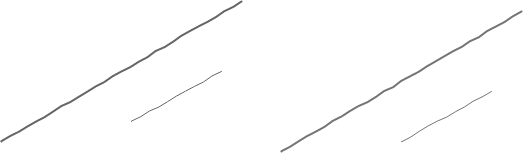
Below is the image showing line drawn with Bresenham's line algorithm (left) and Xiaolin Wu's line algorithm (right) which smooths the line. Which one looks better to you ?
👁 AALineAnti Aliasing concept
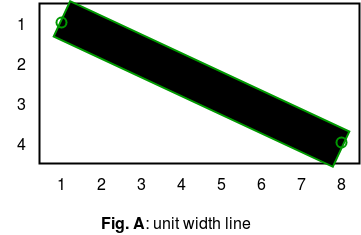
Suppose we want to draw a line from point(1 , 1) to point(8 , 4) with rectangular edges. The ideal line would be the one shown in figure A . Since I want to display it on screen I cannot use that. Line needs to go through a process called
Rasterization
which would determine color of individual pixels. Several algorithms can be used like
Bresenham's Line Algorithm,
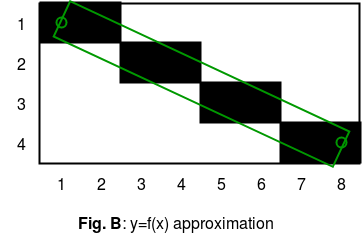
Digital Differential Analyzer, Xiaolin Wu's line algorithm , Gupta-Sproull algorithm . Later two perform anti-aliasing or line smoothing. The result produced by first two algorithm is show in figure B.
👁 solidfillThere are few problems in Line( figure B ). 1. Pixel (4,2) has less coverage than Pixel (3,2), yet they're both drawn fully black. 2. Pixel (2,2) has almost as much coverage as (4,2), and yet it's drawn fully white. To overcome these drawbacks and produce a much smoother looking line we use Xiaolin Wu's line algorithm
Xiaolin Wu's line algorithm
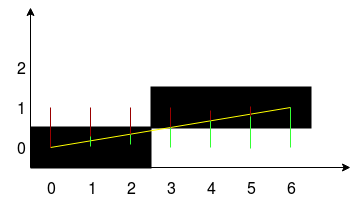
Consider the figure shown below which is drawn using Bresenham’s Line Generation Algorithm . Take a segment and its initial coordinate x. By the X in the loop is added 1 towards the end of the segment. At each step, the error is calculated - the distance between the actual y-coordinate at that location and the nearest grid cell. If the error does not exceed half the height of the cell, it is filled. That's the whole algorithm.
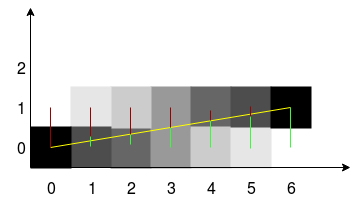
👁 original-a04cf694-556504fba7413We will modify this algorithm so that it can produce an anti-aliased line . Xiaolin Wu's line algorithm is characterized by the fact that at each step of the calculation is carried out for the two closest to the line of pixels, and they are colored with different intensity, depending on the distance. Current intersection middle pixel intensity gives 100% if the pixel is within 0.9 pixel, the intensity will be 10%. In other words, one hundred percent of the intensity is divided between the pixels which limit vector line on both sides.
👁 original-ccf57794-556504fc0787fIn the picture the red and green color shows the distance to the two adjacent pixels. To calculate the error, you can use floating point and take the error value of the fractional part.
NOTE:
The following implementation uses
SDLlibrary to draw pixels on screen . If you are on debian system like ubuntu just run following command to install SDL library.
sudo apt-get install libsdl2-dev
To build use
gcc filename.c -lSDL2
Note:
If the projection of the segment on the x-axis is less than the projection on the y-axis, or the beginning and end of the segment are swapped, then the algorithm will not work. To avoid this, you need to check the direction of the vector and its slope, and then swap the coordinates of the line , ultimately to reduce everything to some one or at least two cases. Following algorithm assumes that only integer co-ordinates will be given as inputs since pixel value cannot be floating point.
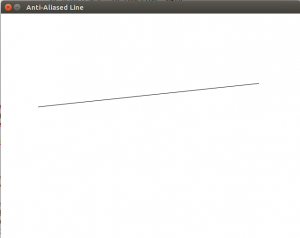
Output:
👁 outputAALine