|
VOOZH | about |
|
VOOZH | about |
Animation is the illusion of making us think that an object is really moving on the screen. But underneath they are just complex algorithms updating and drawing different objects.
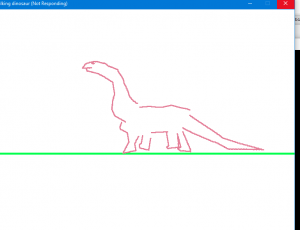
Aim: A complex animation of a walking dinosaur in 2D. Method: Using Transformations of individual body parts. See this Video:
In OPENGL.
Algorithm
There are 3 main transformations in Computer Graphics - Translation, Rotation and Scaling. All can be implemented using very simple mathematics.
Translation: X = x + tx, tx is the amount of translation in x-axis
 Y = y + ty, ty is the amount of translation in y-axis

Rotation: X = xcosA - ysinA, A is the angle of rotation.
 Y = xsinA + ycosA

Scaling: X = x*Sx, Sx is Scaling Factor
 Y = y*Sy, Sy is Scaling Factor
For drawing figures, Bresenham's Line drawing algorithm will be used together with the above equations to draw each line according to need.
Implementation
The body of the dinosaur is split up into 8 main portions - Head, upperBody, Tail, downBody, and the four legs The parts are stores as text files with comma separated coordinates, which are imported during running of the program:
The centres of rotation of each object were stored in a separate file:
Since, all files were created by hand, there was room for little errors which were corrected in the following file:
Note: Please download all the above files before running the program and keep in the same directory. Each one will have its own object storing the following:
The program will work in the following order:
During updation of an object, the rotationstate is checked and if it is overshooting the threshold of rotation, then the direction of rotation is reversed. The rotationstate is 0 if it is not to be rotated.
Output: This is a sample screenshot:
Don't forget to download the files before running the program.