|
VOOZH | about |
|
VOOZH | about |
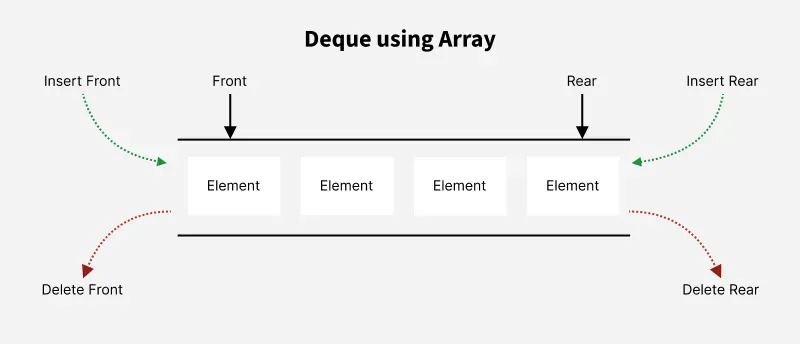
A Deque (Double-Ended Queue) is a data structure that allows insertion and deletion of elements at both ends (front and rear). This flexibility makes it more versatile than a regular queue, where insertion and deletion can only happen at one end. In this article, we will explore how to implement a deque using a simple array.
The key operations that can be performed on a deque implemented using a simple array:
1. Initialization
The deque is initialized using an array and two pointers, front and rear, which track the positions of the front and rear elements.
front and rear are initialized to -1 to indicate that the deque is empty.arr will store the elements of the deque.2. Insert at Front
To insert an element at the front of the deque, we shift all the elements one position to the right and place the new element at the front.
front and rear pointers are initialized to 0.front pointer is at 0, there is no space for insertion at the front, and an error is returned.3. Insert at Rear
To insert an element at the rear of the deque, we place it at the position of the rear pointer and increment the rear.
front and rear are set to 0.4. Delete from Front
To delete an element from the front of the deque, we simply increment the front pointer to remove the element. If there’s only one element, both the front and rear are reset to -1.
front and rear to -1.front pointer to remove the element.5. Delete from Rear
To delete an element from the rear of the deque, we decrement the rear pointer. If there’s only one element, reset both front and rear.
front and rear.rear pointer to remove the element.6. Get Front and Rear
7. Check if Empty or Full
isEmpty checks if the front pointer is -1, indicating that the deque is empty.isFull checks if the rear pointer has reached the last index of the array.5 10 20 30 10 20 1 10 20 50
| Operation | Time Complexity |
|---|---|
| insertFront(x) | O(n) |
| insertRear(x) | O(1) |
| deleteFront() | O(n) |
| deleteRear() | O(1) |
| getFront() | O(1) |
| getRear() | O(1) |
| isEmpty() | O(1) |
| isFull() | O(1) |
Advantages
Limitations