|
VOOZH | about |
|
VOOZH | about |
Given a linked list, the task is to insert a new node after a given node of the linked list. If the given node is not present in the linked list, print "Node not found".
Examples:
Input: LinkedList = 2 -> 3 -> 4 -> 5, newData = 1, key = 2
Output: LinkedList = 2 -> 1 -> 3 -> 4 -> 5Input: LinkedList = 1 -> 3 -> 5 -> 7, newData = 1, key = 2
Output: Node not found
Approach: To solve the problem, follow the below idea:
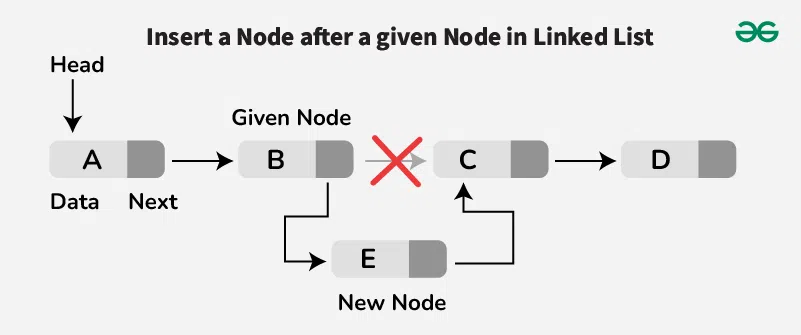
If we want to insert a new node after a given node, we first locate that node. If the node is not found, print "Node not found". If we find it, we set the new node's next reference to point to the node that follows the given node. Then, we update the given node's next to point to the new node.
Follow the below steps for inserting a node after a given node:
Below is the implementation of the approach:
Original Linked List: 2 3 5 6
Linked List after insertion: 2 3 4 5 6
Time Complexity: O(N), where N is the number of nodes in the linked list.
Auxiliary Space: O(1)