Bitwise operators are special operators in programming that work directly on binary bits (0 and 1). Since computers store all data in binary form, bitwise operations help us manipulate data at the lowest level using operations like AND, OR, XOR, NOT, and bit shifting.
They are commonly used in optimization, performance-critical code, masking, toggling bits, and low-level programming.
They are used to perform fast calculations and binary manipulation.
They help in setting, clearing, checking, and toggling bits.
Bitwise operations are often faster for low-level and bit-manipulation tasks.
Bitwise operations enable packing multiple flags into a single variable, reducing memory usage.
Bitwise Operators / Basics of Bit manipulation
Bit manipulation works on binary bits (0 and 1) using bitwise operators, making it fast and efficient. These operations are executed by the CPU’s Arithmetic Logic Unit (ALU) and are commonly used for optimization, efficient flag handling, and performance-critical tasks.
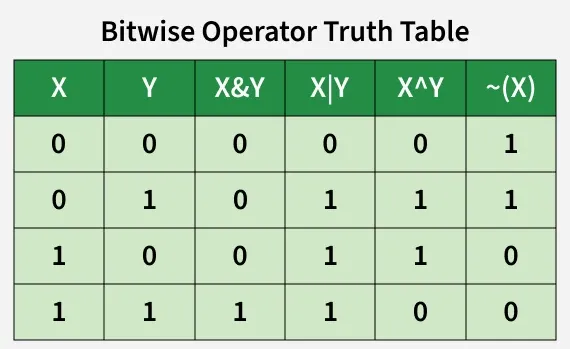
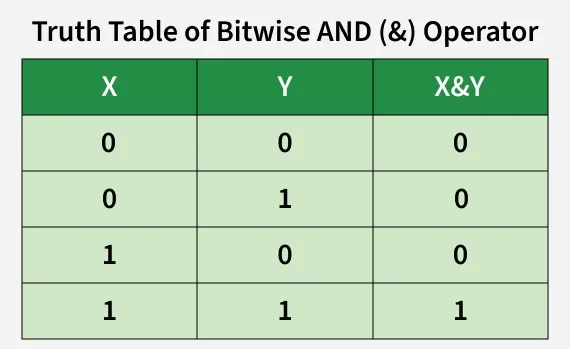
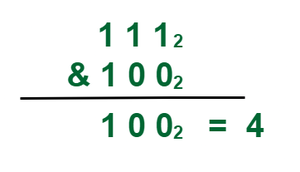
The bitwise AND operator is denoted using a single ampersand symbol, i.e. &. The & operator takes two equal-length bit patterns as parameters. The two-bit integers are compared. If the bits in the compared positions of the bit patterns are 1, then the resulting bit is 1. If not, it is 0.
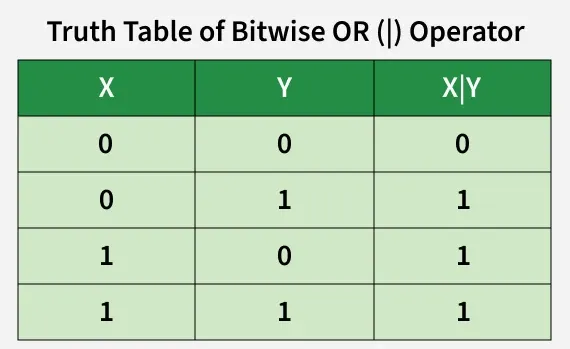
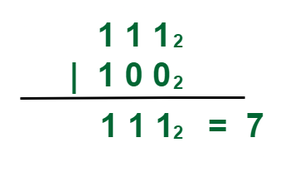
The | Operator takes two equivalent length bit designs as boundaries; if the two bits in the looked-at position are 0, the next bit is zero. If not, it is 1.
Explanation: On the basis of truth table of bitwise OR operator we can conclude that the result of
1 | 1 = 1 1 | 0 = 1 0 | 1 = 1 0 | 0 = 0
We used the similar concept of bitwise operator that are show in the image.
Output
29
Bitwise XOR Operator (^)
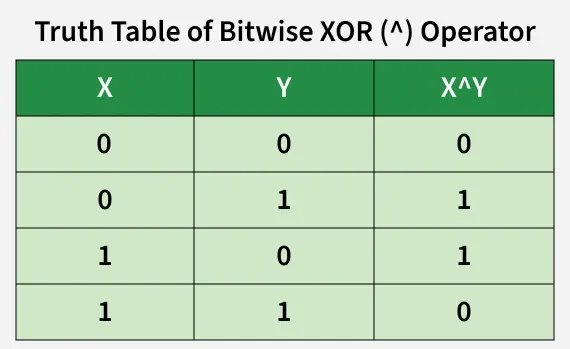
The ^ operator (also known as the XOR operator) stands for Exclusive Or. Here, if bits in the compared position do not match their resulting bit is 1. i.e, The result of the bitwise XOR operator is 1 if the corresponding bits of two operands are opposite, otherwise 0.
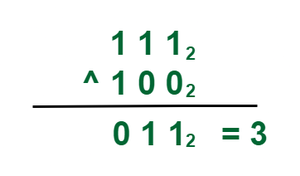
Explanation: On the basis of truth table of bitwise XOR operator we can conclude that the result of
1 ^ 1 = 0 1 ^ 0 = 1 0 ^ 1 = 1 0 ^ 0 = 0
We used the similar concept of bitwise operator that are show in the image.
Output
21
Bitwise NOT Operator (~)
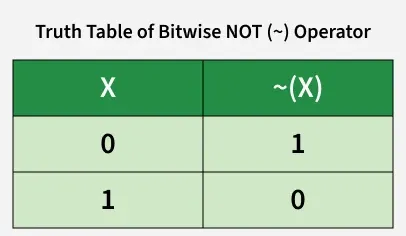
All the above three bitwise operators are binary operators (i.e, requiring two operands in order to operate). Unlike other bitwise operators, this one requires only one operand to operate.
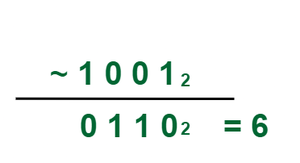
Explanation: The bitwise NOT operator (~) flips every individual bit in the binary representation of a number. Based on the truth table, every 1 becomes a 0, and every 0 becomes a 1.
The resulting binary string is 0110₂, which is equal to the decimal number 6.
Note: The output of ~ changes depending on how many bits your system uses. In a 4-bit system, ~9 (1001) becomes 0110 (6). But in an 8-bit system, 9 is stored with leading zeros as 0000 1001. Flipping it yields 1111 0110, giving a completely different decimal result.
Output
Value of a without using NOT operator: 0
Inverting using NOT operator (with sign bit): -1
Left-Shift (<<)
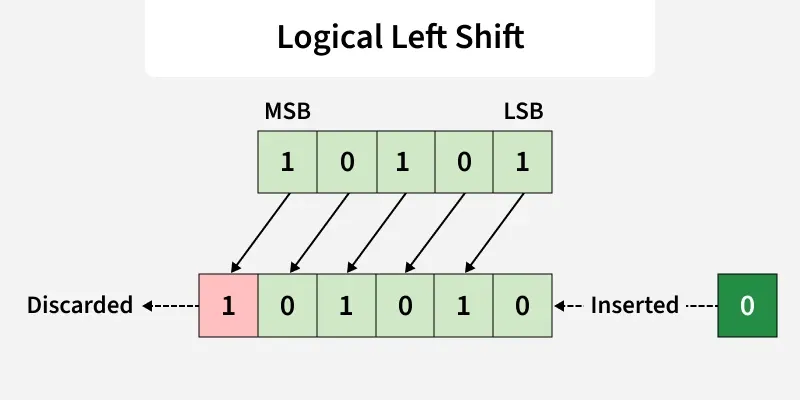
The left shift operator is denoted by the double left arrow key (<<). The general syntax for left shift is shift-expression << k. The left-shift operator causes the bits in shift expression to be shifted to the left by the number of positions specified by k. The bit positions that the shift operation has vacated are zero-filled.
Note: Every time we shift a number towards the left by 1 bit it multiply that number by 2.
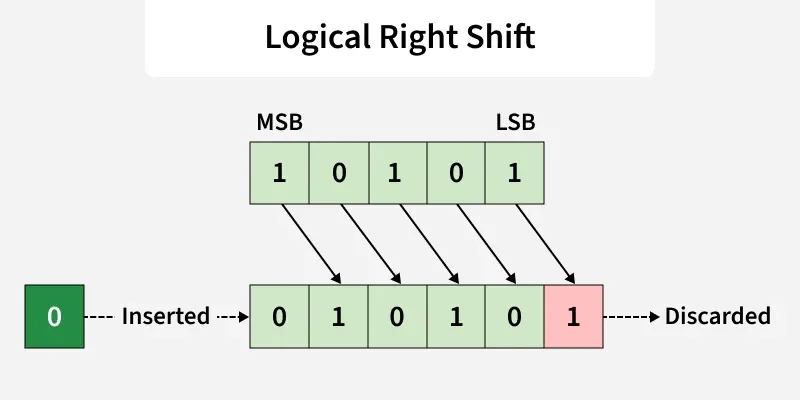
The right shift operator is denoted by the double right arrow key (>>). The general syntax for the right shift is "shift-expression >> k". The right-shift operator causes the bits in shift expression to be shifted to the right by the number of positions specified by k. For unsigned numbers, the bit positions that the shift operation has vacated are zero-filled. For signed numbers, the sign bit is used to fill the vacated bit positions. In other words, if the number is positive, 0 is used, and if the number is negative, 1 is used.
Note: Every time we shift a number towards the right by 1 bit it divides that number by 2.
Bit operations are used for the optimization of embedded systems.
The Exclusive-or operator can be used to confirm the integrity of a file, making sure it has not been corrupted, especially after it has been in transit.
Bitwise operations are used in Data encryption and compression.
Bits are used in the area of networking, framing the packets of numerous bits which are sent to another system generally through any type of serial interface.
Digital Image Processors use bitwise operations to enhance image pixels and to extract different sections of a microscopic image.
Practice Problems on Bitwise Algorithm
Solve these questions to improve your understanding of bitwise operators and bit manipulation techniques.
Note: All the above Bitwise Practice Problems are optimized and run in O(1) Time Complexity with O(1) Auxiliary Space.
1. Set a bit in the number
If we want to set a bit at nth position in the number 'num', it can be done using the 'OR' operator( | ).
First, we left shift 1 to n position via (1<<n).
Then, use the "OR" operator to set the bit at that position. "OR" operator is used because it will set the bit even if the bit is unset previously in the binary representation of the number 'num'.
Note: If the bit would be already set then it would remain unchanged.
Output
6
2. unset/clear a bit at n'th position in the number
Suppose we want to unset a bit at nth position in number 'num' then we have to do this with the help of "AND" (&) operator.
First, we left shift '1' to n position via (1<<n) then we use bitwise NOT operator '~' to unset this shifted '1'.
Now after clearing this left shifted '1' i.e making it to '0' we will 'AND'(&) with the number 'num' that will unset bit at nth position.
Output
5
3. Toggling a bit at nth position
Toggling means to turn bit 'on'(1) if it was 'off'(0) and to turn 'off'(0) if it was 'on'(1) previously. We will be using the 'XOR' operator here which is this '^'. The reason behind the 'XOR' operator is because of its properties.
Properties of 'XOR' operator.
1^1 = 0
0^0 = 0
1^0 = 1
0^1 = 1
If two bits are different then the 'XOR' operator returns a set bit(1) else it returns an unset bit(0).
Output
6
4. Checking if the bit at nth position is Set or Unset
We used the left shift (<<) operation on 1 to shift the bits to nth position and then use the & operation with number given number, and check if it is not-equals to 0.
Output
1
5. Multiply a number by 2 using the left shift operator
6. Divide a number 2 using the right shift operator
You can divide a number by 2 using the right shift operator (>> 1), which shifts all bits one position to the right.
Output
6
7. Compute XOR from 1 to n (direct method)
The problem Compute XOR from 1 to n can be solved based on the following observations: n%4==0->n, 1->1, 2->n+1, 3-0.
Say x = n % 4. The XOR value depends on the value if x.
If, x = 0, then the answer is n. x = 1, then answer is 1. x = 2, then answer is n+1. x = 3, then answer is 0.
8. How to know if a number is a power of 2?
This can be solved based on the following fact:
If a number N is a power of 2, then the bitwise AND of N and N-1 will be 0. But this will not work if N is 0. So just check these two conditions, if any of these two conditions is true.
9. Count Set bits in an integer
Counting set bits means, counting total number of 1’s in the binary representation of an integer. For this problem we go through all the bits of given number and check whether it is set or not by performing AND operation (with 1).
10. Position of rightmost set bit
The idea is to unset the rightmost bit of number n and XOR the result with n. Then the rightmost set bit in n will be the position of the only set bit in the result. Note that if n is odd, we can directly return 1 as the first bit is always set for odd numbers.
Example: The number 20 in binary is 00010100, and the position of the rightmost set bit is 3.
00010100 & (n = 20) 00010011 (n-1 = 19) ------------------- 00010000 ^ (XOR result number with n) 00010100 ------------------- 00000100 -------> rightmost set bit will tell us the position