|
VOOZH | about |
|
VOOZH | about |
Given a binary number as input, we need to write a program to convert the given binary number into an equivalent decimal number.
Examples :
Input : 111
Output : 7
Explanation : The output of 7 for input 111 represents the decimal equivalent of the binary number 111.Input : 1010
Output : 10
Explanation : The output of 10 for input 1010 represents the decimal equivalent of the binary number 1010.Input: 100001
Output: 33
Explanation : The output of 33 for input 100001 represents the decimal equivalent of the binary number 100001.
Check:Binary to Decimal Converter
The idea is to extract the digits of a given binary number starting from the rightmost digit and keep a variable dec_value. At the time of extracting digits from the binary number, multiply the digit with the proper base (Power of 2) and add it to the variable dec_value. In the end, the variable dec_value will store the required decimal number.
For Example:
If the binary number is 111.
dec_value = 1*(2^2) + 1*(2^1) + 1*(2^0) = 7
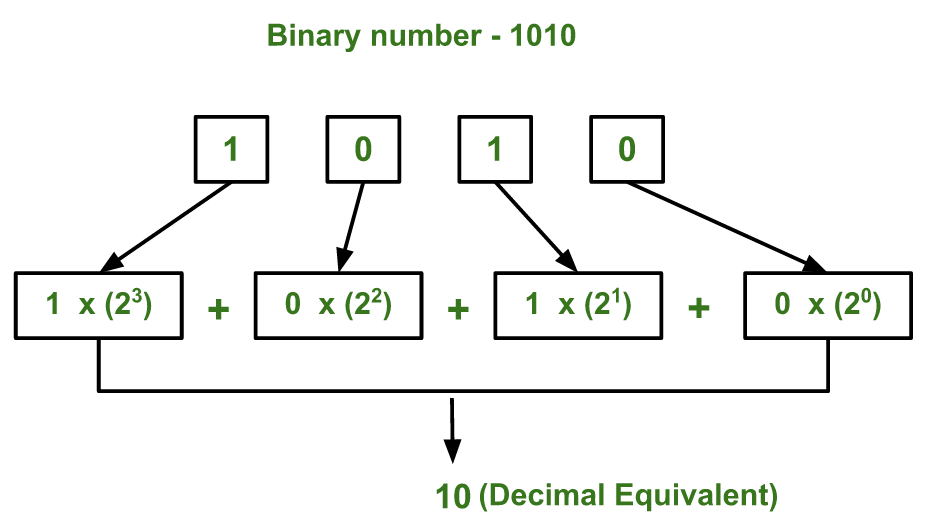
The below diagram explains how to convert ( 1010 ) to equivalent decimal value:
Below is the implementation of the above idea :
169
Time complexity : O( log n) We can also say time complexity as O(d) where d is number of digits.
Auxiliary Space : O(1)
Note: The program works only with binary numbers in the range of integers. In case you want to work with long binary numbers like 20 bits or 30 bit, you can use a string variable to store the binary numbers.
Below is a similar program which uses string variable instead of integers to store binary value:
169
Time complexity : O(n) where n is the length of the string.
Auxiliary Space : O(1)
Here is another way to convert decimal to binary numbers which is more intuitive and faster. At every iteration we extract the last digit (or a character in case of string input), check if it is a 1, if it is then multiply by the power of 2(where the power depends on which bit we are currently on ) and add it to the decimal number( initially = 0 ) .If it is a 0, then we don't need to add anything to our decimal value since that bit is not contributing, so just increase the power and move to the next bit.
If we left shift 1 by n times ( 1<<n ), we basically get 2^n. Hence we use left shift operator( << ) to find the powers of two since it is faster.
1) If the input is of int type :
169
Time complexity : O(log n)
Space complexity : O(1)
2) If the input is of string type :
169
Time complexity: O(k) [since at max, we will have to process 32 bits which will take 32 iterations.]
Auxiliary Space : O(1)
Using pre-defined function:
9
Time complexity: O(n) where n is the length of the given string.
Auxiliary Space: O(1)
Horner’s scheme is an efficient approach for computing polynomials and it can be redirected into different other scenarios like converting numbers from one numerical system to another (Binary to decimal, etc.), evaluating the Taylor series, etc.
Given a polynomial of degree n, Cnxn + Cn-1xn-1 + Cn-2 xn-2 +…+C1x + C0, it can be nested such that the solution is achieved with n multiplications and n additions using this scheme. Simply put, starting from the first coefficient, multiply by x and add the next coefficient.
Cnxn + Cn-1xn-1 + Cn-2 xn-2 +…+C1x + C0 = (((Cnx + Cn-1)x + Cn-2)x + Cn-3)x +… + C0
Example:
3x3 + 4x2 + 6x + 3 = ((3x + 4)x + 6)x + 3
Observe that when we expand a binary number, it takes the form of a polynomial:
Polynomial: Cnxn + Cn-1xn-1 + Cn-2xn-2 +…+C1x + C0Binary expansion: digitn(2n) + digitn-1(2n-1) + digitn-2(2n-2) + … + digit0(20)
The constants in the polynomial form are replaced by digits of the binary number and x=2. Hence, we can just use the same polynomial trick on this conversion:
Example:
101002
= 1*24 + 0*23 + 1*22 + 0*21 + 0*20
= (((1(2) + 0)2 + 1)2 + 0)2 + 0
= 20
Output:
Enter Binary number: 10010
Decimal: 18
Time complexity: O(n)
Decreased operations: Horners scheme only takes n multiplications and n additions for the conversion.