An array is a collection of elements of the same type stored in a single variable. It allows you to access each element using an index. Arrays make it easy to store and manage multiple values together.
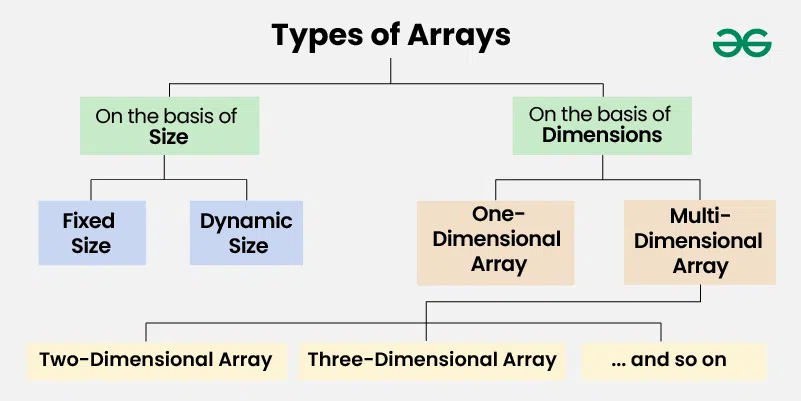
👁 Types-of-Arrays On the basis of Size: 1. Fixed Sized Arrays: The size of a fixed-size array cannot be changed after creation. Memory is allocated only for the size mentioned in square brackets []. Declaring a larger size than needed wastes memory. Declaring a smaller size than needed is not enough to store all elements. Fixed-size arrays are not preferred when the number of elements is unknown. Output Array elements are: 1 2 3 4 5 2. Dynamic Sized Arrays: The size of a dynamic array can change during program execution. Elements can be added or removed as needed. Memory is allocated and de-allocated automatically. Don’t need to worry about the array size in advance. Dynamic arrays are flexible and useful when the number of elements is unknown. Output Array elements are: 10 20 30
After removing last element: 10 20 Note: In C, there is no built-in dynamic array like in other languages, but you can create one using pointers and malloc/realloc.
On the basis of Dimensions 1. One-dimensional Array : A 1-D array is a single row of elements stored in a sequence under one name. Each element can be accessed using an index starting from 0. It is used to store multiple values of the same type in a linear manner. 👁 1Darray
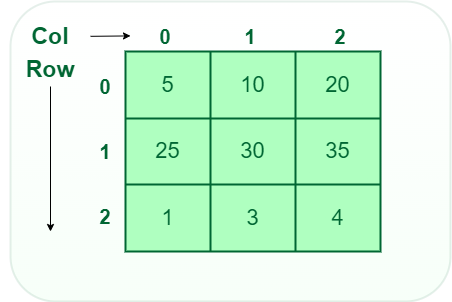
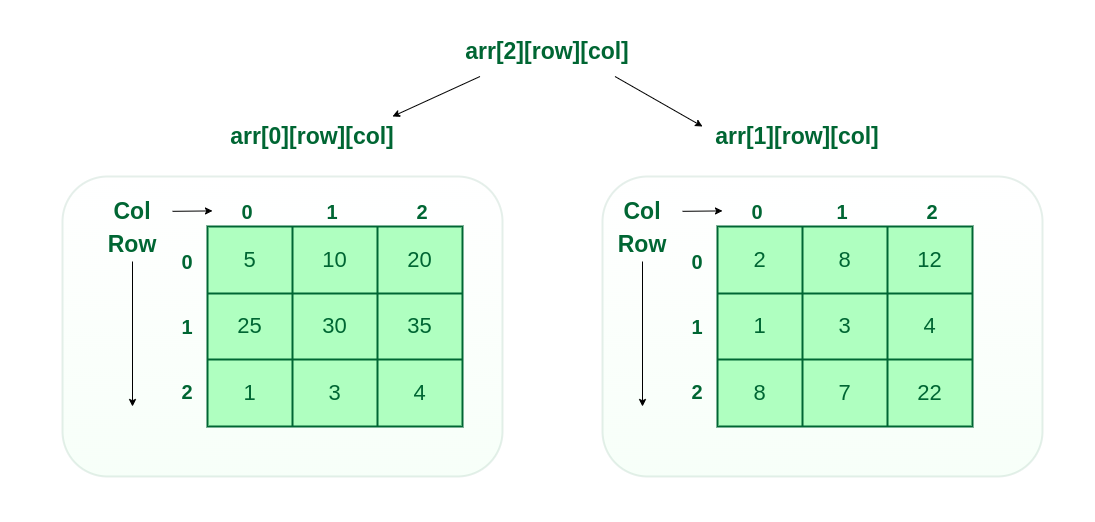
2. Two-dimensional (2D) array: A 2-D array is like a table or grid with rows and columns. Each element is accessed using two indices: one for the row and one for the column. It is used to store multiple values of the same type in a matrix-like structure. 👁 2D array 3. Three-dimensional array: A 3-D array is like a stack of 2-D arrays, forming rows, columns, and layers. Each element is accessed using three indices: for layer, row, and column. It is used to store multiple values of the same type in a 3-dimensional structure. 👁 3D array Output 1 2 3
4 5 6
7 8 9
10 11 12