|
VOOZH | about |
|
VOOZH | about |
A regular expression (regex) is a sequence of characters that defines a search pattern. It is mainly used for pattern matching in strings, such as finding, replacing, or validating text. Regex is supported in almost every programming language, including Python, Java, C++ and JavaScript.
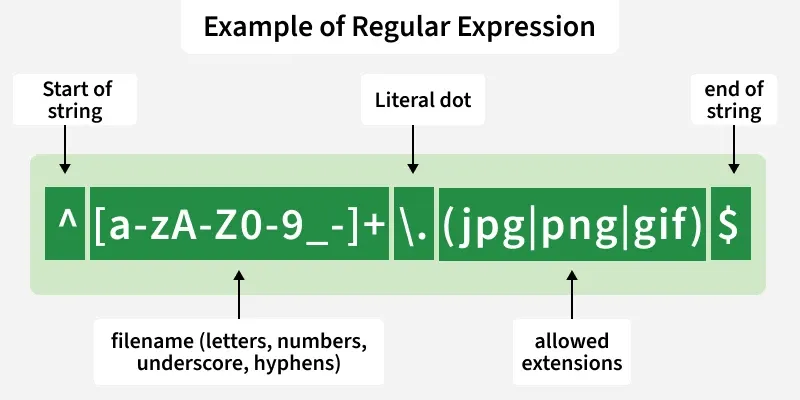
Below image shows an example of a regular expression and explains its parts, helping you understand how filenames or patterns can be matched effectively.
This regex checks if a filename is valid, allowing letters, numbers, underscore, hyphens and ends with .jpg, .png or .gif. Example matches: file123.jpg, my-photo.png, logo_1.gif.
Examples: Match a Filename Ending with .jpg, .png, or .gif
Regular expressions are built using special symbols and characters. Below are the most commonly used regex elements explained with simple examples.
1. Repeaters ( *, +, and { } ): Repeaters specify how many times the preceding character or group should appear.
2. Asterisk symbol (*): Matches the preceding character 0 or more times.
Example: The regular expression ab*c will give ac, abc, abbc, abbbc….and so on
3. The Plus symbol (+): Matches the preceding character 1 or more times.
Example: The regular expression ab+c will give abc, abbc, abbbc, … and so on.
4. The curly braces { … }: Defines an exact or range of repetitions.
Example: {{2}: exactly 2 times
{min,}: at least min times
{min,max}: between min and max times
5. Wildcard (.): Matches any single character except a newline.
Example: Regular expression .* will tell the computer that any character can be used any number of times.
6. Optional character (?): Matches 0 or 1 occurrence of the preceding character.
Example: docx? matches doc and docx
7. The caret ( ^ ) symbol: Ensures the match starts at the beginning of the string.
Example : ^\d{3} matches 901 in 901-333
8. The dollar ( $ ) symbol: Ensures the match ends at the end of the string.
Example: \d{3}$ matches 333 in 901-333
9. Character Classes: Match specific types of characters:
\s: whitespace
\S: non-whitespace
\d: digit
\D: non-digit
\w: word character (letters, digits, _)
\W: non-word character
\b: word boundary
Example: [abc] matches a, b, or c
10. Negated Character Class ([^ ]): Matches characters not listed in the brackets.
Example : [^abc] -> matches any character except a, b, c