|
VOOZH | about |
|
VOOZH | about |
Resolving comments in Google Docs helps keep shared documents organized during collaboration. Once feedback is addressed, resolving comments clears clutter and keeps the document clean.
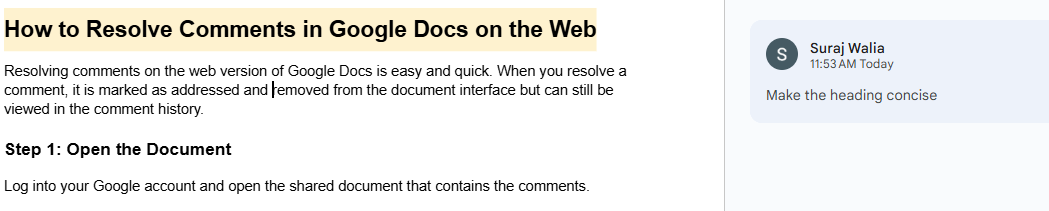
Resolving comments on Google Docs is easy and quick. When you resolve a comment, it is marked as addressed and removed from the document interface but can still be viewed in the comment history.
Log into your Google account and open the shared document that contains the comments.
Find the comment that you want to address.
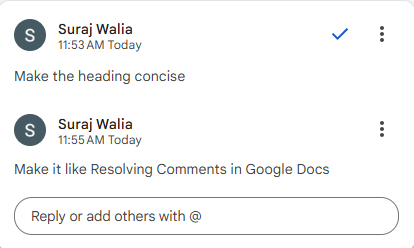
Once you’ve addressed the feedback, you can mark the comment as resolved.
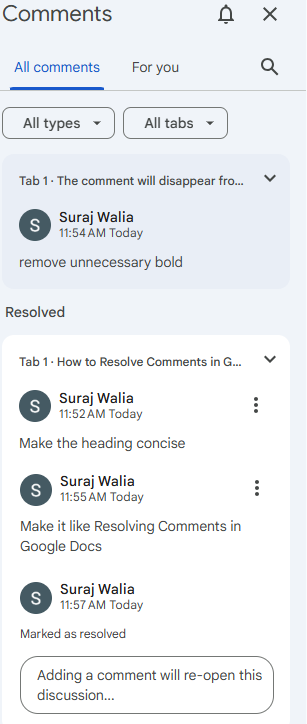
You can access resolved comments to review previous feedback.
Keyboard Shortcuts:
- Use
Ctrl + Alt + M(Windows) orCmd + Option + M(Mac) to quickly add a comment.- Navigate through comments using the Next and Previous options in the comment history.