|
VOOZH | about |
|
VOOZH | about |
GraphQL is an application layer for querying and mutating data in APIs built on the concept of a type system that you define for the data with which your application is built. GraphQL API differs from the traditional REST API as it makes client’s queries efficient and flexible allowing them to ask for the exact data they need. In this article, we will learn Execution in GraphQL with their working in details.
Ensure we have Node.js and NPM installed. we can download and install them from the official Node.js website.
Verify the installation by running:
node -v
npm -v
Create a new directory for your project and navigate into it:
mkdir graphql-demo
cd graphql-demo
Initialize a new Node.js project with default settings:
npm init -yOutput:
1.4 Install Dependencies
Install the necessary dependencies, including Apollo Server and GraphQL:
npm install apollo-server graphqlCreate a file named schema.js to define our GraphQL schema.
const { gql } = require('apollo-server');

const typeDefs = gql`
 type Query {
 hello: String
 user(id: ID!): User
 users: [User]
 }

 type Mutation {
 createUser(name: String!, age: Int!): User
 }

 type User {
 id: ID!
 name: String
 age: Int
 }
`;

module.exports = typeDefs;
Create a file named resolvers.js to define our resolvers.
const users = [
 { id: '1', name: 'John Doe', age: 25 },
 { id: '2', name: 'Jane Doe', age: 28 },
];

const resolvers = {
 Query: {
 hello: () => 'Hello, world!',
 user: (parent, args) => users.find(user => user.id === args.id),
 users: () => users,
 },
 Mutation: {
 createUser: (parent, args) => {
 const newUser = { id: String(users.length + 1), ...args };
 users.push(newUser);
 return newUser;
 },
 },
};

module.exports = resolvers;
Create a file named index.js to set up and start our Apollo Server.
const { ApolloServer } = require('apollo-server');
const typeDefs = require('./schema');
const resolvers = require('./resolvers');

const server = new ApolloServer({ typeDefs, resolvers });

server.listen().then(({ url }) => {
 console.log(`? Server ready at ${url}`);
});
Start GraphQL server, using the following command:
node index.jsWe should see a message indicating that your server is running:
Open a web browser and navigate to http://localhost:4000/. This will open the Apollo Server's GraphQL Playground, where you can write and execute queries and mutations.
In the GraphQL Playground, enter the following query to fetch all users:
query {
 users {
 id
 name
 age
 }
}
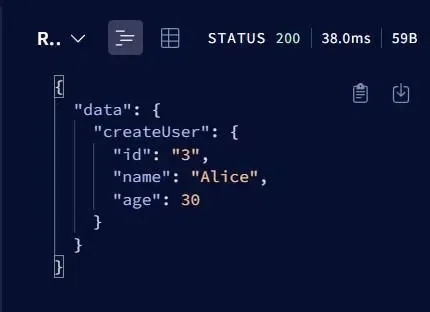
To create a new user, enter the following mutation in the GraphQL Playground:
mutation {
 createUser(name: "Alice", age: 30) {
 id
 name
 age
 }
}
Output:
Overall, Execution in GraphQL involves parsing the query string into an Abstract Syntax Tree (AST), validating it against the schema, and executing it by resolving each field with its corresponding resolver function. Resolver functions fetch the data for their fields, populating a result object that mirrors the query structure.