|
VOOZH | about |
|
VOOZH | about |
GraphQL is an open-source Query Language for APIs that allows us to query only the data we require, unlike the REST framework which returns the entire data as is configured in its API. With GraphQL, we can maintain a Schema that defines what data we can query from the server, and we can define a proper contractual schema like this between the client and the server. In this article, we will learn about the Union Types in GraphQL Schema, and implement our resolver for it in Node.JS.
Union type in a GraphQL Schema is declared using the union keyword and the pipe symbol (|), and it suggests that a field can have more than one type. Let's take a look at the example below -
type Post {
 text: String!
 title: String!
}
type Author {
 name: String!
}
union Feed = Post | Author
Here, Feed is a union type of Post and Author, implying that Feed can be either of type Post or of type Author.
Now, let's create a basic Schema with a union type, and create our own resolver to see it in action.
Let’s set up the server, save the file as server.js and we will implement resolvers. Resolver functions are responsible for resolving the queries that are defined in the schema. Here, we will create a "search" resolver that will be responsible for resolving the "search" query, and we will return a static data based on the provided query string. We will also create a "SearchResult" resolver that will determine the type of the search result, which will be either "Book" or "Author".
Then, we will create an executable schema using the "makeExecutableSchema" function that will combine our schema and resolvers, and create an executable GraphQL schema.
At last, we will create and initialise our App using express, and start the app.
To start the server run the below command in the terminal.
node server.js
Output:
Server running on http://localhost:3000/graphql
To test the query, execute the below query in the GraphiQL interface.
query {
 search(query: "GraphQL") {
 __typename
 ... on Book {
 title
 isbn
 }
 ... on Author {
 name
 books {
 title
 isbn
 }
 }
 }
}
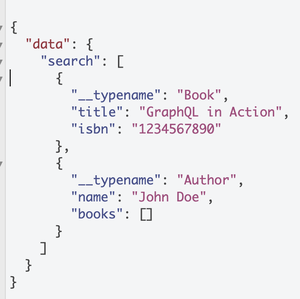
In the above query, we first define a search query that takes in a parameter with value, "GraphQL", and since it can return data with the type of either Book, or Author, so we define 2 cases, first if the type is Book, we select only the title and the isbn field from the response, and if the type is Author, we select only title and books of type title, and isbn.
Output:
The output of the above query will look like below
In this article, we learned about the Union types in GraphQL Schema, and how we use it provide more than one type to a data field. We also created a Node.JS server, with a GraphQL schema, and a resolver for it to see it in action. Union is a powerful type that can help us handle different types of data in different conditions.