|
VOOZH | about |
|
VOOZH | about |
The VAR function in Google Sheets is a simple tool for calculating the variance of a dataset. Variance measures how much the values in a dataset differ from the average, helping you understand the spread or variability in your data. It's especially useful when analyzing trends, performance, or any dataset with numerical values.
The VAR function computes the variance by finding the average of the squared differences from the mean. This helps in understanding the variability or consistency within the dataset.
Here is the syntax of the Google Sheets VAR statement:
VAR(data) To use the VAR function in Google Sheets follow the steps given below:
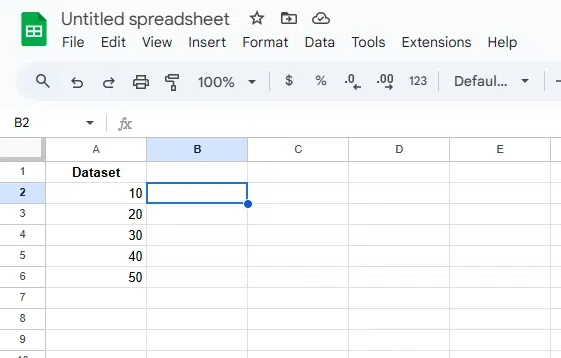
Ensure your dataset is in a single column. For Example, place your values in column A from cells A2 to A6.
Click on the cell where you want to calculate the variance result. For example, select cell B2.
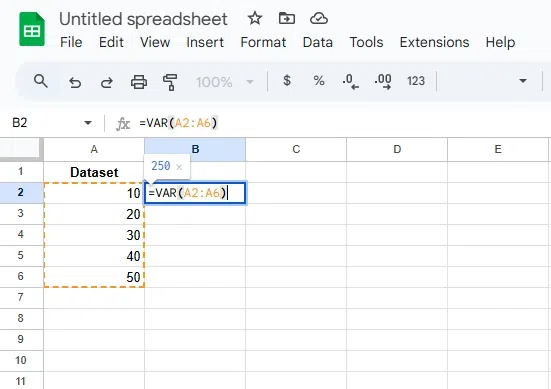
In the selected cell, type =VAR(A2:A6), where A2:A6 represents the range of your data.
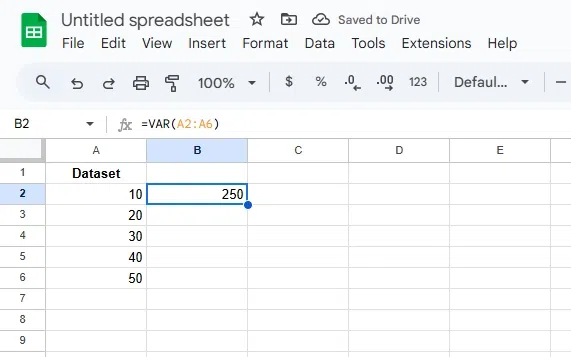
Press Enter to get the variance value, which indicates how spread out the data points are from the mean.